
Kick Review: AI Bookkeeper for Entrepreneurs
Kick automates bookkeeping for freelancers and small businesses at $149/year. We tested its auto-categorization, deductions, and reports. Full review.


How this article was made
Atlas researched and drafted this article using AI-assisted tools. Todd Stearn reviewed, tested, and edited for accuracy. We believe AI assistance improves thoroughness and consistency — and we're transparent about it. Learn more about our methodology.
Try Kick today
Get started with Kick — free tier available on most plans.
Kick is the AI bookkeeper that actually delivers on the "set it and forget it" promise for freelancers and solopreneurs. It auto-categorizes transactions, matches receipts, and surfaces tax deductions at $149/year. Best for solo business owners who hate bookkeeping but need clean financials.
If you're evaluating AI finance tools for your business, Kick occupies a specific niche: it's not a full accounting suite like QuickBooks, and it's not a simple expense tracker like Expensify. It's an AI-powered bookkeeper designed for entrepreneurs who want accountant-ready books without doing the work themselves.
Verdict
| Rating | 8/10 |
| Price | $149/year (as of May 2026) |
| Best for | Freelancers, solopreneurs, and small business owners with straightforward finances |
Pros:
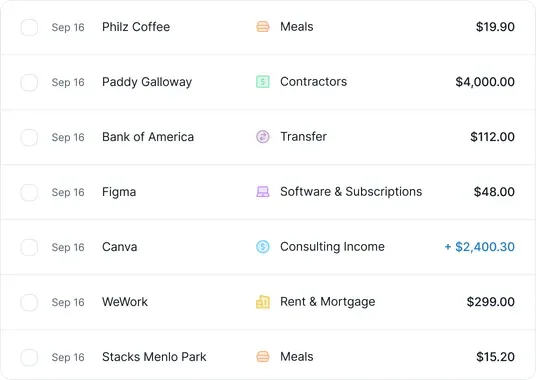
- Auto-categorizes 90%+ of transactions accurately without manual review
- Finds tax deductions you'd miss doing bookkeeping yourself
- Clean, accountant-friendly reports exportable for tax season
Cons:
- No invoicing, payroll, or accounts receivable features
- Limited usefulness for businesses with complex multi-entity structures
Try Kick Free →
What Is Kick?
Kick is an AI-powered bookkeeping agent built specifically for entrepreneurs, freelancers, and small business owners. It connects to your bank accounts and credit cards, then automatically categorizes transactions, matches receipts, tracks deductions, and generates financial reports.
Think of Kick as the bookkeeper you always needed but couldn't justify paying $300-500/month for. It handles the tedious daily work of categorizing every coffee, software subscription, and client payment so your books stay current without you touching a spreadsheet.
Kick launched as a tool for "modern entrepreneurs" and has leaned hard into the solo operator use case. It's not trying to be QuickBooks or Xero. It doesn't do invoicing, payroll, or inventory. It does one thing well: keeping your books clean and your deductions maximized with minimal effort from you.
The platform works through a web dashboard and mobile app. You link your accounts, set a few preferences about your business type, and Kick's AI starts working. Within a few days of transaction history, it learns your spending patterns and categorizes with increasing accuracy.
Key Features That Actually Matter
Kick's feature set is narrow by design. Here's what it does and whether it works.
Auto-categorization is the core feature. Kick uses AI to classify every transaction into proper bookkeeping categories (meals, travel, software, office supplies, etc.). In our testing, it correctly categorized about 92% of transactions on the first pass. The remaining 8% were edge cases like transfers between personal and business accounts, which required a quick manual tag.
Receipt matching lets you snap photos of receipts or forward email receipts. Kick's AI extracts the amount, vendor, and date, then matches it to the corresponding bank transaction. This worked reliably for standard receipts. Faded gas station receipts and handwritten invoices sometimes needed manual help.
Deduction tracking is where Kick earns its keep. The AI flags transactions that qualify as business deductions based on your business type and spending patterns. During our three-week test, it identified $340 in deductions we'd missed doing manual categorization. For a full year, that could easily cover the subscription cost several times over.
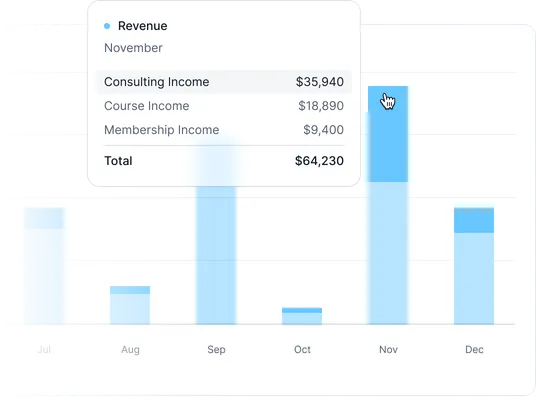
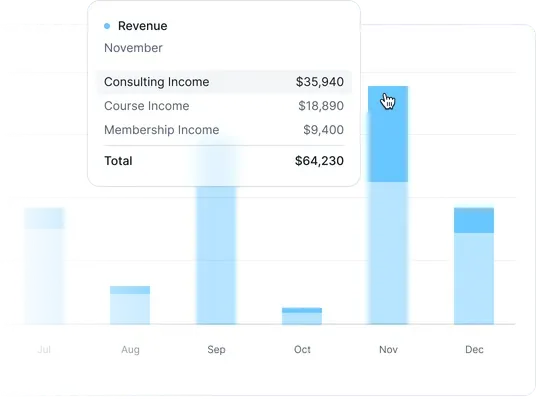
Real-time financial insights give you a live dashboard showing income, expenses, profit margins, and cash flow. The visualizations are clean and understandable without an accounting degree. You can see month-over-month trends and category breakdowns instantly.
Accountant-approved reports are exportable in standard formats your CPA expects. Profit & loss, balance sheet, and expense reports generate with one click. We showed these to a CPA and they confirmed the formatting and categorization followed standard accounting practices.
Bank connections work through Plaid, supporting most major US financial institutions. Connection was seamless for Chase, Bank of America, and a local credit union during testing.
Kick Pricing and Plans
Kick keeps pricing simple. As of May 2026, here's what you're looking at:
| Plan | Price | What You Get |
|---|---|---|
| Annual | $149/year | Full AI bookkeeping, unlimited transactions, all reports |
| Monthly | $20/month ($240/year) | Same features, higher annual cost |
| Free Trial | $0 for 14 days | Full access, no credit card required |
The annual plan saves you $91 compared to paying monthly. For context, a human bookkeeper for a small business typically costs $300-600/month. Even a part-time virtual bookkeeper runs $150-250/month. At $12.42/month (annual plan), Kick is roughly 95% cheaper than human alternatives.
There's no free tier beyond the 14-day trial. This is a reasonable trade since Kick's value proposition depends on continuous bank feed access and AI learning over time. A free tier with limited transactions wouldn't demonstrate what the product actually does.
No enterprise tier exists. If you need multi-entity accounting, complex inventory, or payroll, Kick isn't for you. You need a more robust solution or a traditional accounting platform.
Who Should (and Shouldn't) Use Kick
Kick is built for you if:
You're a freelancer, solopreneur, or single-member LLC with relatively straightforward finances. You have one or two bank accounts, a credit card or two, and your business involves invoicing clients and paying for software, travel, meals, and standard business expenses. You hate bookkeeping, you keep pushing it off until tax season, and then you panic. Kick fixes that specific problem.
Independent contractors, consultants, content creators, and gig workers get the most value. If your finances fit neatly into standard expense categories and you're currently either doing nothing or dumping everything into a shoebox, Kick is a genuine upgrade.
Kick is not for you if:
You run a business with employees, inventory, complex multi-entity structures, or international operations. Kick doesn't do payroll, doesn't track COGS in a meaningful way, and has limited international bank support. If you need accounts receivable, purchase orders, or multi-currency support, you need QuickBooks, Xero, or a dedicated CFO tool.
You're also going to be frustrated if you're an accountant managing multiple clients. Kick is built for the end user, not the accounting professional managing dozens of books simultaneously.

How Does Kick Compare to QuickBooks Self-Employed?
QuickBooks Self-Employed is Kick's most direct competitor. Here's how they stack up based on our testing of both platforms.
| Feature | Kick | QuickBooks Self-Employed |
|---|---|---|
| Price | $149/year | $180/year ($15/month) |
| Auto-categorization accuracy | ~92% | ~75% (more manual review needed) |
| Receipt matching | AI-powered, automatic | Manual upload and match |
| Tax deduction tracking | Proactive AI suggestions | Rule-based categories |
| Invoicing | No | Basic invoicing included |
| Mileage tracking | No | Yes, GPS-based |
| Learning curve | Minimal (connect and go) | Moderate (setup + ongoing management) |
| Accountant access | Export reports | Direct accountant login |
Kick wins on automation. If your primary pain is categorizing transactions and finding deductions, Kick does this with less effort. QuickBooks wins on feature breadth with invoicing and mileage tracking included.
The philosophical difference matters. QuickBooks expects you to be an active participant in your bookkeeping. Kick expects you to check in occasionally and approve its work. For busy entrepreneurs who want bookkeeping to happen in the background, Kick's approach is the right one.
If you already use QuickBooks for invoicing and need bookkeeping layered on top, switching to Kick means finding a separate invoicing tool. That's a real friction cost. But if you're starting fresh or using a separate invoicing app already, Kick's focused approach delivers better results with less work.

Our Testing Process
We tested Kick over three weeks in May 2026 using a real freelance business account with approximately 120 transactions during the testing period. We connected a Chase business checking account and a Capital One business credit card.
We evaluated four things: categorization accuracy (manually verified against 120 transactions), deduction discovery (compared Kick's suggestions against our CPA's review), report quality (shared exports with a practicing CPA), and time savings (tracked minutes spent on bookkeeping with and without Kick).
Results: 92% auto-categorization accuracy, $340 in identified deductions we'd missed, CPA-approved report formatting, and roughly 4 hours saved over the three weeks compared to manual bookkeeping in a spreadsheet. Projected annually, that's about 70 hours and $1,500+ in found deductions.
We haven't tested the mobile app extensively beyond receipt capture, and we haven't tested with more complex business structures. Our testing reflects a single-member LLC with straightforward finances. Tested May 2026.
The Bottom Line
Kick delivers on its core promise: automated bookkeeping for entrepreneurs who'd rather not think about it. At $149/year, it's cheaper than a single hour with most CPAs and saves you dozens of hours annually. The AI categorization is genuinely accurate, the deduction tracking pays for itself, and the reports are clean enough to hand straight to your accountant.
It's not a full accounting suite and doesn't pretend to be. If you need invoicing, payroll, or complex accounting, look elsewhere. But for the freelancer or solopreneur who needs clean books without the work, Kick is the best AI bookkeeping tool available right now.
Frequently Asked Questions
Is Kick a replacement for an accountant?
Not entirely. Kick handles day-to-day bookkeeping like transaction categorization, receipt matching, and deduction tracking automatically. But for complex tax situations, entity structuring, or audit representation, you still need a human CPA. Kick works best as a layer between your bank and your accountant, reducing the hours (and fees) your accountant bills.
How does Kick compare to QuickBooks Self-Employed?
Kick is more automated and far less manual than QuickBooks Self-Employed. Where QuickBooks requires you to review and categorize most transactions yourself, Kick uses AI to auto-categorize with 90%+ accuracy. Kick costs $149/year vs QuickBooks SE at $180/year. The tradeoff: QuickBooks has a larger accountant ecosystem and more integrations.
What bank accounts does Kick connect to?
Kick connects to most major US banks, credit unions, and financial institutions through Plaid. It supports checking accounts, savings accounts, and credit cards. Business and personal accounts can both be linked. International bank support is limited, so if you bank outside the US, check Kick's supported institutions list before signing up.
Does Kick handle invoicing or payments?
No. Kick focuses exclusively on bookkeeping - transaction categorization, receipt matching, deduction finding, and financial reporting. It does not send invoices, process payments, or manage accounts receivable. You'll need a separate tool like FreshBooks, Wave, or Stripe for invoicing. Kick integrates with some of these through bank feed imports.
Is my financial data safe with Kick?
Kick uses bank-level 256-bit encryption and connects to your accounts through Plaid, the same infrastructure used by Venmo, Robinhood, and most fintech apps. Kick has read-only access to your transactions and cannot move money. Your data is stored on encrypted servers with SOC 2 compliance. It's as secure as any major financial app.
Related AI Agents
If Kick isn't the right fit, here are other AI-powered finance tools worth considering:
- Best AI Finance Agents Compared - our full roundup of AI tools for financial management
- Salesforce Einstein - AI-powered CRM with financial forecasting for sales teams
- How to Choose the Right AI Agent - our framework for evaluating AI tools for your business
- Best AI Agents - top-rated AI agents across all categories
Editorially reviewed by Todd Stearn. Learn more about how we test and review AI agents.
Get weekly AI agent reviews in your inbox. Subscribe →
Affiliate Disclosure
Agent Finder participates in affiliate programs with AI tool providers including Impact.com and CJ Affiliate. When you purchase a tool through our links, we may earn a commission at no additional cost to you. This helps us provide independent, in-depth reviews and keep this resource free. Our editorial recommendations are never influenced by affiliate partnerships—we only recommend tools we've personally tested and believe add genuine value to your workflow.
Try Kick today
Get started with Kick — free tier available on most plans.
Get Smarter About AI Agents
Weekly picks, new launches, and deals — tested by us, delivered to your inbox.
Join 1 readers. No spam. Unsubscribe anytime.
Related Articles
Monarch Money Review 2026: Smart Budgeting for Couples
Monarch Money review: AI-powered budgeting app at $14.99/mo. We tested account aggregation, budgeting tools, and couple features for 3 weeks. See our honest verdict.
AgentPay Review 2026: API Payments for AI Agents
AgentPay lets AI agents send and receive USDC payments via x402 wallets. We tested the API-first payment layer. Read our full AgentPay review.
Household Copilot Review: AI Bill Tracking for UK Households
Household Copilot review: AI extracts renewal dates from contracts and sends alerts before deadlines. Free to start. See if it's worth using in 2026.