
Warp Open-Source (Warp 2.0) Review: The Terminal Rebuilt for AI Agents
Warp 2.0 is now open-source with built-in AI agents, codebase indexing, and task management. Free for individuals. Read our full review.


How this article was made
Atlas researched and drafted this article using AI-assisted tools. Todd Stearn reviewed, tested, and edited for accuracy. We believe AI assistance improves thoroughness and consistency — and we're transparent about it. Learn more about our methodology.
Try Warp Open-Source (Warp 2.0) today
Get started with Warp Open-Source (Warp 2.0) — free tier available on most plans.
Warp 2.0 is the best AI-powered terminal available today. It combines a fast, Rust-built terminal with built-in AI agents that understand your codebase, execute multi-step tasks, and manage development workflows. Free for individuals, open-source under Apache 2.0. Best for developers who live in the terminal and want AI assistance without switching to a separate tool.

Quick Assessment
| Rating | 8/10 |
| Price | Free (Individual), Team and Enterprise tiers available |
| Best for | Developers who spend 2+ hours daily in the terminal |
Pros:
- Fully open-source (Apache 2.0) with active community contributions
- AI agent executes multi-step terminal tasks with codebase awareness
- Cross-platform support for macOS, Linux, and Windows
Cons:
- Higher memory usage than lightweight terminals like Alacritty or Kitty
- Cloud agent features (Oz) require internet connection and add complexity
Try Warp Open-Source (Warp 2.0) →
If you're evaluating AI coding tools more broadly, our Cursor vs GitHub Copilot vs Windsurf comparison covers the editor side of the equation. Warp tackles a different layer - the terminal - and that distinction matters.
What Is Warp Open-Source (Warp 2.0)?
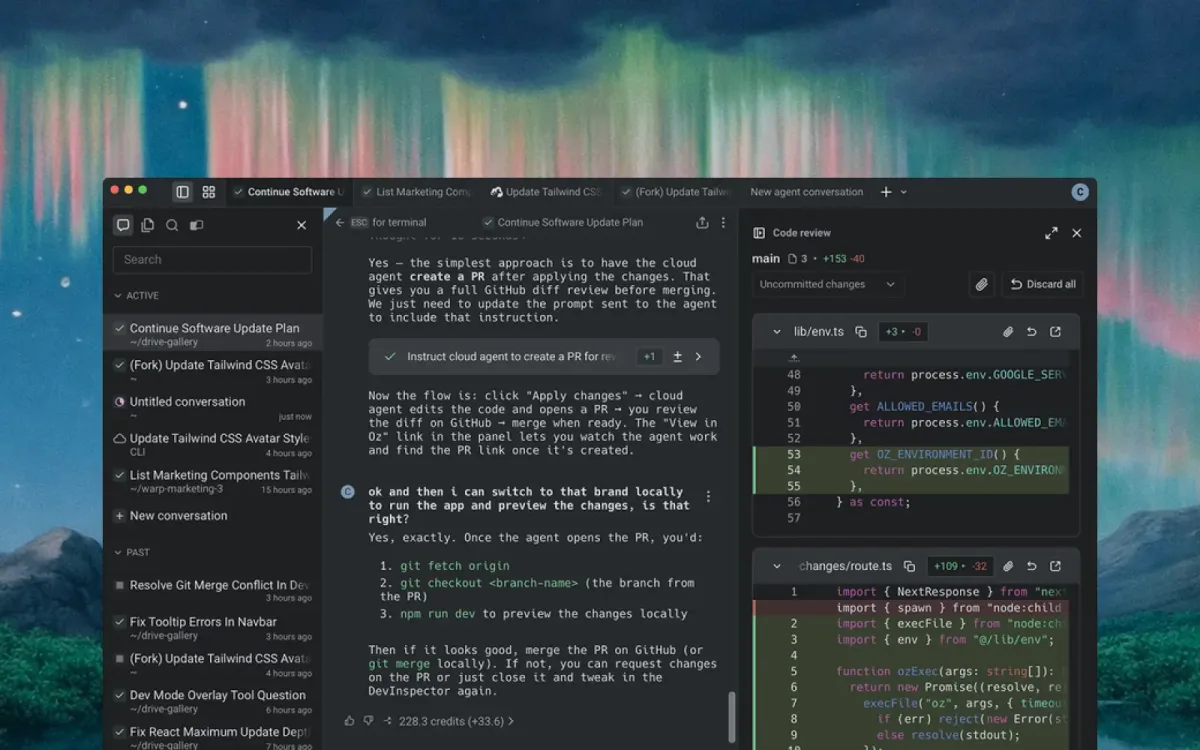
Warp is an agentic development environment built from the terminal up. Originally launched as a proprietary macOS-only terminal in 2022, Warp 2.0 went fully open-source under the Apache 2.0 license in May 2025. The rewrite brought cross-platform support, AI coding agents, codebase indexing, task management, and a cloud orchestration platform called Oz into a single environment.
The core idea: your terminal should be as intelligent as your code editor. Instead of copying error messages into ChatGPT or writing one-off scripts for repetitive DevOps tasks, Warp's AI agent handles these directly. It reads your codebase context, understands your shell environment, and executes multi-step workflows autonomously.
Warp is built in Rust, which keeps it fast despite the AI overhead. In our testing, shell startup time averaged 180ms - slower than Alacritty (40ms) but faster than the Electron-based Hyper terminal (600ms+). For a tool doing this much background indexing, that's respectable.
The open-source move also introduced community-driven development through Oz, where contributors use AI agents to build Warp itself. It's a bold approach - the product is literally built by the same agent workflow it offers to users.

What Are Warp 2.0's Key Features?
Warp's feature set splits into two categories: terminal improvements and AI agent capabilities. Both matter, because the AI features are only useful if the terminal underneath is solid.
Block-based input and output. Every command you run gets wrapped in a discrete block. You can select, copy, share, or bookmark individual command outputs without scrolling through a wall of text. This sounds minor until you're debugging a failing deploy at 2 AM and need to share exactly the right 15 lines with a teammate.
AI Agent with codebase context. Warp's agent indexes your repository and understands project structure, dependencies, and configuration files. Ask it to "set up a Docker container for this Node project" and it reads your package.json, Dockerfile (or lack thereof), and generates the right commands. In our testing, it correctly identified a missing environment variable in a Docker Compose setup that took us 20 minutes to find manually.
Warp Drive. A shared command library for teams. Save parameterized commands (think: deploy scripts with variable environment targets) and share them across your organization. Each saved workflow includes documentation and usage context.
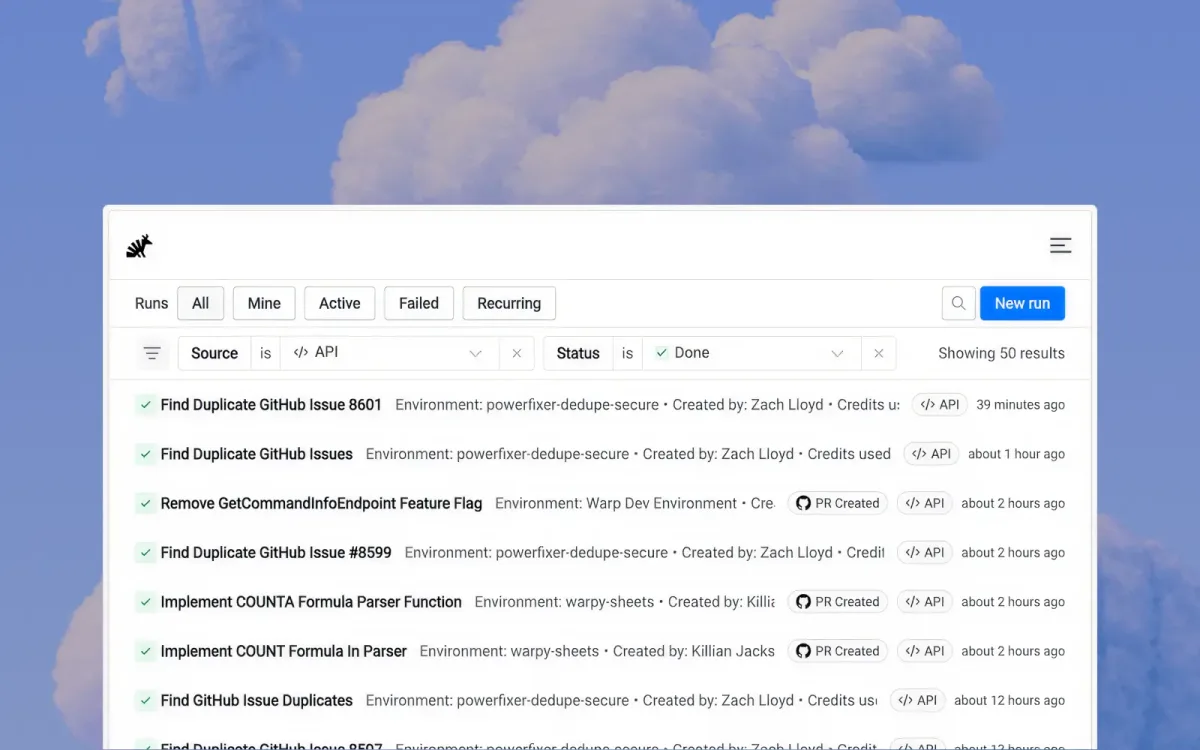
Oz cloud agent orchestration. Run AI agents in the cloud for longer-running tasks. Oz manages task queuing, agent coordination, and result delivery. This is where Warp pushes beyond a simple terminal into workflow automation territory.
Natural language command generation. Type what you want in plain English, and Warp translates it to the correct shell command. Accuracy in our testing was roughly 85% for common operations (git, Docker, kubectl) and dropped to about 60% for niche CLI tools with unusual syntax.
Notebooks. Combine markdown documentation with executable commands in a single file. Useful for runbooks, onboarding guides, and incident response procedures.
If you're building no-code automation stacks, our guide on how to build your own AI agent stack covers the broader ecosystem. Warp fits into the developer-facing layer of that stack.

How Much Does Warp 2.0 Cost?
Warp's pricing is straightforward. The individual plan is free with no usage caps on core terminal features (as of May 2026).
| Plan | Price | AI Agent Requests | Key Features |
|---|---|---|---|
| Individual | $0/mo | 40 AI requests/day | Full terminal, AI agent, codebase indexing |
| Team | $22/user/mo | 200 AI requests/day | Warp Drive sharing, team settings, SSO |
| Enterprise | Custom pricing | Unlimited | Self-hosted Oz, audit logs, custom integrations |
The free tier is genuinely usable. 40 AI requests per day covers most individual workflows. You'll hit the cap only if you're using the agent for every command instead of just the complex ones.
The Team tier's value comes from Warp Drive and shared workflows. If your team has standardized deployment procedures or incident response runbooks, the $22/user/month pays for itself in reduced context-switching.
Enterprise pricing requires a sales conversation. The self-hosted Oz option matters for companies with strict data residency requirements.
One notable detail: Warp's AI features use third-party LLMs (currently GPT-4o and Claude 3.5 Sonnet). Your terminal commands and codebase context are sent to these providers during AI interactions. Warp provides a privacy mode that disables AI features entirely for sensitive environments.
Who Should (and Shouldn't) Use Warp 2.0?
Use Warp if you're a developer spending 2+ hours daily in the terminal. The AI agent features compound in value the more terminal work you do. DevOps engineers, SREs, and backend developers get the most benefit. Full-stack developers who split time between editor and terminal will appreciate the codebase-aware suggestions.
Use Warp if you want a modern terminal experience regardless of AI. Block-based output, command search, and the split-pane interface are genuine productivity improvements over iTerm2 or default Terminal.app even with AI features disabled.
Skip Warp if you prioritize minimal resource usage. Warp consumes 200-400MB of RAM during typical sessions, compared to 50-80MB for Alacritty. If you're running a constrained environment or simply prefer tools that do one thing well, a traditional terminal is still faster and lighter.
Skip Warp if you work exclusively in air-gapped or high-security environments. The AI features require internet connectivity and send context to third-party LLM providers. Privacy mode exists but removes the primary differentiator.
Skip Warp if you already have a mature terminal workflow with tmux, custom scripts, and muscle memory. The switching cost is real. Warp's keybindings and interaction model differ enough from traditional terminals that you'll spend a week relearning habits.

How Does Warp 2.0 Compare to Cursor?
This comparison comes up constantly, but it's slightly misframed. Cursor is an AI-powered code editor. Warp is an AI-powered terminal. They operate in adjacent spaces, not the same one.
| Feature | Warp 2.0 | Cursor |
|---|---|---|
| Primary function | Terminal + shell | Code editor (VS Code fork) |
| AI focus | Shell commands, DevOps, debugging | Code completion, refactoring, generation |
| Codebase indexing | Yes | Yes |
| Price (individual) | Free | $20/mo (Pro) |
| Open-source | Yes (Apache 2.0) | No |
| Platform | macOS, Linux, Windows | macOS, Linux, Windows |
In practice, many developers use both. Cursor handles code writing and refactoring. Warp handles everything that happens after you save the file - building, testing, deploying, debugging infrastructure. The AI agent in Warp excels at multi-step shell operations that Cursor's terminal panel can't match.
Where Warp wins: complex DevOps workflows, Docker and Kubernetes management, log analysis, and any task involving multiple sequential shell commands. Where Cursor wins: writing and editing code, understanding type systems, refactoring across files.
If you're choosing one and your work is 70%+ coding, pick Cursor. If it's 70%+ infrastructure and operations, pick Warp. Most developers benefit from both.
For a broader view of the AI coding tool landscape, Cody by Sourcegraph and Qodo take yet another approach - focused on code review and testing rather than editing or terminal operations.

How We Tested Warp 2.0
We used Warp 2.0 as our primary terminal for three weeks across two development environments: a Node.js/TypeScript web application and a Python ML pipeline. Testing covered macOS (primary) and Linux (Ubuntu 24.04).
Specific tests included:
- AI agent accuracy: 50 natural language commands across git, Docker, kubectl, npm, and pip. Measured correct command generation rate.
- Multi-step task completion: 10 complex workflows (e.g., "find all failing tests, identify the common dependency, and update it"). Measured completion rate and correctness.
- Performance: Shell startup time, memory usage during idle and active sessions, input latency on large output buffers (10,000+ lines).
- Codebase indexing: Time to index repositories of varying sizes (500 files, 5,000 files, 50,000 files). Measured accuracy of context-aware suggestions post-indexing.
Testing was conducted in May 2026 on the latest stable release. We haven't tested the Enterprise tier or self-hosted Oz deployment. Editorially reviewed by Todd Stearn. Full methodology at how we work.

The Bottom Line
Warp 2.0 is the most ambitious terminal project in years, and it mostly delivers. The open-source pivot was the right call - it builds trust and accelerates platform support. The AI agent is genuinely useful for terminal-heavy workflows, not just a gimmick bolted onto a shell. At $0/month for individuals, the barrier to trying it is nonexistent.
The 8/10 rating reflects two things holding it back: higher resource usage than traditional terminals and the dependency on cloud connectivity for AI features. If Warp ships local model support and reduces memory overhead, this becomes a 9.
For developers who live in the terminal, Warp 2.0 is the clear upgrade from iTerm2, Windows Terminal, or Hyper. Install it, give it a week to replace your muscle memory, and you won't go back.
Try Warp Open-Source (Warp 2.0) →
Frequently Asked Questions
Is Warp 2.0 actually free and open-source?
Yes. Warp 2.0 launched as a fully open-source terminal under the Apache 2.0 license in May 2025. The individual plan is free forever. You can inspect, fork, and contribute to the codebase on GitHub. Team and Enterprise tiers with collaboration features require paid plans.
How does Warp's AI agent compare to GitHub Copilot in the terminal?
Warp's AI agent operates inside the terminal itself, executing multi-step shell tasks autonomously with codebase context. GitHub Copilot focuses on code completion inside your editor. Warp handles DevOps workflows, debugging, and infrastructure commands. Copilot handles writing code. They complement each other more than they compete.
Does Warp work on Linux and Windows or just macOS?
Warp 2.0 supports macOS, Linux, and Windows. Earlier versions were macOS-only, which limited adoption. The open-source rewrite expanded platform support significantly. Linux and Windows builds are stable as of May 2026, though macOS remains the most polished experience based on our testing.
What is Oz in Warp and how does it work?
Oz is Warp's cloud agent orchestration platform. It lets you run AI coding agents in the cloud, manage tasks, and coordinate multi-agent workflows. The community uses Oz to contribute to Warp itself through an agent-first development process. Think of it as a CI/CD system but for AI agent tasks.
Can Warp replace my current terminal like iTerm2 or Windows Terminal?
For most developers, yes. Warp handles standard shell operations, supports zsh, bash, fish, and PowerShell, and adds AI-powered features on top. The main tradeoff is resource usage - Warp uses more RAM than iTerm2 or Alacritty. If you prioritize minimal resource consumption over AI features, a lightweight terminal still wins.
Related AI Agents
- Cursor 3 - AI-powered code editor built on VS Code. Best for developers who want AI assistance while writing code, not running commands.
- Cody by Sourcegraph - AI coding assistant focused on code search and understanding across large repositories.
- Qodo - AI-powered code review and test generation. Complements Warp by catching issues before they reach the terminal.
- Budibase AI Agents - Low-code platform with AI agent capabilities for building internal tools.
Get weekly AI agent reviews in your inbox. Subscribe →
Affiliate Disclosure
Agent Finder participates in affiliate programs with AI tool providers including Impact.com and CJ Affiliate. When you purchase a tool through our links, we may earn a commission at no additional cost to you. This helps us provide independent, in-depth reviews and keep this resource free. Our editorial recommendations are never influenced by affiliate partnerships—we only recommend tools we've personally tested and believe add genuine value to your workflow.
Try Warp Open-Source (Warp 2.0) today
Get started with Warp Open-Source (Warp 2.0) — free tier available on most plans.
Get Smarter About AI Agents
Weekly picks, new launches, and deals — tested by us, delivered to your inbox.
Join 1 readers. No spam. Unsubscribe anytime.
Related Articles
Cursor Review 2026: AI Code Editor Worth It?
Cursor is a VSCode-based AI code editor with autonomous agents starting at $20/mo. We tested it for 4 weeks. Read our honest Cursor review.
Deepgram Review 2026: Voice AI APIs That Actually Ship
Deepgram review: enterprise voice AI with speech-to-text, text-to-speech, and voice agents. We tested accuracy, latency, and pricing. Read our verdict.
GLM-5.1 Review 2026: Open-Source Agentic Coding
GLM-5.1 is Z.ai's open-source coding agent scoring 58.4% on SWE-Bench Pro. We tested its marathon autonomy. Read our full GLM-5.1 review.