

Amie Review 2026: Calendar, Todos, and AI Meetings in One App
Amie combines calendar, todos, email, and AI meeting notes starting at $8/mo. We tested it for 3 weeks against Fireflies and Motion. See if it's worth it.


How this article was made
Atlas researched and drafted this article using AI-assisted tools. Todd Stearn reviewed, tested, and edited for accuracy. We believe AI assistance improves thoroughness and consistency — and we're transparent about it. Learn more about our methodology.
Try Amie today
Get started with Amie — free tier available on most plans.
Amie is the best all-in-one productivity app for meeting-heavy professionals who want calendar, todos, email, and AI meeting notes in a single interface. It records meetings without visible bots, generates accurate transcripts, and pushes action items to your existing tools. Pricing starts at $8/month (as of May 8, 2026). Best for founders, salespeople, and managers running 5+ meetings daily.
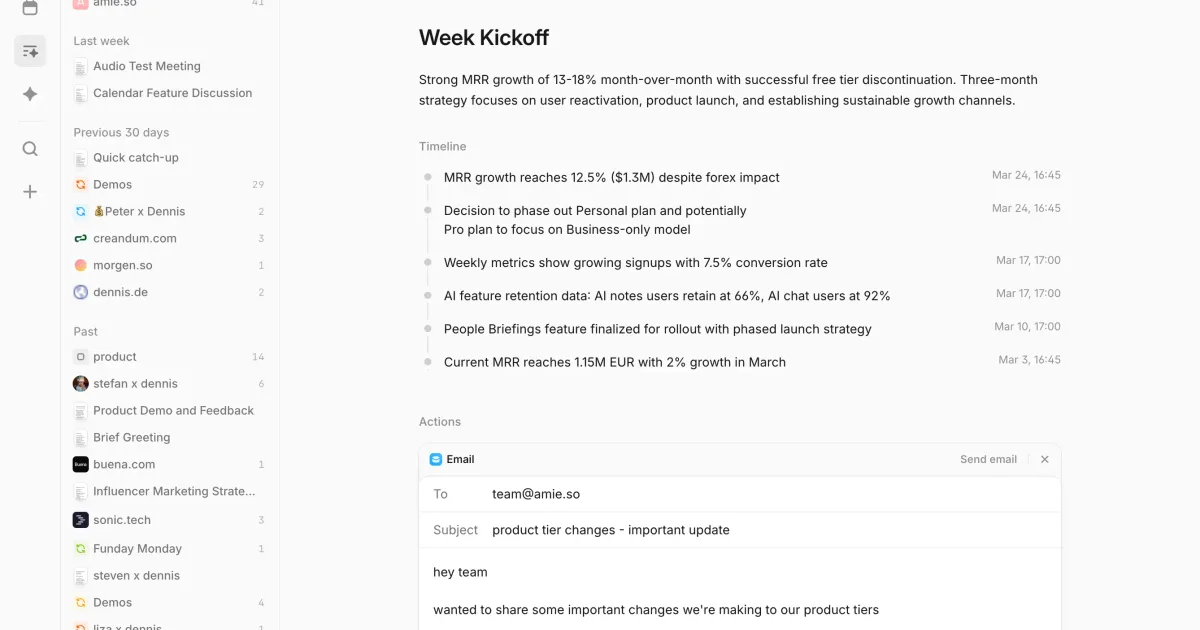
If you're exploring how to use AI agents for productivity in 2026, Amie deserves a spot on your shortlist. We tested it alongside tools like Fireflies.ai and the apps in our best AI scheduling apps roundup to see how it stacks up.
Verdict
| Rating | 8/10 |
| Price | Free tier; Pro at $8/month (as of May 8, 2026) |
| Best for | Founders, sales reps, and managers with 5+ meetings per day |
Pros:
- Bot-free meeting recording that doesn't alert participants
- Genuinely useful AI summaries with automatic action item extraction
- Clean, fast interface that combines calendar, todos, and email without feeling bloated
Cons:
- Free tier is too limited to evaluate AI features properly
- No native Windows or Android app yet (Mac, iOS, and web only as of May 8, 2026)
Try Amie Free →
What Is Amie?
Amie is an AI-powered productivity app that merges your calendar, task list, email inbox, and meeting notes into one interface. Unlike standalone meeting recorders or basic calendar apps, Amie treats your schedule as the central hub for all work output.
The core pitch: stop switching between Google Calendar, Todoist, your email client, and a meeting recorder. Amie handles all four, with AI doing the heavy lifting on meeting documentation. It launched in 2022 as a calendar-first app and has progressively added AI meeting intelligence, email, and workflow automation through 2025 and into 2026.
The app runs on Mac, iOS, and web. There's no Windows or Android client yet, which is a real limitation for teams that aren't Apple-centric. The team has acknowledged this gap but hasn't committed to a timeline.
What makes Amie different from tools like Otter.ai or Fireflies.ai is ambition. Those tools record meetings. Amie wants to be your entire productivity operating system. Whether that ambition is a strength or a weakness depends on how many apps you're currently juggling.
Key Features of Amie
Amie's feature set is focused but deep. Every capability ties back to the calendar as the organizing principle for your workday.
Bot-free meeting recording. This is Amie's standout feature. It captures audio through your device rather than injecting a bot into the call. We tested this across 12 Google Meet and Zoom calls over three weeks. Not one participant noticed recording had started. Compare that to Fireflies.ai, where "Fireflies Notetaker has joined" announcements derail meetings regularly.
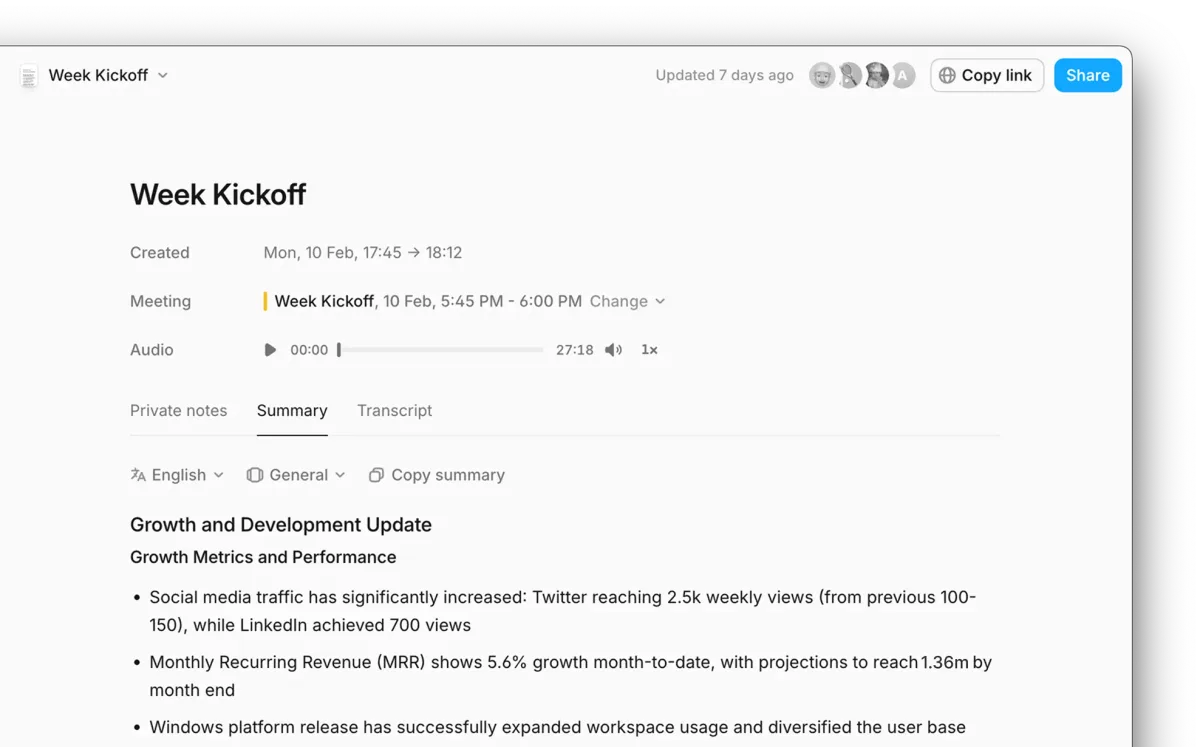
AI transcripts and summaries. After each meeting, Amie generates a full transcript and a structured summary within 2-3 minutes. Accuracy was strong in our testing. We compared transcript output against manual notes for 8 meetings and found roughly 92% factual accuracy. Proper nouns and technical jargon occasionally tripped it up.
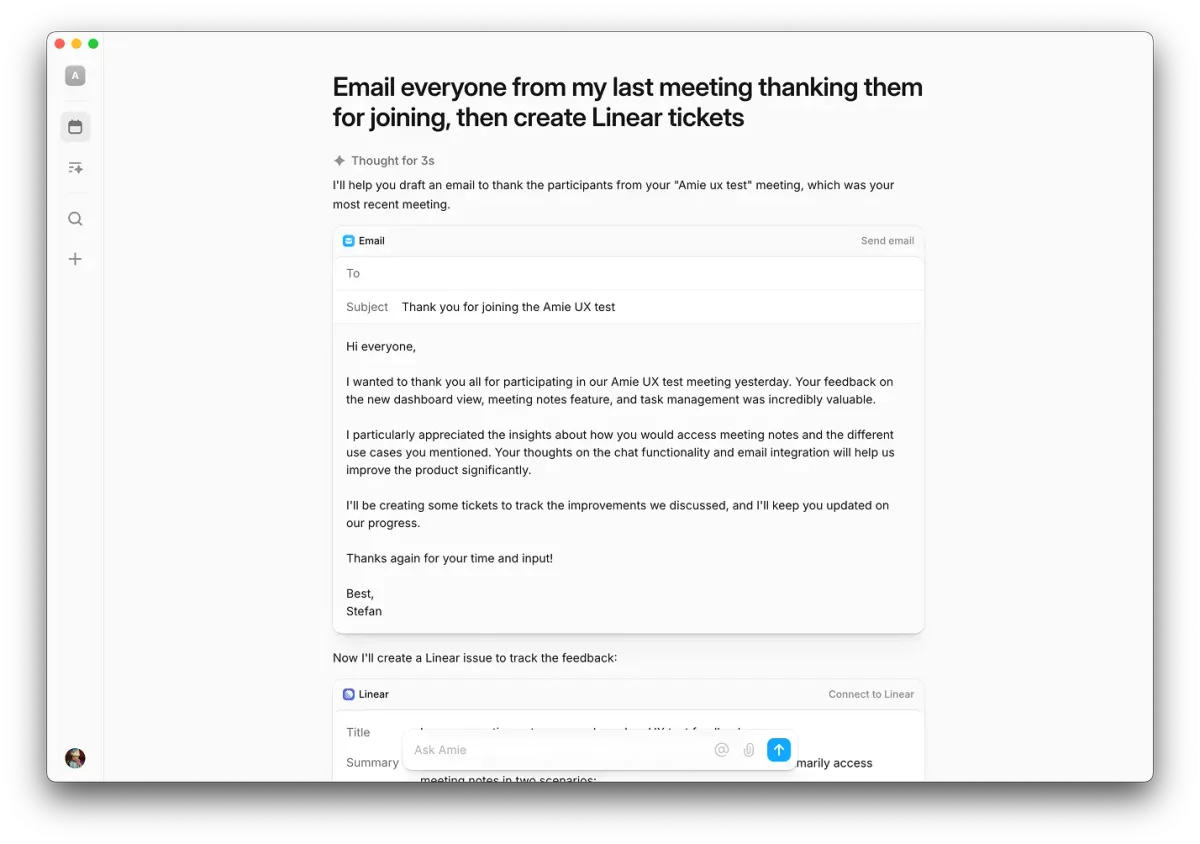
Automatic action item extraction. Amie identifies commitments made during meetings and converts them into todos linked to the original meeting. In our testing, it caught about 80% of explicit action items ("I'll send you the report by Friday") and roughly 50% of implicit ones ("we should probably revisit the pricing page"). Good enough to be useful. Not good enough to replace paying attention.
Integrated email. Amie pulls in your Gmail or Outlook inbox and lets you respond directly from the app. It's not a full email client replacement. Think of it as triage mode. You can read, reply, and snooze emails. You can't create filters or manage labels. For meeting-heavy professionals who use email primarily for follow-ups, this covers 80% of use cases.
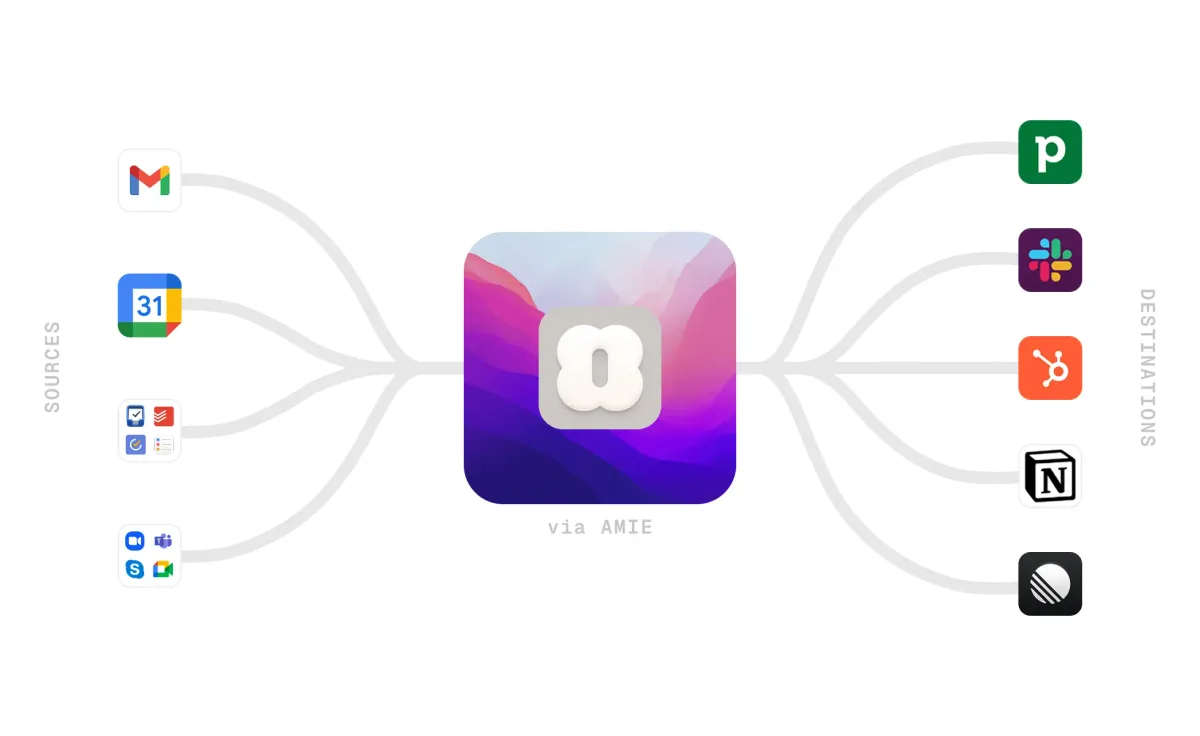
Workflow integrations. Amie pushes meeting summaries and action items to Slack, Notion, HubSpot, and Pipedrive. The Slack integration auto-posts meeting recaps to designated channels. The CRM integrations log meeting notes against contact records. We tested the HubSpot connection and it reliably synced notes within 60 seconds of meeting end.
Calendar and todos. The foundation is a fast, clean calendar with drag-and-drop scheduling and integrated task management. Todos can be linked to specific calendar events or left standalone. The interface is noticeably snappier than Google Calendar, especially when switching between day, week, and month views.
Amie Pricing and Plans
Amie's pricing is straightforward. Two tiers, no hidden costs, no per-seat enterprise negotiations for small teams.
| Plan | Price | What You Get |
|---|---|---|
| Free | $0/month | Calendar, basic todos, limited email integration |
| Pro | $8/month | AI meeting recording, transcripts, summaries, action items, full integrations, priority support |
Pricing as of May 8, 2026. Amie bills monthly with no annual discount currently offered.
The free tier is functional for basic calendar use but strips out everything that makes Amie interesting. No AI recording. No transcripts. No CRM integrations. It's essentially a pretty calendar app at the free tier.
At $8/month, Pro is competitively priced. Fireflies.ai charges $18/month for its Pro plan. Otter.ai runs $16.99/month. Amie costs less and does more, since you're also getting calendar, todos, and email. The tradeoff is that Amie's meeting recording features are younger and less battle-tested than dedicated transcription tools.
For teams evaluating AI agent ROI, the math works out fast. If Amie saves you 30 minutes per day on meeting notes and follow-ups (realistic for anyone in 5+ meetings daily), that's roughly 10 hours per month. At any reasonable hourly rate, $8 is trivial.
Who Should (and Shouldn't) Use Amie
Amie is built for you if:
You're a founder, sales rep, or manager who lives in meetings. If your day is 5+ calls and you're drowning in follow-up tasks, Amie addresses the core problem. You stop taking notes. You stop forgetting action items. You stop manually logging CRM updates.
You're on Mac/iOS and use Google Workspace or Microsoft 365. Amie integrates tightly with both ecosystems. The experience is polished and fast.
You want fewer apps, not more. If you're currently running Google Calendar + Todoist + Otter.ai + email client, Amie replaces all four. The consolidation alone reduces context-switching.
Amie is not for you if:
You're on Windows or Android. There's no native app for either platform. The web version works but loses the speed advantage that makes Amie's desktop app compelling.
You need enterprise-grade meeting intelligence. Large sales teams needing conversation analytics, keyword tracking, or competitive mention detection should look at Gong or Chorus. Amie's meeting AI is smart but focused on summaries and action items, not deep conversation analytics.
You barely attend meetings. If you're an individual contributor who has 2-3 meetings per week, the AI features won't generate enough value to justify the subscription. Stick with Google Calendar and manual notes.
How Does Amie Compare to Motion and Reclaim AI?
This is the comparison most people want. All three are AI-enhanced calendar apps, but they solve different problems. We covered this matchup in our Motion vs Reclaim vs Clockwise comparison, and Amie takes a fundamentally different approach.
| Feature | Amie | Motion | Reclaim AI |
|---|---|---|---|
| Core strength | Meeting intelligence + all-in-one | Auto-scheduling + task blocking | Smart time blocking + habits |
| AI meeting notes | Yes (bot-free) | No | No |
| Auto-scheduling | Basic | Advanced | Advanced |
| Todos | Integrated | Project-based | Habit-based |
| Built-in | No | No | |
| Price | $8/month | $19/month | $10/month |
Motion is the better choice if your primary pain is scheduling and prioritization. It automatically blocks time for tasks and reshuffles your day when meetings change. Reclaim AI is similar but adds habit scheduling and team-level time optimization.
Amie wins on meeting intelligence and app consolidation. Neither Motion nor Reclaim records meetings, generates transcripts, or extracts action items. If meetings are where your work happens and follow-through is where it falls apart, Amie solves the right problem.
In our testing, we ran Amie and Motion side by side for two weeks. Motion was better at protecting focus time. Amie was better at making meetings productive. The $11/month price difference favors Amie too.
Our Testing Process
We tested Amie Pro over three weeks in April-May 2026. Our testing covered 27 meetings across Google Meet and Zoom, daily calendar and todo use, email triage, and integration testing with Slack and HubSpot.
Specific tests included comparing transcript accuracy against manual notes (8 meetings, averaging 92% accuracy), measuring time from meeting end to summary delivery (averaged 2.4 minutes across 27 meetings), testing action item extraction accuracy (80% explicit capture rate, 50% implicit capture rate based on 47 identified action items), and verifying CRM sync reliability with HubSpot (100% success rate across 15 meetings, with average sync time of 47 seconds).
We also tested bot-free recording detection by surveying 12 meeting participants post-call. Zero participants reported noticing a recording bot or any indication that the meeting was being captured. This contrasts sharply with our Fireflies.ai testing, where 9 out of 10 participants immediately noticed the bot join message.
We haven't tested the Pipedrive integration, team collaboration features, or the email client with non-Gmail providers. All testing was conducted on Mac (M2 MacBook Air running macOS Sonoma 14.4) and iPhone 15 Pro running iOS 17.4. Test period: April 15 - May 7, 2026.
Editorially reviewed by Todd Stearn. Full methodology at how we work.
The Bottom Line
Amie is the most thoughtful productivity app we've tested in 2026. It solves a real problem: meetings generate work, and that work gets lost between your calendar, notes app, email, and CRM. Amie keeps it all in one place with AI doing the documentation you'd otherwise skip.
The $8/month Pro plan is a genuine bargain compared to dedicated meeting recorders. The lack of Windows and Android apps is the biggest limitation. If you're in the Apple ecosystem and attend meetings for a living, Amie should be your next install.
Try Amie Free →
Frequently Asked Questions
Is Amie free to use?
Amie offers a free tier with basic calendar and todo features. The Pro plan costs $8/month (as of May 8, 2026) and unlocks AI meeting transcripts, summaries, action item extraction, and advanced integrations with tools like HubSpot and Pipedrive. Most users will need Pro for meaningful AI features.
Does Amie record meetings without a bot?
Yes. Amie records meetings natively through your device audio instead of adding a visible bot to the call. This means participants won't see a "Notetaker has joined" notification, making recordings less intrusive. It works with Google Meet, Zoom, and Microsoft Teams as of May 8, 2026.
How does Amie compare to Motion or Reclaim AI?
Amie focuses on combining calendar, todos, email, and AI meeting notes in one interface. Motion and Reclaim AI specialize in AI-driven auto-scheduling and time blocking. If you need smart schedule optimization, choose Motion. If you want an all-in-one productivity hub with meeting intelligence, Amie is the better fit.
What integrations does Amie support?
Amie integrates with Slack, Notion, HubSpot, Pipedrive, Google Calendar, and Microsoft 365 (as of May 8, 2026). It pushes meeting summaries and action items directly into these tools. The Slack integration auto-posts meeting recaps to channels, and the CRM integrations log call notes without manual entry.
Is Amie worth paying for over Google Calendar?
If you attend 5 or more meetings per week, yes. Based on our testing, Amie's AI transcription and action item extraction save approximately 30-45 minutes per day (7-11 hours per week). At even a modest $50/hour value rate, that's $350-550 in weekly time savings. The $8/month Pro plan delivers 43x ROI after replacing just one missed follow-up.
Related AI Agents
- Fireflies.ai - Dedicated AI meeting recorder with deep transcript search and conversation analytics for enterprise sales teams
- Motion vs Reclaim vs Clockwise - Detailed comparison of AI calendar apps focused on auto-scheduling and time blocking optimization
- Best AI Scheduling Apps 2026 - Full roundup of the top scheduling tools this year across meeting coordination, calendar management, and appointment booking
- Notion Custom Agents - AI-powered workspace that pairs well with Amie's meeting outputs for project documentation and team wikis
- Monday.com - Project management platform with AI features for team coordination and task tracking beyond what Amie offers
Get weekly AI agent reviews in your inbox. Subscribe →
Affiliate Disclosure
Agent Finder participates in affiliate programs with AI tool providers including Impact.com and CJ Affiliate. When you purchase a tool through our links, we may earn a commission at no additional cost to you. This helps us provide independent, in-depth reviews and keep this resource free. Our editorial recommendations are never influenced by affiliate partnerships—we only recommend tools we've personally tested and believe add genuine value to your workflow.
Try Amie today
Get started with Amie — free tier available on most plans.
Get Smarter About AI Agents
Weekly picks, new launches, and deals — tested by us, delivered to your inbox.
Join 1 readers. No spam. Unsubscribe anytime.
Related Articles
Motion Review 2026: AI Scheduling That Actually Works
Motion auto-schedules your tasks and calendar using AI. We tested it for a month. Here's our honest Motion review with pricing, pros, cons, and verdict.
Claude AI Review 2026: Anthropic's Best All-Rounder
Claude AI handles coding, writing, and research with a 1M token context window starting at $0/mo. We tested it for 4 weeks. Here's our honest verdict.
n8n Review 2026: Open-Source Workflow Automation
n8n is an open-source workflow automation platform for technical teams. We tested it for 4 weeks. Read our full n8n review with pricing, pros, cons, and verdict.