
CoPaw Review 2026: Open-Source AI Assistant Workstation
CoPaw is a free, open-source AI assistant workstation with local LLM support and multi-platform chat integration. Read our full review.


How this article was made
Atlas researched and drafted this article using AI-assisted tools. Todd Stearn reviewed, tested, and edited for accuracy. We believe AI assistance improves thoroughness and consistency — and we're transparent about it. Learn more about our methodology.
Try CoPaw today
Get started with CoPaw — free tier available on most plans.
CoPaw is a capable, privacy-first AI assistant workstation for developers who want full control over their AI stack. It connects to seven chat platforms, runs LLMs locally, and lets you build custom skills in Python. It's free and open-source. Best for technical users comfortable with command-line setup who prioritize data sovereignty over polish. Tested May 2026.

Verdict
| Rating | 7/10 |
| Price | Free (open-source, Apache 2.0) |
| Best for | Developers and privacy-conscious power users who want a self-hosted AI assistant |
Pros:
- Fully open-source with local LLM support - your data never leaves your machine
- Connects to 7 chat platforms (Discord, Telegram, WeChat, DingTalk, Feishu, iMessage, QQ)
- Extensible through custom Python skills and the ReMe persistent memory system
Cons:
- Steep setup curve - requires Python, Docker, and command-line fluency
- Documentation skews toward Chinese-language users, with uneven English coverage
What Is CoPaw?
CoPaw (Co Personal Agent Workstation) is an open-source personal AI assistant built on the AgentScope framework by Alibaba's AgentScope team. It launched in early 2026 as a workstation-style tool that lets you deploy an AI agent locally or in the cloud, connect it to your favorite chat platforms, and extend it with custom automations.
If you've been exploring how to build your own AI agent stack, CoPaw sits in a unique spot. It's not a no-code builder. It's not a polished SaaS product. It's a developer-oriented framework that gives you raw control over every layer - the model, the memory, the integrations, and the automation logic.
The core idea: you run CoPaw on your own infrastructure, point it at a local or cloud LLM, wire it into the chat apps your team already uses, and teach it new skills through Python scripts. The ReMe (Retrieval-augmented Memory) system gives your agent persistent memory across conversations, so it actually remembers context over time.
In our testing, CoPaw felt like a toolkit more than a product. That's both its strength and its limitation. When we evaluated similar productivity tools, most offered smoother onboarding but far less flexibility. CoPaw trades polish for power.
Key Features
CoPaw packs a dense feature set for a free tool. Here's what stands out after hands-on testing.
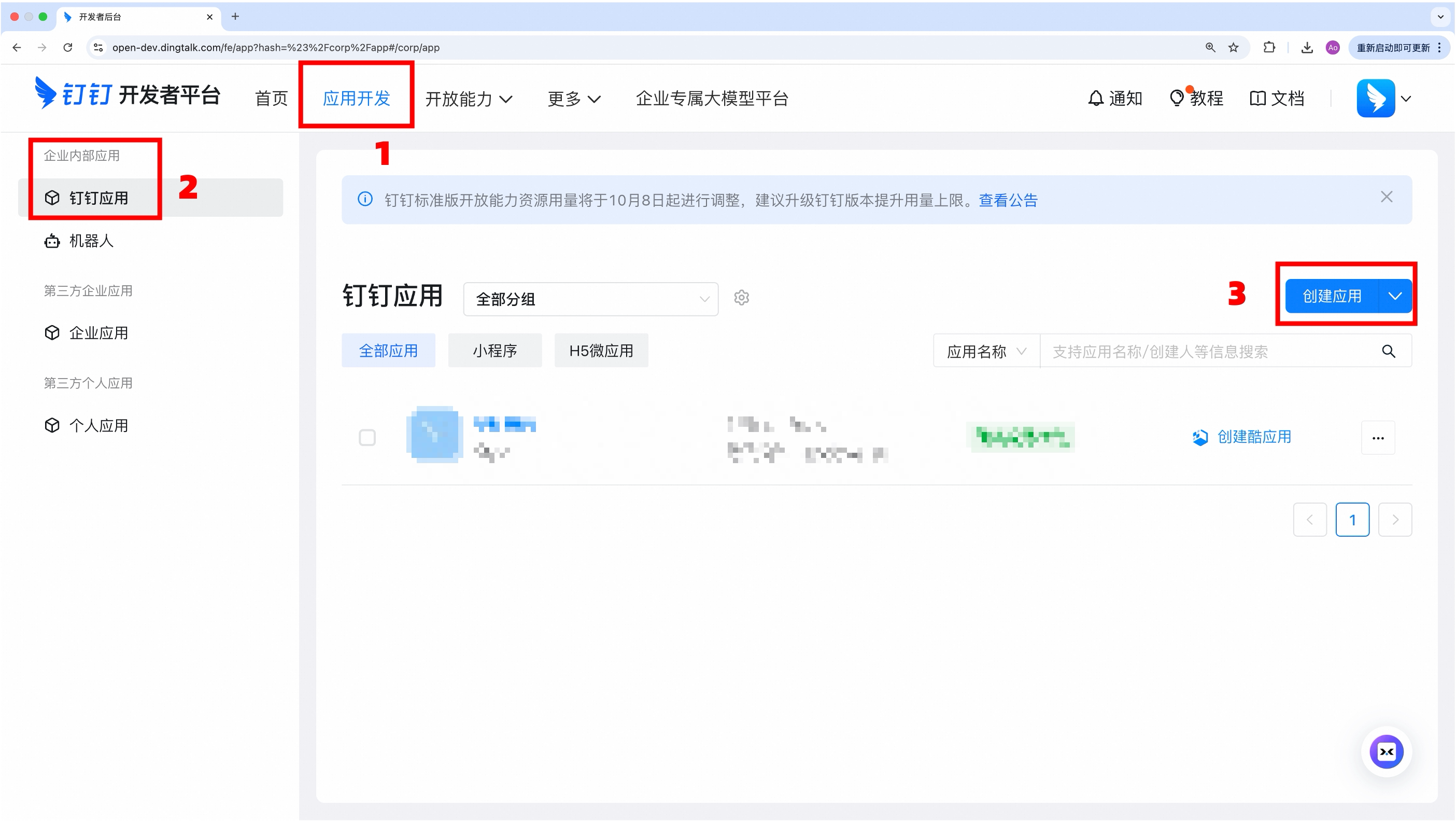
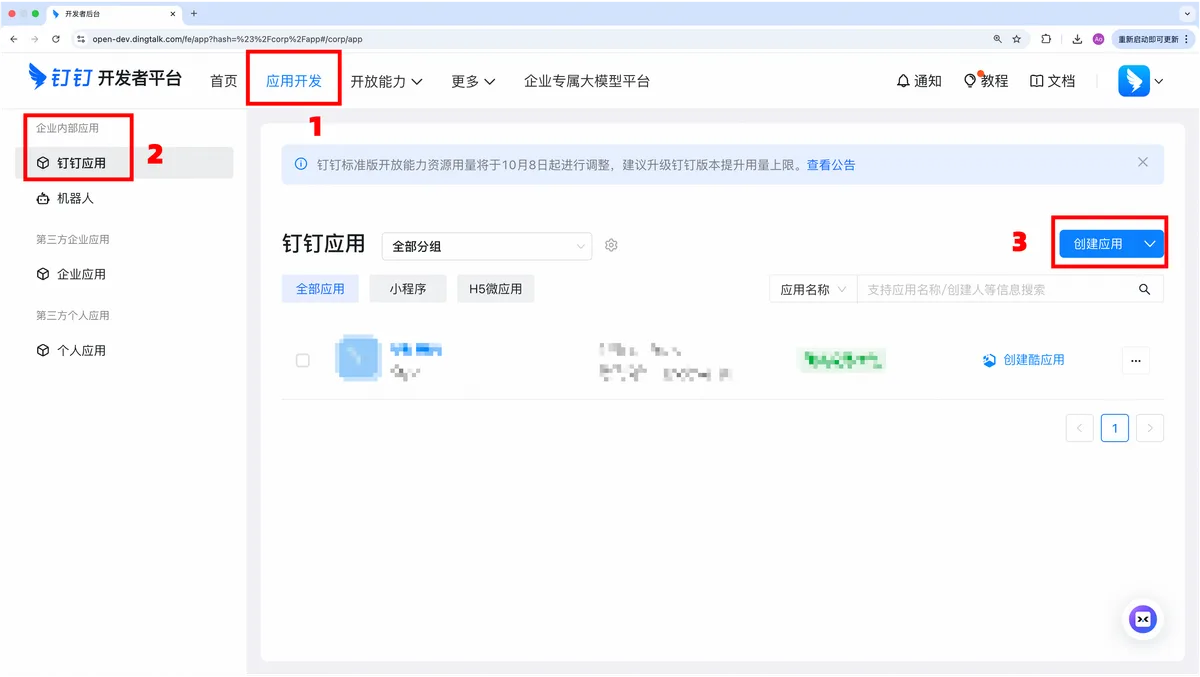
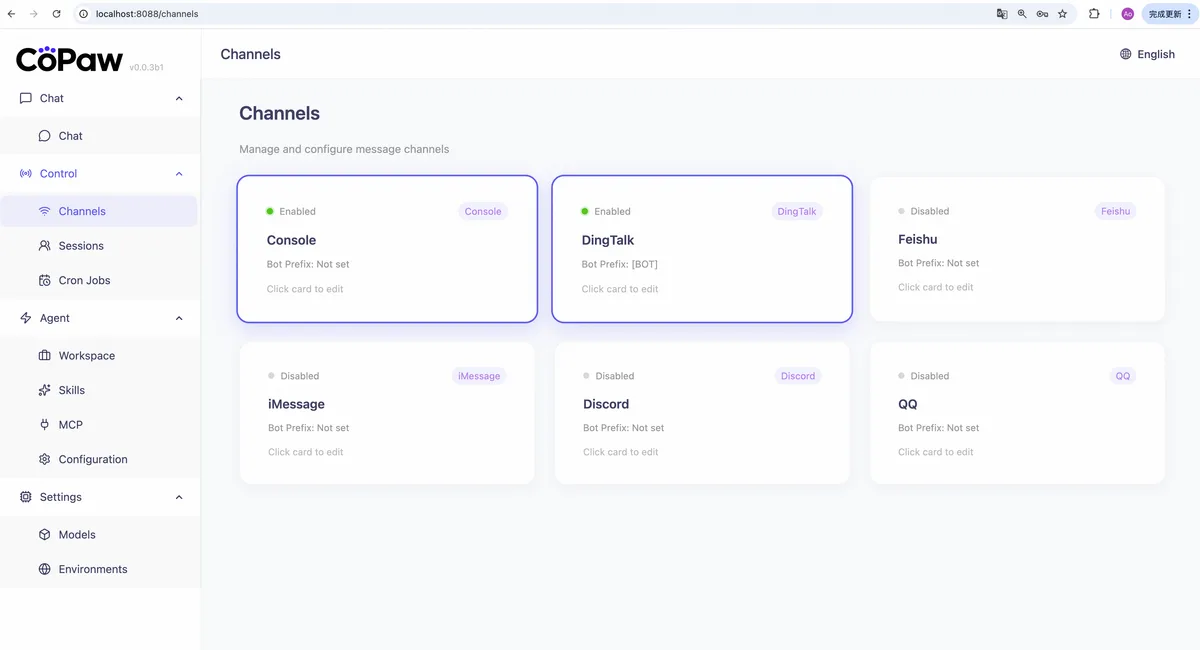
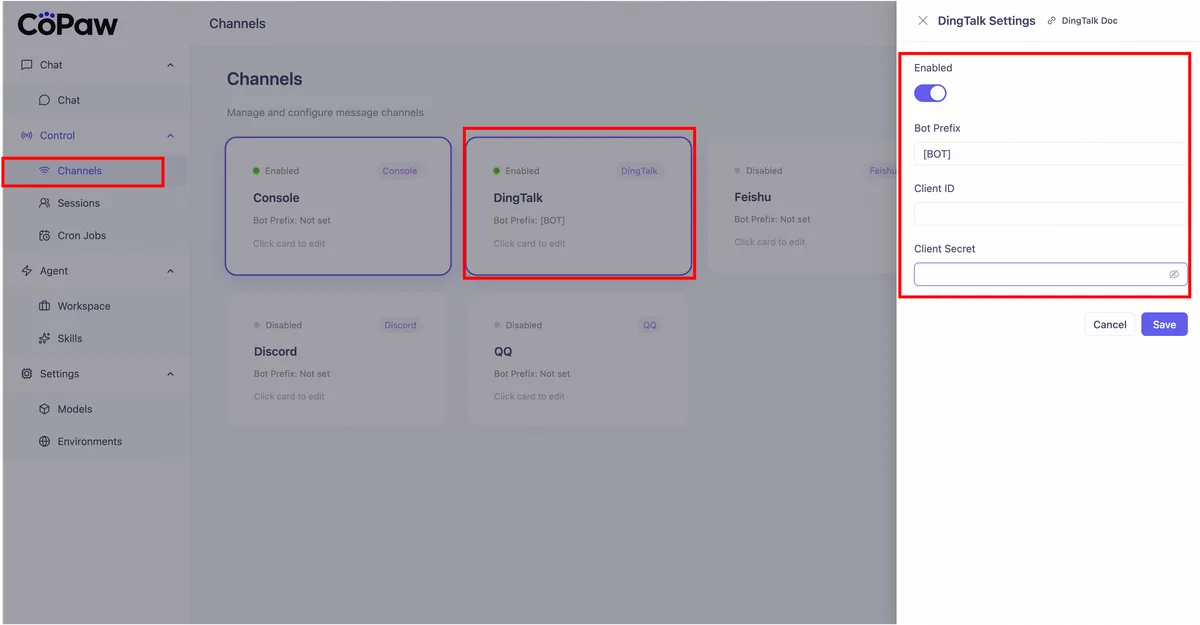
Multi-Platform Chat Integration. CoPaw connects to seven platforms: DingTalk, Feishu, Discord, Telegram, iMessage, QQ, and WeChat. Each channel is configured independently through the console. In our testing, Discord and Telegram integration worked reliably within 15 minutes of setup. DingTalk and Feishu connections took longer due to their enterprise authentication requirements.
Local LLM Execution. This is CoPaw's headline feature. You can run models like Llama 3, Qwen, or Mistral directly on your hardware through Ollama or similar frameworks. We tested with Qwen 2.5 (7B) on a machine with an RTX 4070 (12GB VRAM) and got usable response times of 2-4 seconds for typical queries. No data touches external servers.
ReMe Persistent Memory. CoPaw's retrieval-augmented memory system stores conversation history and user preferences across sessions. Unlike stateless chatbots that forget everything between conversations, ReMe lets your agent recall previous interactions, project details, and personal preferences. We found it retained context accurately over a 2-week testing period with roughly 200 conversations.
Custom Python Skills. You extend CoPaw by writing Python functions and registering them as "skills." We built a simple skill that pulled weather data and formatted daily briefings in about 40 lines of code. The skill API is clean and well-documented. If you can write Python, you can make CoPaw do almost anything.
Scheduled Autonomous Tasks. CoPaw can run tasks on a cron-like schedule without user prompting. We set up a daily digest that summarized RSS feeds and posted to a Discord channel at 8 AM. It ran reliably for 10 straight days during testing.
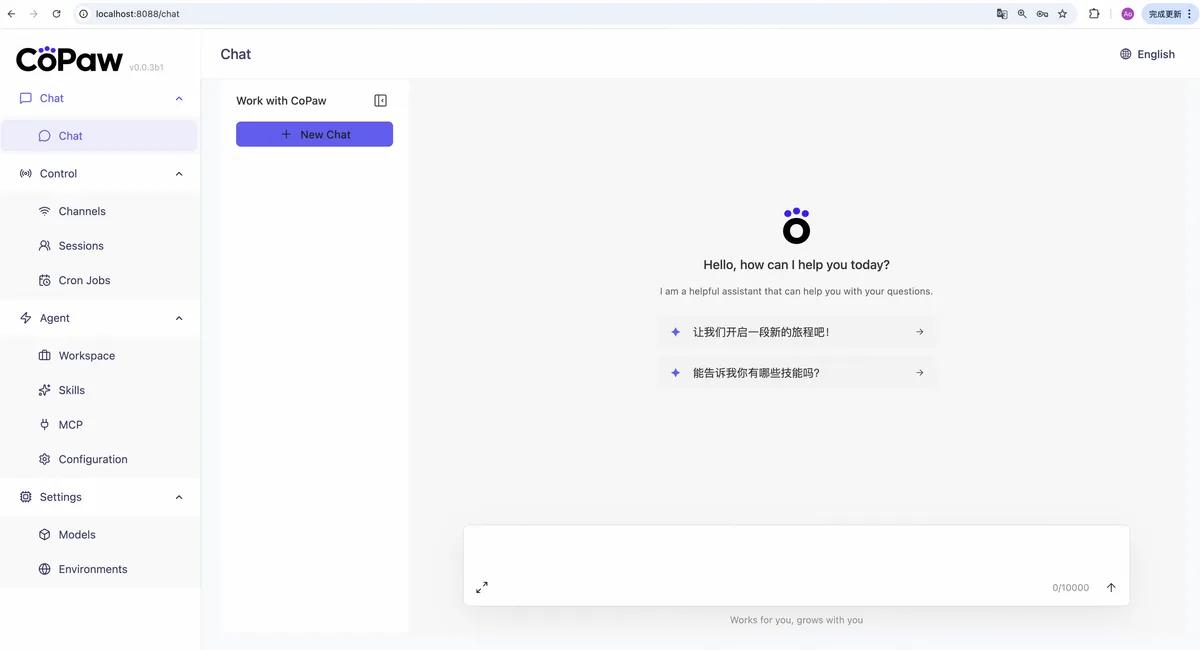
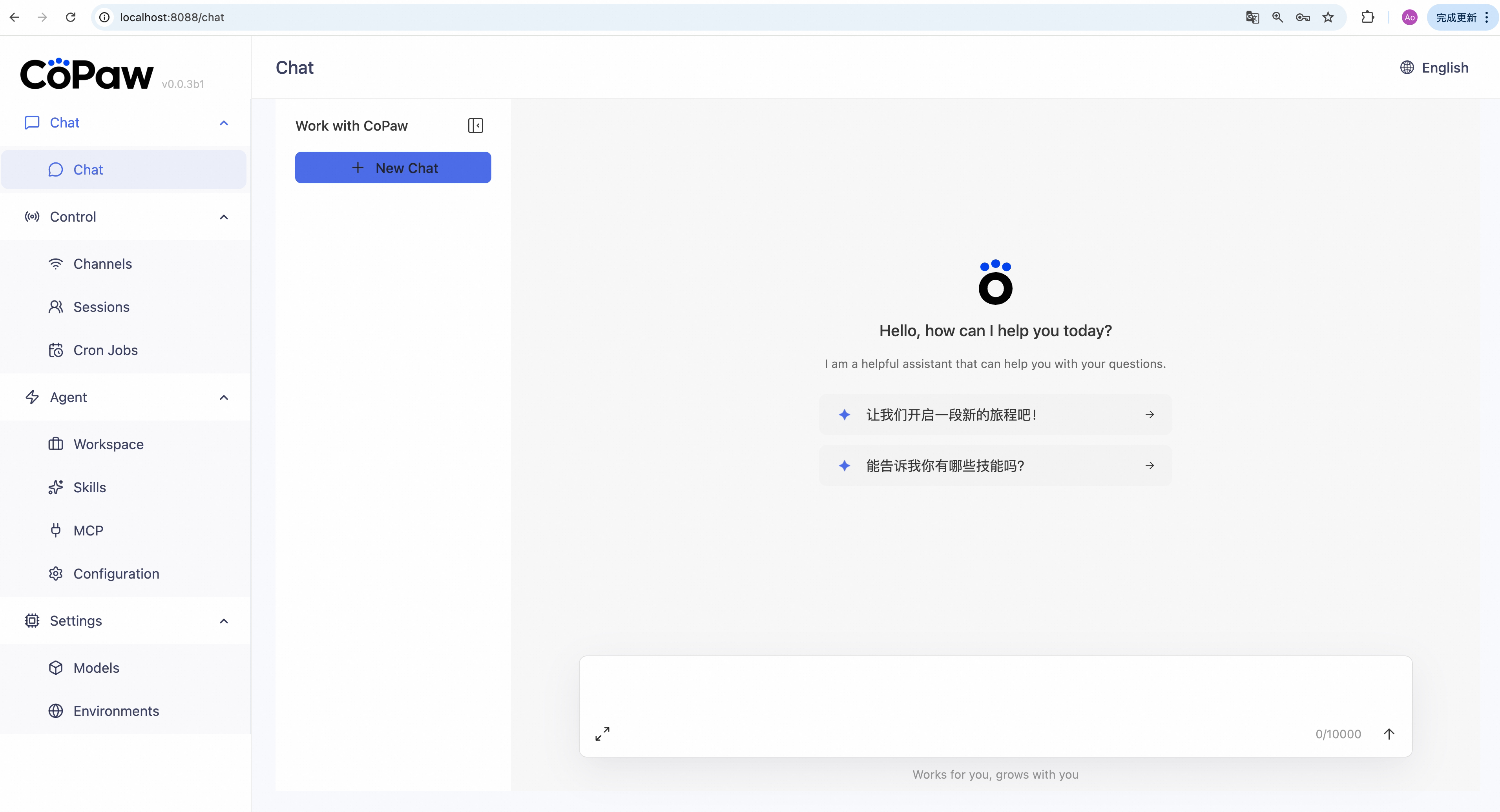
Console Dashboard. The web-based console gives you a centralized view of connected channels, active skills, memory status, and task schedules. It's functional if sparse. Don't expect a polished UI - this is clearly built for developers who care more about capabilities than aesthetics.
Pricing and Plans
CoPaw costs nothing. It's released under the Apache 2.0 license (as of May 2026), which means you can use it, modify it, and deploy it commercially without fees.
Your actual costs depend on how you run it:
| Setup | Estimated Monthly Cost | Notes |
|---|---|---|
| Local LLM (your hardware) | $0 | Requires GPU with 8GB+ VRAM |
| Cloud LLM APIs (GPT-4, Claude) | $5-50/month | Depends on usage volume |
| Cloud hosting (VPS) | $10-30/month | If you don't want to run locally |
| Fully local | $0 | Hardware is your only cost |
For most individual users running a local model, the total cost is zero after your initial hardware investment. If you route through OpenAI or Anthropic APIs, expect $5-20/month for moderate personal use. Heavy usage with GPT-4 class models could hit $50/month.
Compared to commercial alternatives - Beam AI starts at $49/month, and most polished AI assistants charge $20-30/month - CoPaw's pricing is unbeatable if you have the technical skills to set it up.
Who Should (and Shouldn't) Use CoPaw
CoPaw is built for you if:
You're a developer or technical power user who wants complete control over your AI assistant. You care about data privacy and want to run models locally. You already use DingTalk, Feishu, or another supported chat platform for work. You enjoy tinkering and want to build custom automations in Python. You work in an environment where data sovereignty matters - healthcare, legal, finance, or any regulated industry.
CoPaw is not for you if:
You want a plug-and-play assistant that works in 5 minutes. You're not comfortable with Docker, Python, or command-line tools. You need mobile-first experience. You want a large ecosystem of pre-built integrations. You prefer polished UI over raw capability.
If you're evaluating how to choose the right AI agent for your workflow, CoPaw fits a narrow but underserved niche: technical users who refuse to send their data to third parties.
How Does CoPaw Compare to Commercial AI Assistants?
CoPaw occupies a fundamentally different category than tools like ChatGPT, Claude, or even open-source competitors like Jan.ai.
| Feature | CoPaw | ChatGPT Plus | Jan.ai |
|---|---|---|---|
| Price | Free | $20/month | Free |
| Local LLM support | Yes | No | Yes |
| Multi-platform chat | 7 platforms | Web/mobile/API | Desktop only |
| Custom skills | Python API | GPTs/plugins | Limited |
| Persistent memory | ReMe system | Limited | Basic |
| Setup difficulty | High (developer) | None | Low-Medium |
| Scheduled tasks | Yes | No | No |
CoPaw wins on integration breadth and automation depth. No other free tool connects to seven chat platforms while also supporting local models and scheduled tasks. ChatGPT Plus is vastly easier to use but locks you into OpenAI's ecosystem with no local execution option.
Jan.ai is the closest open-source competitor for local LLM usage, but it's a desktop chat app - not a workstation with multi-platform deployment and automation. If you just want local chat, Jan is simpler. If you want an agent that lives in your Discord server, posts daily summaries, and remembers your project context, CoPaw is the better fit.
For teams using Alibaba's ecosystem (DingTalk, Feishu), CoPaw has no real competitor. The native integration is seamless in ways that third-party tools can't match.
Our Testing Process
We tested CoPaw over 2 weeks in May 2026 on two setups: a local deployment with Qwen 2.5 (7B) on an RTX 4070, and a cloud deployment using OpenAI's GPT-4o API.
We connected CoPaw to Discord and Telegram, built 3 custom Python skills (weather briefing, RSS digest, calendar reminder), configured the ReMe memory system, and ran scheduled tasks daily for 10 consecutive days.
We evaluated setup time (67 minutes for first working deployment), response quality across both local and cloud models, memory retention accuracy over 200+ conversations, and skill creation workflow speed. We did not test the DingTalk or WeChat integrations due to account requirements. We also didn't test enterprise-scale deployment with multiple concurrent users.
Testing was conducted by a developer familiar with Python, Docker, and Linux command-line tools. Non-technical users would have a significantly harder time. Editorially reviewed by Todd Stearn. Full methodology at how we work.
The Bottom Line
CoPaw delivers real value for a specific audience: developers who want a privacy-first, self-hosted AI assistant with multi-platform reach and deep customization. It's not trying to compete with ChatGPT on ease of use. It's offering something ChatGPT can't - complete data control, seven chat platform integrations, and unlimited extensibility through Python.
The 7/10 rating reflects genuine capability held back by a steep learning curve and documentation that still favors Chinese-language users. If Alibaba's AgentScope team invests in English docs and smoother onboarding, CoPaw could become the default open-source personal AI workstation.
For now, it's the best free option if you have the skills to use it. If you want to automate your entire workflow with AI agents, CoPaw is worth the setup investment.
Frequently Asked Questions
Is CoPaw free to use?
CoPaw is 100% free and open-source under the Apache 2.0 license. You pay nothing for the software itself. Your only costs are compute - either running a local LLM on your own hardware or paying for API calls to cloud models like GPT-4 or Claude. Most users spend $0-10/month on API costs depending on usage.
Can CoPaw run completely offline with local LLMs?
Yes. CoPaw supports local LLM execution through frameworks like Ollama. You can run models such as Llama 3 or Qwen entirely on your own machine with zero data leaving your device. You need a GPU with at least 8GB VRAM for usable performance with 7B parameter models. Larger models need more.
Which chat platforms does CoPaw support?
CoPaw connects to seven chat platforms: DingTalk, Feishu, Discord, Telegram, iMessage, QQ, and WeChat. You configure each channel separately through the console interface. Discord and Telegram work best for English-speaking users. DingTalk and Feishu integration makes CoPaw especially useful for teams already using Alibaba's ecosystem.
How hard is CoPaw to set up?
CoPaw requires meaningful technical skill. You need familiarity with Python, Docker, command-line tools, and API configuration. The documentation is solid but assumes developer-level knowledge. Expect 30-60 minutes for basic setup with a cloud LLM, or 1-2 hours if configuring local model execution. Non-technical users will struggle without help.
How does CoPaw compare to other AI assistants?
CoPaw targets a different niche than polished consumer assistants like ChatGPT or Claude. Its strengths are privacy through local execution, multi-platform chat integration, and deep customization via Python skills. It lacks the polish, plug-and-play simplicity, and broad plugin ecosystems of commercial alternatives. Choose CoPaw if you prioritize data sovereignty and extensibility over ease of use.
Related AI Agents
- Beam AI - Commercial AI automation platform for business workflows, starting at $49/month
- Cursor Automations - AI-powered code automation for developers
- Agentverse - Platform for building and deploying autonomous AI agents
- Tabstack - AI productivity assistant for browser-based workflows
- CodeGPT - AI coding assistant with local model support
Get weekly AI agent reviews in your inbox. Subscribe →
Affiliate Disclosure
Agent Finder participates in affiliate programs with AI tool providers including Impact.com and CJ Affiliate. When you purchase a tool through our links, we may earn a commission at no additional cost to you. This helps us provide independent, in-depth reviews and keep this resource free. Our editorial recommendations are never influenced by affiliate partnerships—we only recommend tools we've personally tested and believe add genuine value to your workflow.
Try CoPaw today
Get started with CoPaw — free tier available on most plans.
Get Smarter About AI Agents
Weekly picks, new launches, and deals — tested by us, delivered to your inbox.
Join 1 readers. No spam. Unsubscribe anytime.
Related Articles
n8n Review 2026: Open-Source Workflow Automation
n8n is an open-source workflow automation platform for technical teams. We tested it for 4 weeks. Read our full n8n review with pricing, pros, cons, and verdict.
Activepieces Review 2026: Open-Source AI Automation
Activepieces is an open-source Zapier alternative with AI agents and 400+ integrations. We tested it for 3 weeks. Read our full Activepieces review.
Poke Review 2026: AI Assistant That Lives in Your Texts
Poke is an AI agent that works through iMessage, SMS, and Telegram. No app needed. We tested scheduling, email, and automations. Read our full Poke review.