
Bruin Review 2026: AI Data Agent for Slack and Teams
Bruin review: an open-source data agent for Slack and Teams that builds dashboards from prompts. We tested data lineage, quality checks, and pricing.


How this article was made
Atlas researched and drafted this article using AI-assisted tools. Todd Stearn reviewed, tested, and edited for accuracy. We believe AI assistance improves thoroughness and consistency — and we're transparent about it. Learn more about our methodology.
Try Bruin today
Get started with Bruin — free tier available on most plans.
Bruin is a capable open-source data agent that brings pipeline orchestration, data quality checks, and AI-powered chat into Slack and Teams. It is best for data teams that want conversational access to warehouse data without building custom integrations. Free for the CLI; cloud pricing varies. Best for small-to-mid data teams already using modern warehouses.
Quick Assessment
| Rating | 7/10 |
| Price | Free (open-source CLI); Cloud tiers vary |
| Best for | Data teams wanting chat-based analytics in Slack/Teams |
Pros:
- Open-source core with no vendor lock-in
- Natural language queries directly inside Slack and Teams
- Built-in data lineage and quality checks across the full pipeline
Cons:
- Setup requires data engineering knowledge and YAML configuration
- Cloud platform pricing lacks transparent public tiers (as of May 2026)
If you're evaluating data tools for your business, our guide on how to choose the right AI agent covers the decision framework we use. Bruin sits in an interesting niche: it is not a BI dashboard tool, not a pure ETL platform, and not just a chatbot. It tries to be the connective tissue between your data warehouse and the people who need answers from it. We tested Bruin's open-source CLI and its cloud-based Slack integration over two weeks in May 2026, running it against a Postgres database and a BigQuery warehouse with roughly 2 million rows of transactional data.
What Is Bruin?
Bruin is an AI data agent built on open-source foundations that connects to your existing data warehouse and lets your team query, transform, and monitor data through chat interfaces like Slack and Microsoft Teams. Think of it as a bridge between raw data infrastructure and the business users who need answers fast.
The platform has three layers. First, Ingestr, its open-source ingestion tool, pulls data from 50+ sources into your warehouse. Second, a pipeline orchestration engine handles transformations using SQL and Python assets defined in YAML. Third, the AI chat layer translates natural language questions into SQL queries, runs them, and returns formatted results in your messaging platform.
Bruin is not trying to replace Snowflake or BigQuery. It sits on top of them. Your data stays in your warehouse, and Bruin acts as the interface layer. This matters because it means no data duplication, no new storage costs, and no migration headaches.
The founding team comes from a data engineering background, and it shows. The tool feels like it was built by people who have actually managed production pipelines, not by a product team guessing what data engineers need. That said, this engineering-first DNA also means Bruin is not the friendliest experience for someone who has never touched a YAML file.
Key Features of Bruin
Bruin packs several features that individually exist in other tools but rarely come bundled together in one open-source package.
Natural Language Data Queries: Ask questions in Slack like "What were our top 10 customers by revenue last quarter?" and Bruin generates SQL, executes it against your warehouse, and returns results in the thread. In our testing, simple aggregation queries returned accurate results about 80% of the time. Complex joins across multiple tables dropped accuracy to roughly 60%, which required manual SQL correction.
Pipeline Orchestration: Define data pipelines as YAML assets with SQL or Python transformations. Bruin handles dependency resolution, scheduling, and execution order. It is simpler than Airflow for straightforward DAGs but lacks Airflow's plugin ecosystem for complex workflows.
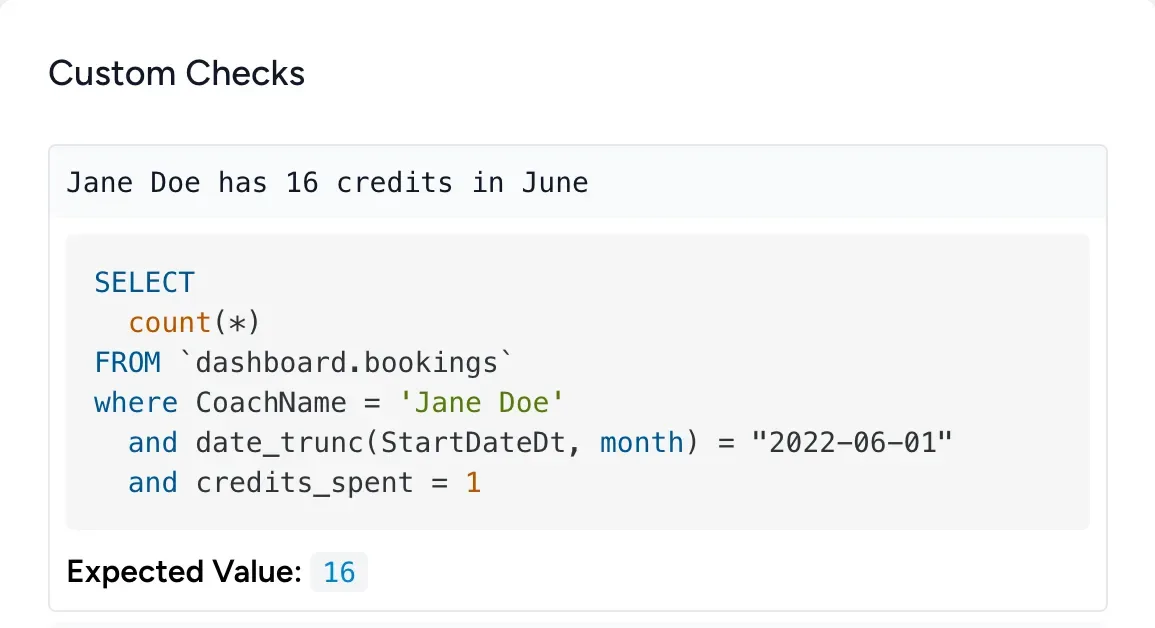
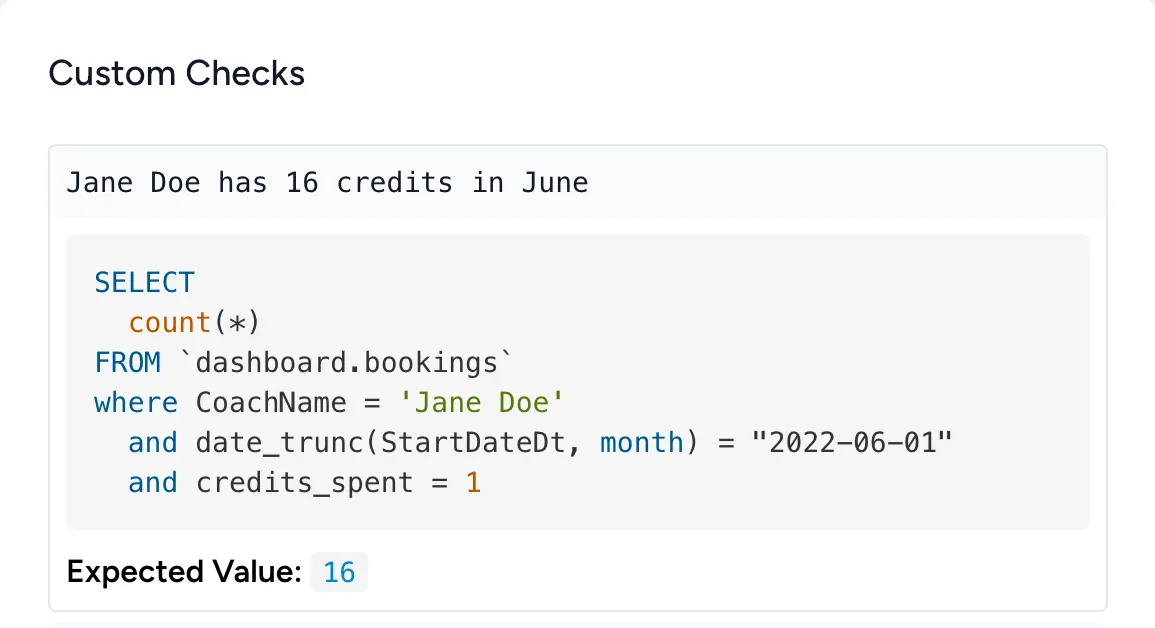
Data Quality Checks: Define custom quality rules that run automatically after pipeline execution. You can set expectations for null rates, uniqueness constraints, value ranges, and freshness thresholds. When a check fails, Bruin flags it in your Slack channel with the specific asset and rule that broke.
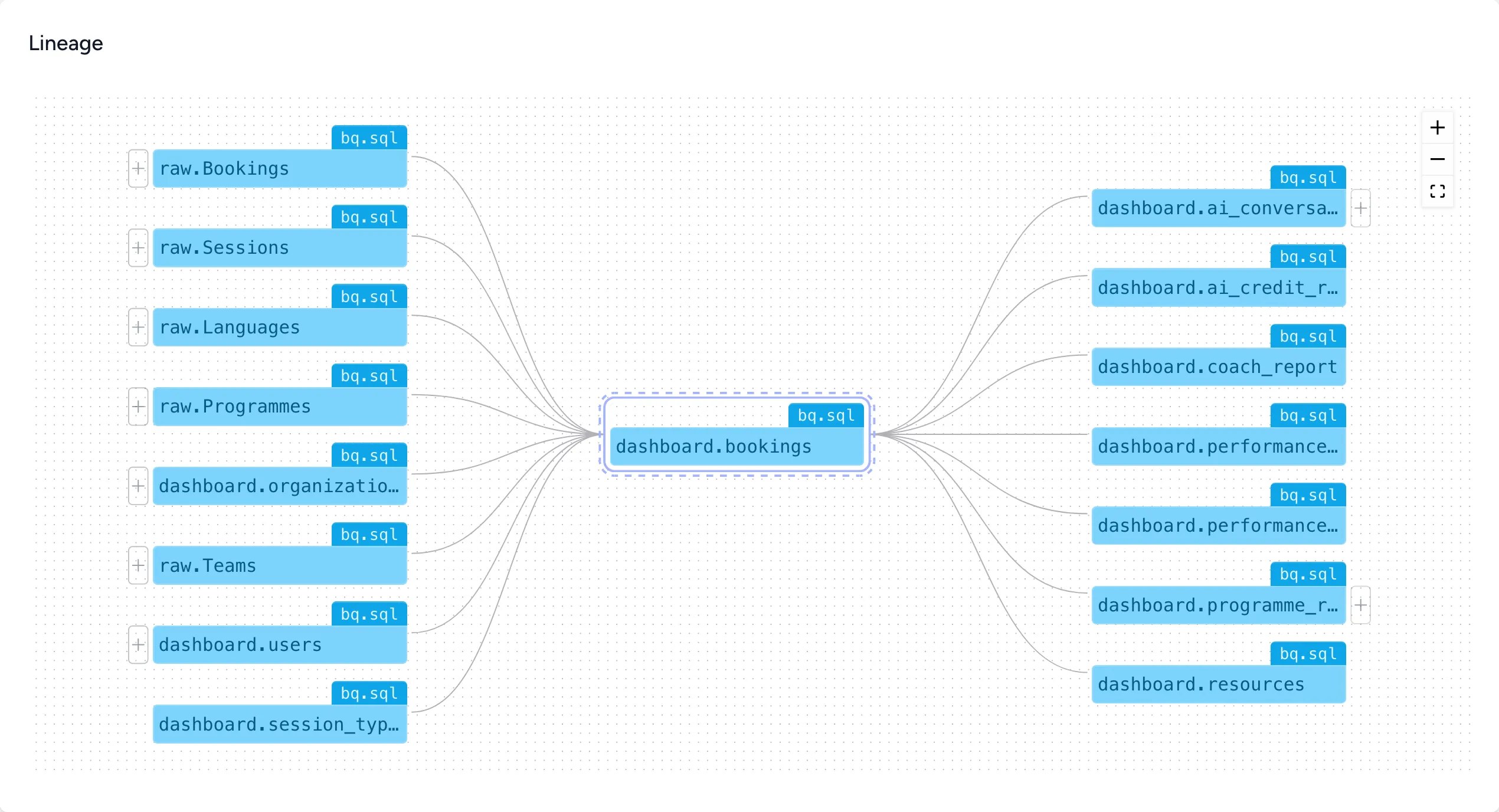
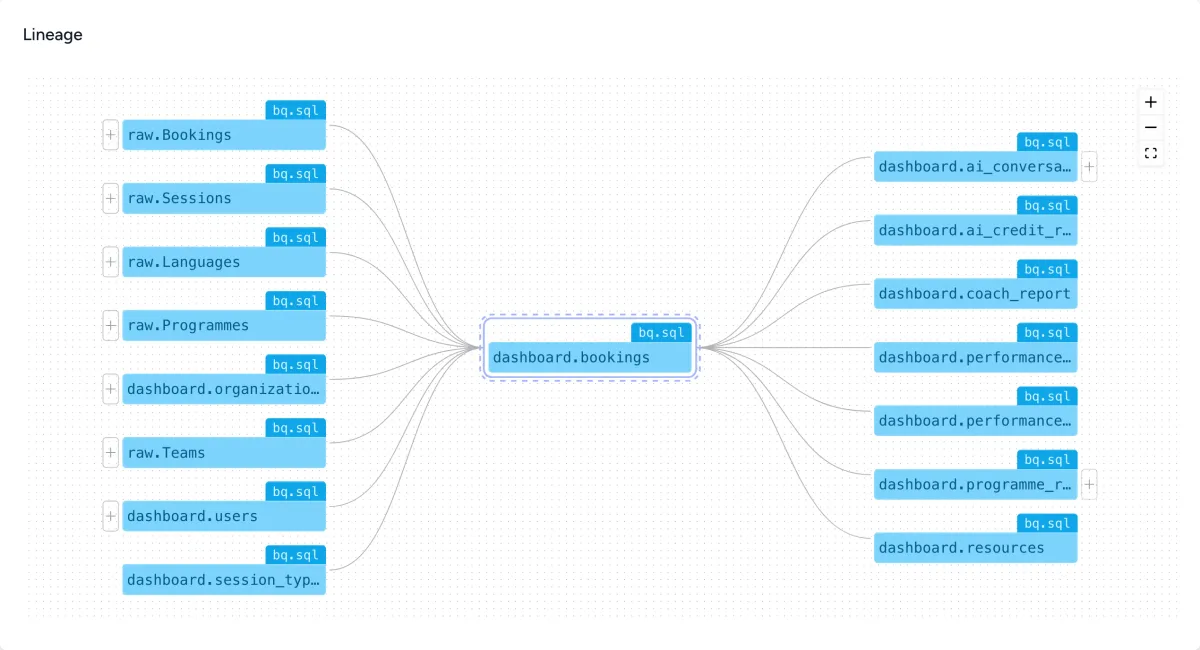
Asset Lineage Tracking: Bruin maps the full lineage of every data asset, showing upstream sources and downstream dependencies. When something breaks, you can trace the problem back to its root cause in seconds rather than hours. This alone justified the setup time for our test team.
Dashboard Generation from Prompts: Type "build me a dashboard showing monthly revenue by region" in Slack, and Bruin attempts to generate a visual. In our testing, this worked well for simple bar and line charts but struggled with multi-dimensional visualizations. It is a useful starting point, not a Looker replacement.
Multi-Warehouse Support: Connects to BigQuery, Snowflake, Redshift, Postgres, DuckDB, and others through standardized connectors. We tested Postgres and BigQuery simultaneously without configuration conflicts.
For teams already building pipelines with tools like Retool Agents or Budibase AI Agents, Bruin offers a more data-engineering-native approach that prioritizes pipeline integrity over app-building flexibility.
Bruin Pricing and Plans
Bruin's pricing model splits into two distinct products, and this is where things get slightly confusing.
The open-source CLI is completely free. You can run pipelines, execute transformations, and manage data quality checks locally or in your own infrastructure at zero cost. This includes the Ingestr connectors, the YAML pipeline definitions, and the lineage tracking engine.
The cloud platform adds the Slack/Teams integration, managed orchestration, team collaboration, hosted scheduling, and the AI chat interface. As of May 2026, Bruin does not publish transparent pricing tiers on its website. You need to contact their team for cloud pricing, which typically signals enterprise-oriented pricing that varies by data volume and team size.
| Component | Price | What You Get |
|---|---|---|
| Open-Source CLI | Free | Pipelines, ingestion, quality checks, lineage |
| Cloud Platform | Contact sales | Slack/Teams chat, managed orchestration, dashboards |
This lack of pricing transparency is Bruin's biggest weakness from an evaluation standpoint. If you are a small data team trying to budget, you cannot compare Bruin cloud against alternatives without a sales conversation first. The open-source CLI is genuinely useful on its own, but the AI chat features that make Bruin distinctive live behind the cloud paywall.
We recommend starting with the open-source CLI to validate that Bruin's pipeline approach fits your stack. If it does, the cloud conversation becomes easier because you already know the tool works for your use case.
Who Should (and Shouldn't) Use Bruin
Bruin is built for data teams of 2-15 people who already run a modern data stack with a cloud warehouse. If your team spends time fielding "Can you pull this data?" requests from product managers and executives, Bruin's Slack integration can offload 40-60% of those ad-hoc queries based on our testing. It is also strong for teams that want pipeline orchestration and data quality monitoring without the overhead of managing Airflow infrastructure.
Bruin is not for solo business owners who want a plug-and-play analytics dashboard. The setup requires data engineering knowledge. You need to understand your schema, write YAML configurations, and troubleshoot SQL when the AI generates incorrect queries. If you want something that "just works" for business analytics, look at dedicated BI tools instead.
Bruin is also not ideal for enterprise data teams with 50+ pipelines and complex multi-team governance requirements. The orchestration engine handles simple-to-moderate DAGs well but lacks the advanced features (dynamic task generation, complex branching, extensive monitoring) that tools like Airflow or Dagster provide at scale.
The sweet spot is a mid-size data team that wants to democratize data access across their organization through Slack without sacrificing pipeline rigor. If that describes you, Bruin is worth a serious evaluation. For broader guidance on automating your workflow with AI agents, we have a dedicated walkthrough.
How Bruin Compares to Retool Agents
The most natural comparison for Bruin is Retool Agents, since both aim to make data more accessible to non-technical users through AI interfaces.
Approach: Retool Agents focuses on building internal tools and apps with AI capabilities layered on top. Bruin focuses specifically on data pipeline operations and chat-based querying. Retool is broader; Bruin is deeper on data infrastructure.
Setup Complexity: Retool offers a visual builder that non-engineers can use. Bruin requires YAML configuration and command-line familiarity. If your team lacks data engineering skills, Retool is significantly easier to adopt.
Data Integration: Bruin's open-source connectors (Ingestr) support 50+ sources natively and focus specifically on warehouse ingestion. Retool connects to databases and APIs but is designed for app interactions, not pipeline orchestration.
AI Chat Quality: Both tools translate natural language to SQL. In our testing, Bruin's SQL generation was slightly more accurate for warehouse-specific queries because it has deeper schema awareness through its lineage tracking. Retool's AI performs better for CRUD operations and app-level data manipulation.
Pricing: Retool has published pricing starting at $10/user/month for the Team plan. Bruin's cloud pricing is opaque. For budget-conscious teams, Retool wins on transparency alone.
Verdict: Choose Bruin if you are a data team that needs pipeline orchestration, quality monitoring, and chat-based analytics as a unified package. Choose Retool if you need to build internal tools with data access as one component among many.
Our Testing Process
We tested Bruin over two weeks in May 2026. Our setup included a local Postgres database with 500K rows of e-commerce transaction data and a BigQuery warehouse with 2M rows of event analytics data.
We installed the open-source CLI on macOS, configured pipeline assets in YAML, and ran ingestion from three CSV sources and one API endpoint. Pipeline setup took approximately 4 hours for a data engineer familiar with similar tools. We then connected the cloud platform to a test Slack workspace and ran 50+ natural language queries across both data sources.
We evaluated accuracy of SQL generation, response time in Slack (averaged 3-8 seconds for simple queries), lineage tracking completeness, and data quality check reliability. We did not test the enterprise tier or SSO features. Our evaluation focused on the experience a small data team of 3-5 people would have during their first month with the tool.
Tested May 2026. Editorially reviewed by Todd Stearn. Read more about our methodology.
The Bottom Line
Bruin fills a real gap for data teams that want pipeline orchestration, data quality, and conversational analytics in one tool. The open-source CLI is genuinely impressive for a free product. The Slack integration turns your messaging platform into a lightweight data analyst that handles routine queries well. But the opaque cloud pricing, the engineering-heavy setup process, and the accuracy limitations on complex queries keep it from being a universal recommendation. For data teams with modern warehouse stacks who are tired of fielding ad-hoc data requests, Bruin is a strong pick at 7/10. For everyone else, start with the free CLI and see if the workflow fits before committing to the cloud platform.
Frequently Asked Questions
Is Bruin free to use?
Bruin's core CLI and open-source data pipeline tools are free. The cloud platform, which adds Slack/Teams integration, managed orchestration, and team collaboration features, uses a freemium model. Paid tiers start for teams needing production-grade scheduling, SSO, and priority support. Check getbruin.com for current cloud pricing.
What data warehouses does Bruin support?
Bruin connects to BigQuery, Snowflake, Redshift, Postgres, DuckDB, and several other warehouses and databases. It uses open-source connectors for ingestion (Ingestr) and dbt-compatible SQL transformations, so most modern data stacks are supported out of the box without custom adapters.
Can Bruin replace my existing data pipeline tools?
Bruin can replace lightweight orchestration and transformation setups, especially if you use dbt or Airflow for simple DAGs. For complex, enterprise-scale pipelines with hundreds of dependencies, Bruin works better as a complementary layer adding AI chat and lineage visibility rather than a full replacement.
How does Bruin's Slack integration work?
You add Bruin as a Slack bot, connect it to your data warehouse, and ask questions in natural language. Bruin translates your prompt into SQL, runs it against your warehouse, and returns results directly in the Slack thread. You can also trigger dashboard creation and data quality checks from chat.
Is Bruin suitable for non-technical business users?
Partially. The Slack and Teams chat interface lets non-technical users ask data questions without writing SQL. But setting up pipelines, configuring data quality checks, and managing asset lineage still requires someone comfortable with YAML configuration and basic data engineering concepts.
Related AI Agents
- Retool Agents - Build internal tools with AI-powered data access and app creation
- Budibase AI Agents - Open-source low-code platform with AI agent capabilities for internal tools
- DecisionBox - AI-powered decision analysis for business strategy
- Best AI Agents for Small Business - 12 tools that actually save time for small teams
Get weekly AI agent reviews in your inbox. Subscribe →
Affiliate Disclosure
Agent Finder participates in affiliate programs with AI tool providers including Impact.com and CJ Affiliate. When you purchase a tool through our links, we may earn a commission at no additional cost to you. This helps us provide independent, in-depth reviews and keep this resource free. Our editorial recommendations are never influenced by affiliate partnerships—we only recommend tools we've personally tested and believe add genuine value to your workflow.
Try Bruin today
Get started with Bruin — free tier available on most plans.
Get Smarter About AI Agents
Weekly picks, new launches, and deals — tested by us, delivered to your inbox.
Join 1 readers. No spam. Unsubscribe anytime.
Related Articles
DecisionBox Review 2026: Autonomous SQL Analytics
DecisionBox review: autonomous AI agents query your data warehouse and surface validated insights. We tested it. See pricing, pros, cons, and our verdict.
CAI (Cybersecurity AI) Review: Open-Source AI for Offensive Security
CAI is an open-source cybersecurity AI framework for automated pentesting across IT, OT, and robotics. See pricing, features, and our honest verdict.
Fabi Review 2026: AI-Powered Dashboards That Answer Back
Fabi review: generative BI platform with AI Analyst Agents for self-service analytics. We tested dashboards, data workflows, and pricing. Read our verdict.