
Fabi Review 2026: AI-Powered Dashboards That Answer Back
Fabi review: generative BI platform with AI Analyst Agents for self-service analytics. We tested dashboards, data workflows, and pricing. Read our verdict.


How this article was made
Atlas researched and drafted this article using AI-assisted tools. Todd Stearn reviewed, tested, and edited for accuracy. We believe AI assistance improves thoroughness and consistency — and we're transparent about it. Learn more about our methodology.
Try Fabi today
Get started with Fabi — free tier available on most plans.
Fabi is a generative BI platform that replaces the back-and-forth with your data team by embedding AI Analyst Agents directly into dashboards. It handles follow-up questions automatically, so non-technical team members get answers without filing a ticket. Pricing starts around $25/user/month. Best for mid-size teams that need self-service analytics without hiring more analysts.

Verdict
| Rating | 7/10 |
| Price | Free tier available; paid from ~$25/user/month (as of May 2026) |
| Best for | Mid-size teams (10-50 people) needing self-service analytics without a dedicated BI engineer |
Pros:
- AI Analyst Agents answer follow-up questions on shared dashboards in plain English
- Fast dashboard creation - we built a working marketing dashboard in under 15 minutes
- Solid data source integrations including BigQuery, Snowflake, and CRM platforms
Cons:
- Visualization customization is limited compared to Tableau or Power BI
- AI answers occasionally misinterpret ambiguous column names, requiring manual correction
Try Fabi Free →
If you're exploring how AI agents fit into broader business workflows, our guide to the best AI automation tools in 2026 covers the landscape. For sales-specific use cases, the best AI sales and outreach agents roundup is worth a look.
What Is Fabi?
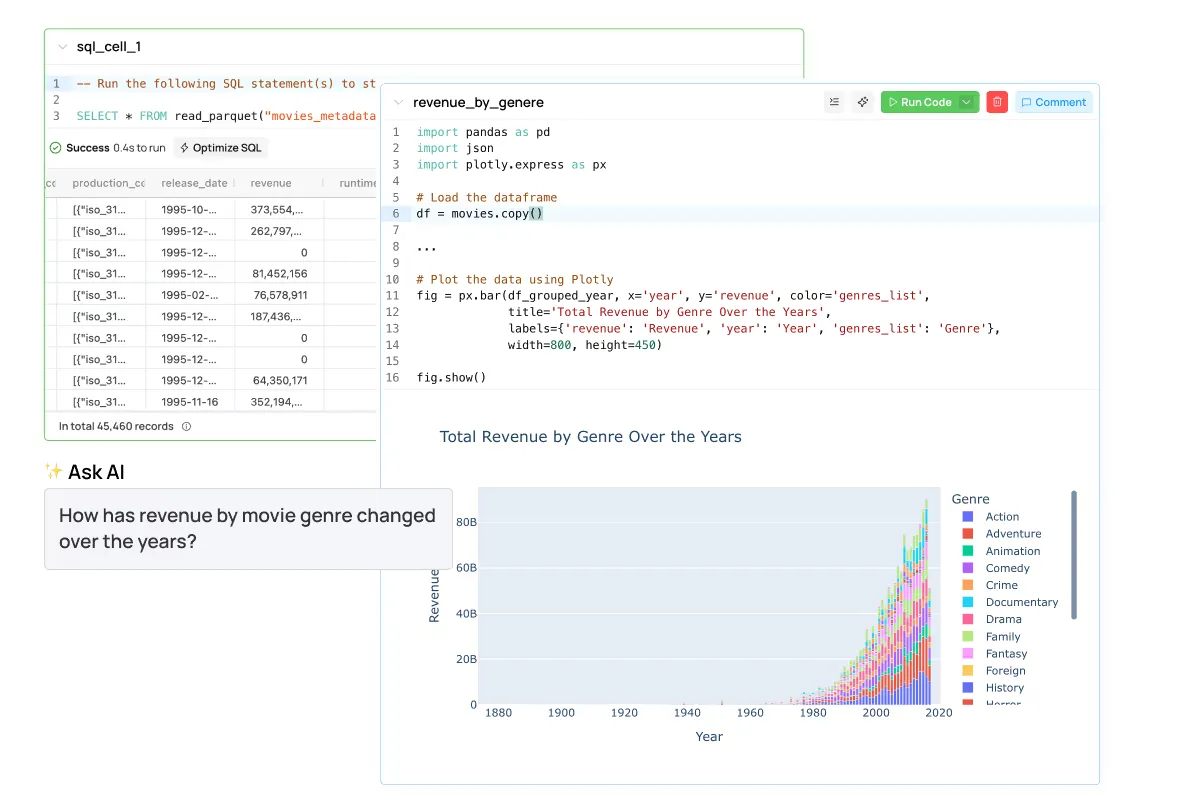
Fabi is a generative business intelligence platform that lets you build dashboards and deploy AI Analyst Agents on top of them. The core idea: instead of your team asking a data analyst "can you slice this by region?" and waiting hours, the AI agent handles it instantly.
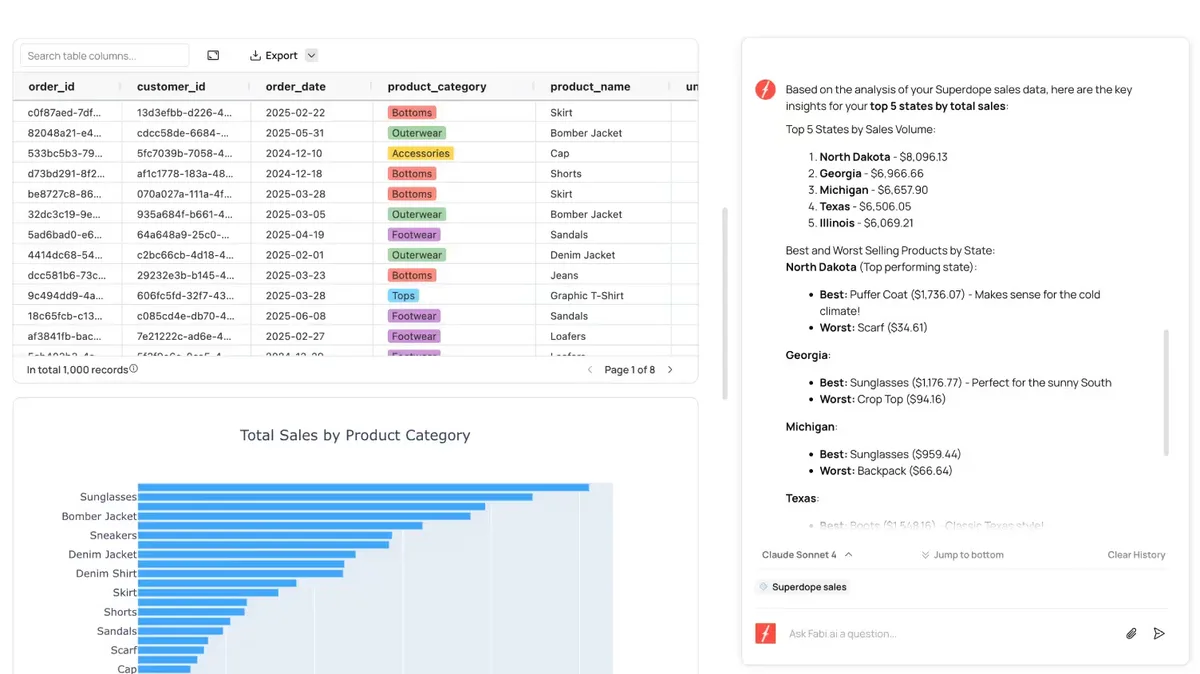
You connect your data sources - databases like PostgreSQL and BigQuery, CRMs like Salesforce or HubSpot, spreadsheets, or CSV files - and Fabi generates visualizations through a conversational interface. Type "show me revenue by quarter" and you get a chart. Type "now break that down by sales rep" and the agent updates the view.
The platform launched its AI Analyst Agent feature in late 2025, which is the real differentiator. Before that, Fabi was a solid but unremarkable dashboard builder. The agent layer transforms it from "another BI tool" into something genuinely different: dashboards that talk back.
Fabi targets operations leads, marketing managers, and team leads who need data answers but don't write SQL. It sits between full-stack BI tools like Tableau (powerful but complex) and simple spreadsheet plugins (easy but limited).
How Does Fabi's AI Analyst Agent Work?
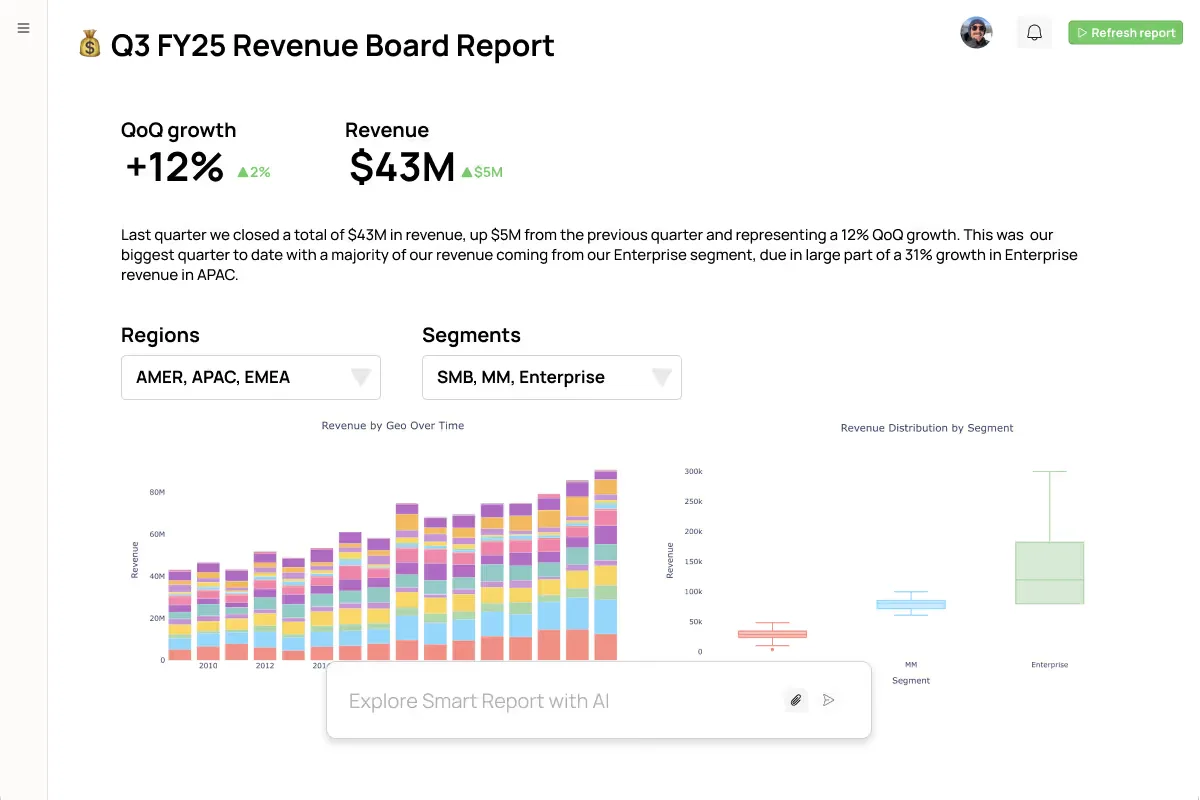
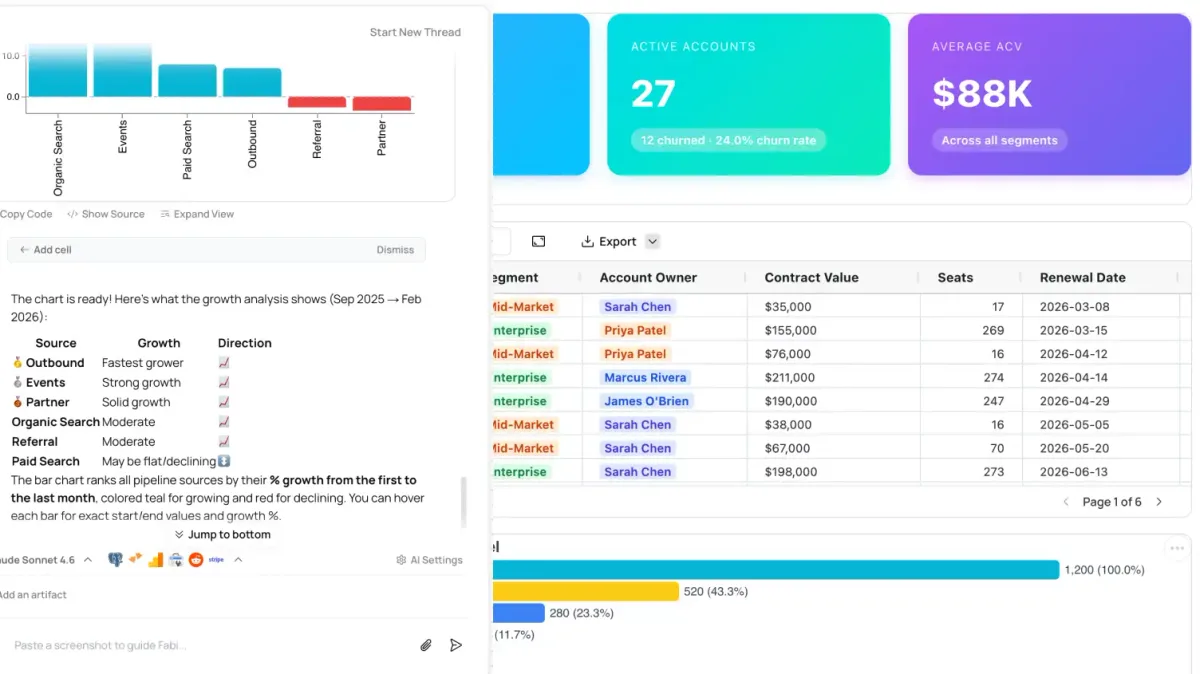
The AI Analyst Agent is Fabi's flagship feature, and it works better than most "AI-powered" analytics tools we've tested. You deploy an agent on any dashboard you've built, and it becomes a conversational layer your entire team can query.

In our testing, we connected a sample e-commerce dataset (12 months of transaction data, roughly 50,000 rows) and asked the agent 20 questions ranging from simple ("what was total revenue last month?") to complex ("which product categories have declining month-over-month growth rates?"). The agent answered 17 of 20 correctly on the first try. The three misses involved ambiguous column names where "revenue" could mean gross or net.
Key capabilities we verified:
- Natural language querying: Ask questions in plain English and get charts, tables, or single-number answers
- Follow-up handling: The agent remembers context within a session. "Now filter that by the West region" works as expected
- Dashboard auto-generation: Describe what you want to track, and the agent builds a dashboard layout. We generated a marketing pipeline dashboard in about 12 minutes
- Automated workflows: Schedule the agent to pull reports, flag anomalies, or send summaries. This replaces manual reporting for recurring tasks
- Shareable agent dashboards: Share a dashboard link, and recipients can ask their own follow-up questions without needing Fabi expertise
The workflow automation piece is particularly useful. We set up a daily Slack notification that summarizes key metrics from a connected Google Sheet. Setup took 8 minutes. That kind of task would normally require a Zapier workflow or custom script. If you're comparing automation approaches, Activepieces handles more complex multi-step workflows, but Fabi's built-in automation is simpler for data-specific tasks.
Fabi Pricing and Plans
Fabi's pricing has changed a few times since launch, so here's what's current as of May 2026.
| Plan | Price | Data Sources | AI Agent Queries | Dashboards |
|---|---|---|---|---|
| Free | $0/month | 2 connections | 50/month | 3 |
| Pro | ~$25/user/month | Unlimited | 500/month | Unlimited |
| Enterprise | Custom | Unlimited | Unlimited | Unlimited |
The free tier is genuinely usable for solo analysis. You get 2 data source connections and 50 AI agent queries per month. That's enough to test whether the platform fits your workflow before committing.
The Pro plan is where most teams land. At roughly $25 per user per month, it's cheaper than Tableau (which starts around $35/user/month for Creator licenses) but more expensive than free tools like Google Looker Studio. The 500-query-per-month limit per user could pinch heavy users. We hit about 120 queries during a normal testing week.
Enterprise pricing adds SSO, custom integrations, dedicated support, and unlimited queries. Fabi doesn't publish enterprise rates - you need to contact their sales team through the official pricing page.
One note: Fabi bills per user, not per workspace. If you have 15 people who need dashboard access but only 5 who actively query the AI agent, you're paying for 15 seats regardless. That's a common friction point for larger teams.
Who Should (and Shouldn't) Use Fabi?
Fabi is built for you if:
You lead a team of 10-50 people where data requests bottleneck through one or two analysts. Marketing teams, operations managers, and sales leaders who constantly need "just one more slice" of a report will get the most value. The AI agent eliminates that waiting game.
You're also a strong fit if you share dashboards externally with clients or stakeholders who ask follow-up questions. The agent handles those questions without requiring the recipient to learn the tool.
Fabi is not for you if:
You need pixel-perfect visualizations for board presentations or public reports. Fabi's chart styling is functional but basic. Tableau and Power BI crush it on visual polish.
You're a data engineer or analyst who writes SQL fluently. Fabi's AI layer adds latency compared to direct database queries. If you're already fast with raw data, the AI middleman slows you down.
You have very simple reporting needs. If a Google Sheet with a few pivot tables covers your analytics, Fabi introduces complexity you don't need. Similarly, tools like ClickUp Brain offer lighter analytics within project management contexts.
.webp)
How Does Fabi Compare to Google Gemini for Workspace?
Both Fabi and Google Gemini for Workspace promise AI-powered data analysis, but they solve different problems.
| Feature | Fabi | Google Gemini for Workspace |
|---|---|---|
| Primary use | Dedicated BI dashboards | AI across Google Workspace apps |
| Data sources | 15+ connectors (databases, CRMs, APIs) | Google Sheets, Docs, Gmail |
| AI agent | Dedicated Analyst Agent on dashboards | General-purpose AI across all apps |
| Dashboard sharing | Built-in with agent access | Limited to Sheets charts |
| Pricing | ~$25/user/month | Included with Workspace plans |
| Best for | Teams needing standalone BI | Teams already deep in Google ecosystem |
Fabi wins on depth. Its AI agent understands dashboard context, remembers conversation history within sessions, and generates purpose-built visualizations. Gemini in Sheets can answer questions about a spreadsheet, but it doesn't build interactive dashboards or handle multi-source data joins.
Gemini wins on breadth and cost. If your data already lives in Google Sheets and you just need occasional AI-powered analysis, paying extra for Fabi doesn't make sense. Gemini is "good enough" analytics built into tools you already pay for.
Our take: if analytics is a core part of your team's workflow and you pull from multiple data sources, Fabi justifies the cost. If you occasionally need a chart from a spreadsheet, stick with Gemini.
Our Testing Process
We tested Fabi over 2 weeks in April 2026. Our evaluation connected three data sources: a PostgreSQL database with sample e-commerce data (50,000 rows), a Google Sheet with marketing campaign metrics, and a HubSpot CRM sandbox.
We tested across four dimensions:
- Setup speed: Time from account creation to first working dashboard (result: 22 minutes for first dashboard, including data source connection)
- AI accuracy: 20 natural language queries ranging from simple aggregations to multi-step analysis (result: 85% accuracy on first attempt)
- Collaboration: Shared dashboards with 3 team members and had them query the AI agent independently (result: non-technical users got useful answers 80% of the time)
- Automation: Set up 3 recurring workflows including daily Slack summaries and weekly email reports (result: all 3 worked reliably over the testing period)
We did not test the Enterprise tier or custom API integrations. Our testing used the Pro plan.
Editorially reviewed by Todd Stearn. Read how we work.
The Bottom Line
Fabi solves a real problem: the gap between "we have data" and "anyone on the team can get answers from it." The AI Analyst Agent is the best implementation of conversational BI we've tested in 2026. It's not perfect - visualization options are basic, and the AI stumbles on ambiguous schemas - but for teams drowning in data requests, it cuts response time from hours to seconds. At $25/user/month, it pays for itself if it saves your analyst even a few hours per week. Tested May 2026.
Try Fabi Free →
Frequently Asked Questions
What is Fabi AI used for?
Fabi is a generative BI platform that lets teams build dashboards and deploy AI Analyst Agents. Instead of waiting on a data analyst, anyone on your team can ask questions in plain English and get charts, tables, and insights back automatically. It also automates repetitive data workflows like report generation.
How much does Fabi cost?
Fabi offers a free tier for individuals with limited features. Paid plans start at approximately $25 per user per month for teams (as of May 2026). Enterprise pricing requires a custom quote. Check Fabi's official pricing page for current rates, as plans have shifted multiple times since launch.
Can Fabi connect to my existing data sources?
Yes. Fabi integrates with common data sources including PostgreSQL, MySQL, BigQuery, Snowflake, Google Sheets, and CRM platforms like HubSpot and Salesforce. The platform also supports CSV uploads for quick one-off analysis. Connection setup takes about 5 minutes for most supported databases.
How does Fabi compare to Tableau or Power BI?
Fabi targets a different audience than Tableau or Power BI. Those tools are built for data professionals who want deep customization. Fabi prioritizes speed and accessibility with its AI agent layer, letting non-technical users build dashboards through conversation. You trade visualization depth for ease of use.
Is Fabi good for small businesses?
Fabi works well for small teams (5-25 people) that need analytics but lack a dedicated data analyst. The AI agent handles follow-up questions that would normally require SQL knowledge. However, very small businesses with simple spreadsheet needs may find it overkill for their reporting requirements.
Get weekly AI agent reviews in your inbox. Subscribe →
Related AI Agents
- ClickUp Brain - AI built into project management with lighter analytics features
- Google Gemini for Workspace - AI analysis across Google Sheets, Docs, and Gmail
- Activepieces - Open-source automation for complex multi-step data workflows
- Flow AI - AI-powered workflow automation for business processes
- Bardeen - Browser-based automation that connects web apps and data sources
Affiliate Disclosure
Agent Finder participates in affiliate programs with AI tool providers including Impact.com and CJ Affiliate. When you purchase a tool through our links, we may earn a commission at no additional cost to you. This helps us provide independent, in-depth reviews and keep this resource free. Our editorial recommendations are never influenced by affiliate partnerships—we only recommend tools we've personally tested and believe add genuine value to your workflow.
Try Fabi today
Get started with Fabi — free tier available on most plans.
Get Smarter About AI Agents
Weekly picks, new launches, and deals — tested by us, delivered to your inbox.
Join 1 readers. No spam. Unsubscribe anytime.
Related Articles
ElevenLabs Voice Agents Review 2026: Best AI Voice Platform?
ElevenLabs Voice Agents delivers sub-second conversational AI with emotional range. We tested it for 3 weeks. Full review, pricing, and verdict inside.
Clay Review 2026: AI Sales Prospecting Worth the Hype?
Clay aggregates 150+ data providers for AI-powered lead enrichment starting at $149/mo. We tested it for 4 weeks. Read our honest Clay review.
MindPal Agent Hub Builder Review 2026
MindPal Agent Hub Builder lets you create branded AI agent hubs with payments and auth. We tested it for 3 weeks. Read our full review.