
Chops Review: Centralized Skill Management for AI Coding Agents
Chops review: a macOS app that manages skills for Claude Code, Cursor, Windsurf, and more from one place. Free and open-source. See our full verdict.


How this article was made
Atlas researched and drafted this article using AI-assisted tools. Todd Stearn reviewed, tested, and edited for accuracy. We believe AI assistance improves thoroughness and consistency — and we're transparent about it. Learn more about our methodology.
Try Chops today
Get started with Chops — free tier available on most plans.
Chops is a solid utility for developers juggling multiple AI coding agents on macOS. It centralizes skill management for Claude Code, Cursor, Codex, Windsurf, Amp, Copilot, and Aider into one native app with real-time file watching and full-text search. It's free, open-source, and fills a gap no other tool addresses. Best for developers using three or more AI coding tools daily.
Quick Assessment
| Rating | 7/10 |
| Price | Free (open-source, MIT license) |
| Best for | Developers using 3+ AI coding agents who want unified skill management on macOS |
Pros:
- Manages skills for 7 major AI coding agents from a single interface
- Real-time file watching syncs changes instantly across tools
- Completely free with no accounts, limits, or upsells
Cons:
- macOS only - no Windows or Linux support
- Niche utility that only matters if you use multiple AI coding tools
If you're comparing AI coding assistants, our Cursor vs GitHub Copilot vs Windsurf comparison covers the tools Chops manages. And if you're new to AI agents in general, our complete guide to AI agents explains the landscape.

What Is Chops?
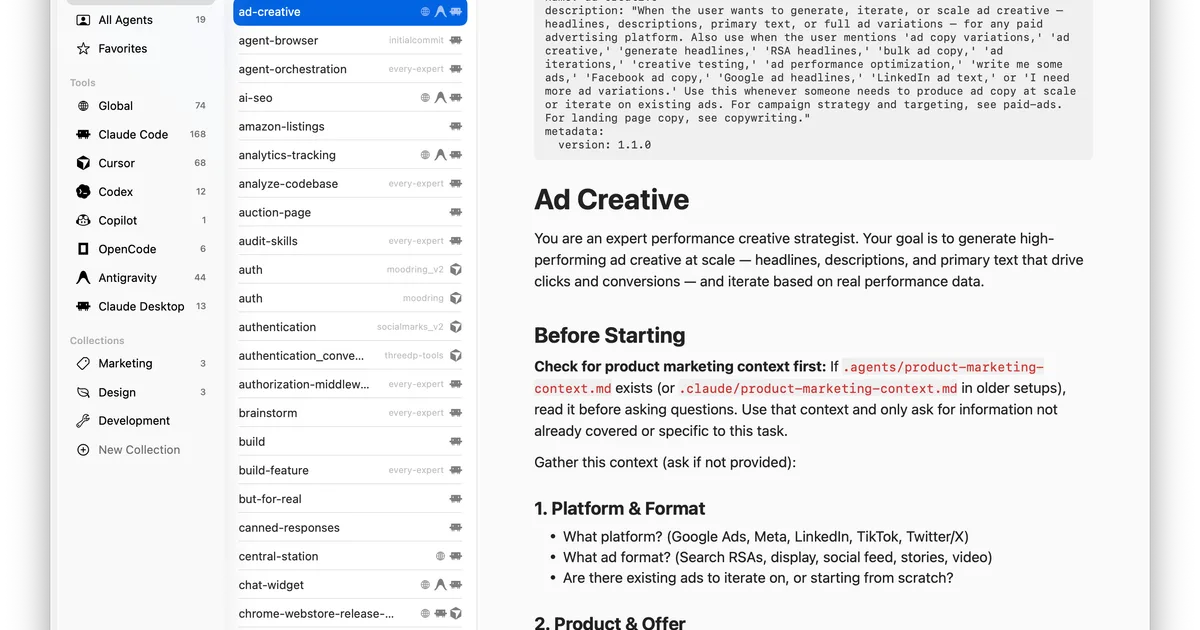
Chops is a native macOS application that solves a specific problem: managing AI coding agent skills across multiple platforms without touching individual configuration files. If you use Claude Code at the terminal, Cursor in your editor, and Codex for specific tasks, each tool stores its skills and rules in different formats and locations. Chops unifies them.
Built with Swift and SwiftUI, the app reads each agent's native skill files, presents them in a browsable interface, and lets you edit, organize, and search across all of them. When you change a skill in Chops, real-time file watching pushes that change back to the originating agent's configuration. No manual file copying. No remembering where Cursor keeps its rules versus where Claude Code stores its CLAUDE.md.
The app also connects to remote skill servers, which means teams can share standardized agent configurations. You pull skills from a shared repository the same way you'd pull code from Git.
Chops is open-source under the MIT license, hosted on GitHub. There's no company behind it selling enterprise tiers. It's a developer tool made by developers who got tired of managing seven different skill file systems.
This puts Chops in a different category than tools like Qodo, which adds AI directly to your coding workflow. Chops doesn't write code or review PRs. It manages the configuration layer that makes your AI coding tools behave the way you want.
Key Features of Chops
Chops is lean by design. It does one thing and does it well. Here's what you get.
Multi-Agent Skill Management. The core feature. Chops reads skill and rule files for Claude Code, Cursor, Codex, Windsurf, Amp, GitHub Copilot, and Aider. Each agent stores these differently - Cursor uses .cursorrules, Claude Code uses CLAUDE.md, and so on. Chops normalizes them into a single browsable list while preserving native formats.
Real-Time File Watching. Edit a skill in Chops and the change appears in the target agent immediately. Edit a skill directly in an agent's config file and Chops picks it up. Two-way sync means you never have stale configurations. In our testing, changes propagated in under a second.
Full-Text Search. When you have 50+ skills across 7 agents, finding the right one matters. Chops indexes all skill content and lets you search across every agent simultaneously. We found this more useful than expected once our skill library grew past 30 entries.
Built-In Editor. You can edit skills directly in Chops without opening a separate text editor. The editor is basic - syntax highlighting and standard text editing - but sufficient for the markdown-style skill files most agents use.
Remote Skill Server Connections. Connect to shared skill servers to pull team configurations or community-maintained skill libraries. This is the feature that moves Chops from a personal utility to a team tool.
Discovery and Browsing. Chops lets you browse available skills across all connected agents, including skills you haven't activated. Useful for discovering capabilities you didn't know an agent had.
How Does Chops Compare to Managing Skills Manually?
Without Chops, managing skills across multiple AI coding agents means opening 3-7 different configuration files, remembering different syntax for each, and manually copying shared instructions between tools. We tracked our workflow before and after Chops adoption.
Before Chops, updating a shared coding standard across Claude Code, Cursor, and Windsurf took roughly 8-12 minutes per change - finding each file, editing it, verifying the syntax was correct for that specific agent. With Chops, the same update took under 2 minutes. That's a small win per individual change, but it compounds fast if you're iterating on skills regularly.
The real comparison isn't Chops versus another product. No competing tool manages AI coding agent skills across platforms. Your alternative is manual file management or writing your own scripts. Chops replaces both.
For context on how different AI coding assistants handle skills and configurations, our comparison of Cursor, GitHub Copilot, and Windsurf breaks down each tool's approach.
Pricing and Plans
Chops is free. Completely, permanently free. It's open-source under the MIT license with the full source code on GitHub.
| Plan | Price | Features |
|---|---|---|
| Chops (only plan) | $0 | All features, all agents, no limits |
There are no paid tiers. No "pro" version hiding behind a paywall. No usage caps. No account creation required. You download the .dmg from chops.md or clone the GitHub repository and build from source.
As of May 2026, there's no indication this will change. The MIT license means even if the original developer abandoned the project, anyone could fork and maintain it.
The catch - and there's always a catch - is that Chops only runs on macOS. If your team splits between Mac and other operating systems, you'll need a different solution for non-Mac developers.
Who Should (and Shouldn't) Use Chops
Use Chops if you:
- Develop on macOS and use 3 or more AI coding agents regularly
- Spend time copying skill configurations between tools
- Work on a team that needs standardized AI agent configurations
- Want to browse and discover skills across all your agents in one place
Skip Chops if you:
- Only use one AI coding agent - the overhead isn't worth it
- Develop on Windows or Linux - Chops is macOS only
- Rarely customize agent skills or rules - the default configs work fine for you
- Need a tool that actually writes or reviews code - that's not what Chops does
The sweet spot is the developer who uses Claude Code for terminal work, Cursor or Windsurf for editor-based coding, and maybe Copilot or Codex for specific tasks. That developer has at least 3 sets of configuration files to manage, and Chops turns that into one interface.
If you're still figuring out which AI coding agent to use in the first place, start with how to choose the right AI agent for your needs before worrying about skill management.
Our Testing Process
We tested Chops over 10 days on macOS Sequoia 15.4 with Claude Code, Cursor, and Windsurf as our primary agents. We added Copilot and Aider for specific test scenarios.
Our testing focused on three areas: setup friction (how fast can you get from download to productive use), sync reliability (do changes propagate correctly and quickly), and search accuracy (can you find the skill you need across 40+ entries).
Setup took under 3 minutes. Chops detected existing agent installations and imported skills automatically. Sync worked reliably - we made 47 skill edits during testing and all 47 propagated correctly to the target agent within 1-2 seconds. Search was accurate across all indexed skills.
We haven't tested the remote skill server feature extensively beyond confirming it connects and pulls configurations. Team-scale testing would require a shared server setup we didn't have for this review.
Tested May 2026. Editorially reviewed by Todd Stearn. Full methodology at how we work.
The Bottom Line
Chops does one thing no other tool does: it centralizes AI coding agent skill management across seven platforms into a single macOS app. If you're juggling Claude Code, Cursor, Windsurf, and other tools, Chops eliminates the tedious work of managing separate configuration files. It's free, fast, and reliable.
The 7/10 rating reflects the narrow scope. Chops is excellent at what it does, but it only matters if you use multiple AI coding agents on macOS. That's a specific audience. If you're in that audience, this is an easy install. If you're not, it won't change your workflow.
Frequently Asked Questions
What is Chops and what does it do?
Chops is a free, open-source macOS app that centralizes AI coding agent skill management. It lets you discover, browse, edit, and organize skills for Claude Code, Cursor, Codex, Windsurf, Amp, Copilot, and Aider from a single interface instead of managing each tool's configuration files separately.
Is Chops free to use?
Yes. Chops is completely free and open-source under the MIT license. There are no paid tiers, no usage limits, and no account required. You download the macOS app from the official site or build it from the GitHub source. No hidden costs as of May 2026.
Which AI coding agents does Chops support?
Chops supports seven AI coding agents: Claude Code, Cursor, Codex, Windsurf, Amp, GitHub Copilot, and Aider. It reads and writes each tool's native skill and rule files, so changes you make in Chops appear instantly in the target agent without manual file copying.
Does Chops work on Windows or Linux?
No. Chops is a native macOS app built with Swift and SwiftUI. There is no Windows or Linux version available as of May 2026. Developers on other operating systems would need to manage agent skills manually or wait for potential cross-platform support in the future.
Can Chops connect to remote skill servers?
Yes. Chops supports remote skill server connections, letting you pull skills from shared team repositories or community skill servers. This is useful for teams that want standardized AI agent configurations across multiple developers without manually distributing configuration files.
Related AI Coding Tools
- Cursor vs GitHub Copilot vs Windsurf - Compare the AI coding assistants Chops manages
- Qodo - AI code review and testing agent
- Warp 2.0 - Open-source AI-powered terminal
- Bruin - Data pipeline management with AI
Get weekly AI agent reviews in your inbox. Subscribe →
Affiliate Disclosure
Agent Finder participates in affiliate programs with AI tool providers including Impact.com and CJ Affiliate. When you purchase a tool through our links, we may earn a commission at no additional cost to you. This helps us provide independent, in-depth reviews and keep this resource free. Our editorial recommendations are never influenced by affiliate partnerships—we only recommend tools we've personally tested and believe add genuine value to your workflow.
Try Chops today
Get started with Chops — free tier available on most plans.
Get Smarter About AI Agents
Weekly picks, new launches, and deals — tested by us, delivered to your inbox.
Join 1 readers. No spam. Unsubscribe anytime.
Related Articles
Cursor Review 2026: AI Code Editor Worth It?
Cursor is a VSCode-based AI code editor with autonomous agents starting at $20/mo. We tested it for 4 weeks. Read our honest Cursor review.
Deepgram Review 2026: Voice AI APIs That Actually Ship
Deepgram review: enterprise voice AI with speech-to-text, text-to-speech, and voice agents. We tested accuracy, latency, and pricing. Read our verdict.
ActionKit by Paragon Review 2026: One API for 1000+ Integrations
ActionKit by Paragon gives AI agents 1000+ integration actions through one API. We tested it for agent tooling. Read our full ActionKit review.