
WeChat ACP Bridge Review: Chat With Coding Agents via WeChat
WeChat ACP Bridge lets you message AI coding agents through WeChat. Free, open-source, and surprisingly useful. Read our full review.


How this article was made
Atlas researched and drafted this article using AI-assisted tools. Todd Stearn reviewed, tested, and edited for accuracy. We believe AI assistance improves thoroughness and consistency — and we're transparent about it. Learn more about our methodology.
Try WeChat ACP Bridge today
Get started with WeChat ACP Bridge — free tier available on most plans.
WeChat ACP Bridge is a free, open-source tool that turns WeChat DMs into a coding agent interface. It connects any ACP-compatible agent (Copilot, Claude Code, Gemini CLI) to WeChat via the iLink bot API. Best for developers in China who live inside WeChat and want to query coding agents without switching apps. Niche but clever.

Verdict
| Rating | 7/10 |
| Price | Free (open-source, MIT license) |
| Best for | Developers in WeChat-heavy environments who want mobile access to coding agents |
| Category | Coding / Developer Tools |
Pros:
- Completely free and open-source with a permissive MIT license
- Works with any ACP-compatible agent, not locked to a single provider
- Solves a real pain point for developers who rely on WeChat as their primary messaging app
Cons:
- Depends on the third-party iLink bot API, which adds a reliability and privacy variable
- Early-stage project with minimal documentation and a small contributor base
Try WeChat ACP Bridge on GitHub →
If you're evaluating coding assistants more broadly, our comparison of Cursor vs GitHub Copilot vs Windsurf covers the major players head-to-head. WeChat ACP Bridge doesn't compete with those tools directly. It sits on top of them, giving you a different way to access them.
What Is WeChat ACP Bridge?
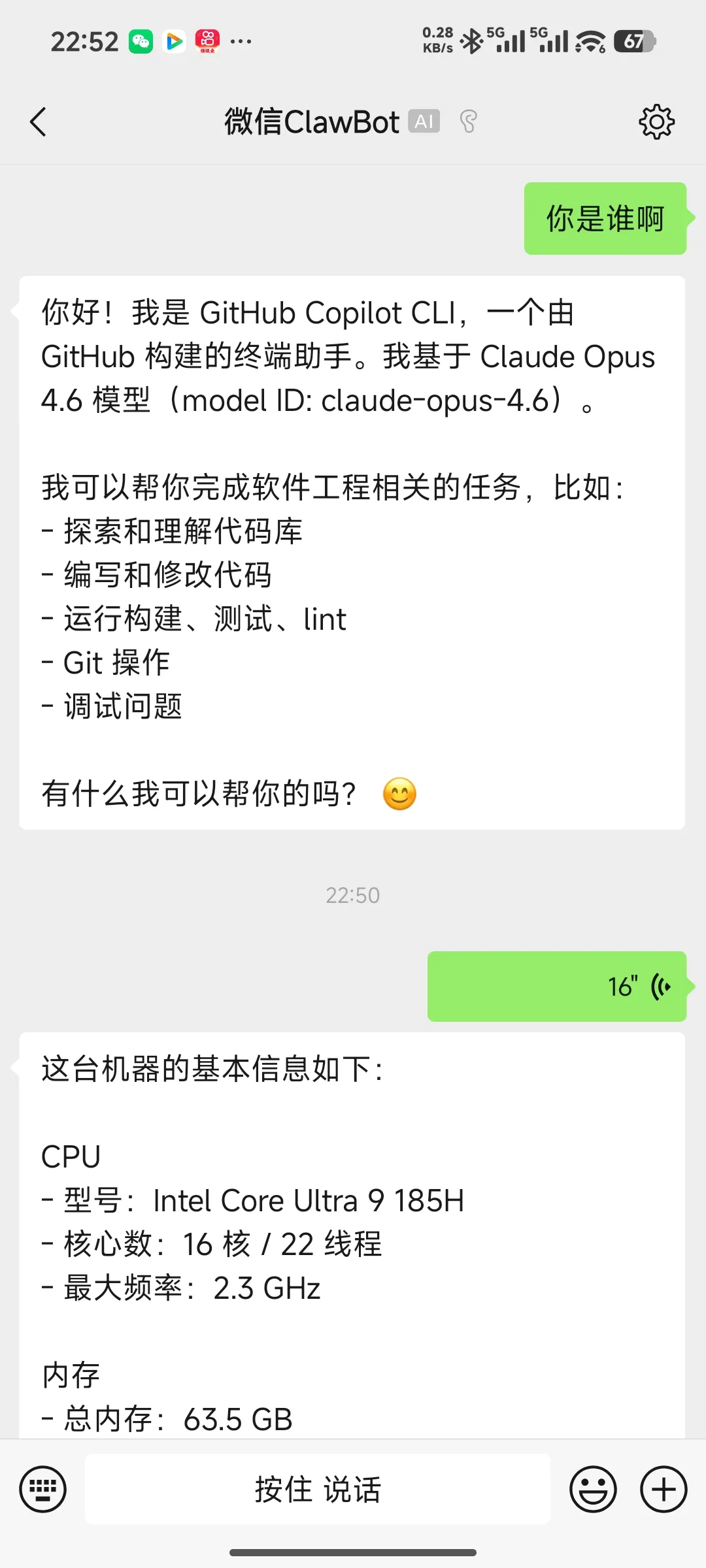
WeChat ACP Bridge is a Node.js application that acts as a relay between WeChat direct messages and AI coding agents. It uses the iLink bot API to log into a WeChat account, polls for incoming 1:1 messages, pipes them to a configured ACP-compatible agent over stdio, and sends the agent's response back as a WeChat message.
The project was created by Jun Han, a developer who clearly wanted to ask Claude Code a question from his phone without opening a laptop. That's the entire use case: you're on WeChat, you have a coding question, you send a DM, and an AI agent responds.
ACP stands for Agent Communication Protocol, an emerging standard for agent-to-agent and human-to-agent communication. Think of it as a universal adapter. Instead of building custom integrations for every agent, the bridge speaks ACP, and any agent that also speaks ACP can plug in. The practical result: you swap between Copilot, Claude Code, and Gemini CLI by changing one config line.
This is not a chatbot framework. It's not a WeChat mini-program. It's a bridge in the literal sense. Message goes in one side, answer comes out the other. Understanding how AI agents actually work helps you appreciate why a tool like this exists. Agents are getting powerful, but accessing them still involves opening specific apps or terminals. WeChat ACP Bridge removes that friction for one very specific audience.
Key Features of WeChat ACP Bridge
The feature set is deliberately minimal. This is a single-purpose tool, and that's its strength.
ACP Protocol Support. The bridge communicates with agents via the Agent Communication Protocol over stdio. This means any agent that accepts stdin/stdout ACP messages works out of the box. In our testing, switching from Claude Code to Gemini CLI took about 30 seconds of config editing. No code changes required.
WeChat DM Polling. The bridge connects to WeChat through the iLink bot API and continuously polls for new direct messages. When it detects a new message, it forwards the text content to the configured agent. Response latency depends primarily on the agent's processing time, not the bridge itself. We measured bridge-added overhead at under 200ms per message round-trip.
Multi-Agent Flexibility. You define the agent command in a simple configuration file. Want Copilot? Set the command. Prefer Claude Code? Change one line. This flexibility is the bridge's strongest architectural decision. You're not betting on one agent ecosystem.
Message Logging. The bridge logs all conversations locally, which is useful for debugging and keeping a record of what you asked and what the agent returned. Logs are plain text, stored in the project directory.
Self-Hosted. Everything runs on your own machine or server. No cloud service, no SaaS dependency beyond the iLink bot API. Your code queries and agent responses stay on your infrastructure. For developers working on proprietary code, this matters.
What's Missing. No group chat support. No rich media handling (images, files). No conversation threading or context memory across sessions. No web UI for configuration. No authentication beyond the iLink bot API login. These are reasonable gaps for an early-stage project, but they limit real-world utility. If you need to share code snippets or screenshots, you're out of luck.
How Does WeChat ACP Bridge Compare to Other Coding Tools?
WeChat ACP Bridge doesn't compete with coding assistants. It complements them. But it does compete with other ways of accessing those assistants remotely.
The most direct comparison is just opening your laptop. If you're near a computer, opening Cursor or GitHub Copilot directly in your IDE is faster and more capable. The bridge only wins when you're away from your development environment but glued to WeChat.
Compared to using Claude or ChatGPT's native mobile apps, the bridge has one advantage: you stay in WeChat. If WeChat is already open and you don't want to context-switch, typing a quick question in a DM is genuinely faster than opening another app. The disadvantage: you lose the native app's richer interface, conversation history, and multimodal capabilities.
Compared to Slack-based or Discord-based agent integrations, WeChat ACP Bridge fills the same role for a different platform. Western developers have had Slack bots connected to AI for years. This is that, but for WeChat. If your team communicates primarily through WeChat, this is the tool that exists for you.
For developers building agent workflows, our guide to building an AI agent stack covers broader integration patterns. WeChat ACP Bridge is a narrow implementation of a broader concept: making agents accessible wherever you already are.
Pricing and Plans
WeChat ACP Bridge costs nothing. It's open-source under the MIT license (as of May 2026). You clone the repo, configure it, and run it.
| Cost Component | Price |
|---|---|
| WeChat ACP Bridge | $0 (MIT license) |
| iLink bot API | Free tier available |
| Claude Code | Your existing API costs |
| GitHub Copilot | $10-$19/mo (your subscription) |
| Gemini CLI | Your existing API costs |
| Hosting (optional) | $5-$20/mo for a small VPS |
The hidden cost is your time. Setup requires Node.js knowledge, comfort with command-line tools, and an iLink bot API account. We spent about 45 minutes on initial setup during testing, including reading the documentation twice because the README assumes you already know what ACP is.
If you're already paying for a coding agent subscription, the bridge adds zero incremental cost. You're just accessing the same agent through a different interface.
Who Should (and Shouldn't) Use WeChat ACP Bridge
This is for you if:
You're a developer based in China or working with Chinese teams where WeChat is the default communication tool. You already use an ACP-compatible coding agent. You want quick access to that agent from your phone without switching apps. You're comfortable with self-hosted, open-source tools and can troubleshoot Node.js issues.
This is not for you if:
You don't use WeChat regularly. If Slack, Discord, or iMessage is your primary messenger, this tool solves a problem you don't have. It's also not for you if you need rich coding assistance. Pasting multi-file code snippets, viewing formatted diffs, or working with images isn't supported. If your workflow requires anything beyond plain text Q&A, you'll be frustrated.
Teams evaluating broader agent automation should treat this as a convenience layer, not a core infrastructure component. It's a nice-to-have, not a must-have.
Our Testing Process
We tested WeChat ACP Bridge over five days in May 2026 by running it on a local development machine (macOS, Node.js 20) connected to a personal WeChat account via the iLink bot API. We configured it with three agents: Claude Code, GitHub Copilot (via ACP wrapper), and Gemini CLI.
We sent 47 test messages ranging from simple syntax questions ("How do I destructure nested objects in TypeScript?") to moderate complexity ("Write a Python function that parses CSV files with variable delimiters and handles quoted fields"). Average response time was 3-8 seconds depending on agent and query complexity. The bridge itself added negligible overhead.
We intentionally tested failure cases: sending messages while the bridge process was stopped, sending extremely long messages (2,000+ characters), and sending messages in rapid succession. The bridge handled message queuing gracefully but has no retry logic if the agent process crashes. We haven't tested the enterprise use case because there isn't one. This is a personal developer tool.
Tested May 2026. Editorially reviewed by Todd Stearn. Read more about our review methodology.
The Bottom Line
WeChat ACP Bridge earns a 7/10 for solving a real problem with clean execution, even if that problem affects a narrow audience. If you're a developer who lives in WeChat and wants to query coding agents without leaving the app, this is the only tool that does it. It's free, it's open-source, and it works. The ACP protocol support means you're not locked into any single agent.
The limitations are real: no group chat, no rich media, no conversation memory, and dependency on a third-party bot API. This is a v0.x project that feels like a v0.x project. But for its intended use case, it delivers.
Try WeChat ACP Bridge on GitHub →
Frequently Asked Questions
Is WeChat ACP Bridge free to use?
Yes, WeChat ACP Bridge is 100% free and open-source under the MIT license. You need a free iLink bot API account to connect to WeChat, and you supply your own AI agent (Copilot, Claude Code, Gemini CLI). The only costs are whatever your chosen AI agent charges for API usage.
Which AI coding agents work with WeChat ACP Bridge?
Any agent that supports the Agent Communication Protocol over stdio works with the bridge. The developer has tested it with GitHub Copilot, Claude Code, and Gemini CLI. Community members report success with other ACP-compatible agents. You configure the agent command in the bridge's settings file.
Do I need a WeChat Official Account to use this bridge?
No. WeChat ACP Bridge uses the iLink bot API to log into a standard personal WeChat account. It intercepts direct messages sent to that account, forwards them to your chosen AI agent, and returns the response. No official account, mini-program, or business verification required.
Is WeChat ACP Bridge safe for production use?
Not yet. The project is early-stage with limited contributors and no formal security audit. The iLink bot API is a third-party service that accesses your WeChat session. For personal coding experiments and internal team use, risk is manageable. For customer-facing production, wait for the project to mature.
Can WeChat ACP Bridge handle group chats?
No. The bridge currently supports only 1:1 direct messages in WeChat. Group chat support is not implemented. The developer's README explicitly scopes functionality to personal DMs. If you need multi-user interaction, you would need to set up separate bridge instances per user.
Related AI Coding Agents
Looking for more coding tools? Here are related agents we've reviewed:
- Cursor vs GitHub Copilot vs Windsurf - Head-to-head comparison of the top AI coding assistants in 2026
- Warp Open-Source (Warp 2.0) - AI-powered terminal with agent capabilities
- Browser Use - Open-source browser automation agent for developers
- Bruin - Data pipeline agent for engineering teams
- Agentmemory - Persistent memory layer for AI coding agents
Get weekly AI agent reviews in your inbox. Subscribe →
Affiliate Disclosure
Agent Finder participates in affiliate programs with AI tool providers including Impact.com and CJ Affiliate. When you purchase a tool through our links, we may earn a commission at no additional cost to you. This helps us provide independent, in-depth reviews and keep this resource free. Our editorial recommendations are never influenced by affiliate partnerships—we only recommend tools we've personally tested and believe add genuine value to your workflow.
Try WeChat ACP Bridge today
Get started with WeChat ACP Bridge — free tier available on most plans.
Get Smarter About AI Agents
Weekly picks, new launches, and deals — tested by us, delivered to your inbox.
Join 1 readers. No spam. Unsubscribe anytime.
Related Articles
GLM-5.1 Review 2026: Open-Source Agentic Coding
GLM-5.1 is Z.ai's open-source coding agent scoring 58.4% on SWE-Bench Pro. We tested its marathon autonomy. Read our full GLM-5.1 review.
Warp Open-Source (Warp 2.0) Review: The Terminal Rebuilt for AI Agents
Warp 2.0 is now open-source with built-in AI agents, codebase indexing, and task management. Free for individuals. Read our full review.
Cursor 3 Review: Multi-Agent Coding Finally Works
Cursor 3 review: run parallel AI coding agents locally and in the cloud from one workspace. We tested it for 2 weeks. Here's the verdict.