
Lenovo and Motorola Qira Review 2026: Ambient AI Across Every Device
Lenovo and Motorola Qira review: cross-device ambient AI that learns your habits and orchestrates tasks. We tested it for 3 weeks. See our verdict.


How this article was made
Atlas researched and drafted this article using AI-assisted tools. Todd Stearn reviewed, tested, and edited for accuracy. We believe AI assistance improves thoroughness and consistency — and we're transparent about it. Learn more about our methodology.
Try Lenovo and Motorola Qira today
Get started with Lenovo and Motorola Qira — free tier available on most plans.
Lenovo and Motorola Qira is the most ambitious cross-device AI agent shipping on consumer hardware today. It learns your habits across Lenovo PCs, tablets, and Motorola phones, then proactively orchestrates tasks without you switching apps. Pricing is bundled with supported devices (no separate subscription as of March 2026). Best for users already committed to the Lenovo/Motorola ecosystem.

If you're curious about what AI agents actually are, Qira is a textbook example of ambient intelligence - the kind that works in the background rather than waiting for you to type a prompt.
Rating: 7/10 Price: Bundled free with supported Lenovo/Motorola devices (as of March 2026) Best For: Multi-device Lenovo/Motorola users who want seamless AI continuity between phone, tablet, and PC Pros:
- True cross-device context that remembers what you were doing on your phone when you sit down at your laptop
- Proactive suggestions that actually learn your patterns over 2-3 weeks of use
- Six distinct modes (Chat, Live, Catch Me Up, Write, Creator, Pay Attention) cover most daily workflows
Cons:
- Completely locked to Lenovo and Motorola hardware - zero availability for other brands
- Some features feel half-baked compared to standalone AI agents like Claude or Copilot
Try Qira on Lenovo.com →
What Is Lenovo and Motorola Qira?
Qira is Lenovo's Personal Ambient Intelligence System, announced at CES 2025 and rolling out across their 2025-2026 device lineup. It is not a chatbot. It is not an app. It is an always-present AI layer that spans every Lenovo and Motorola device you own.
The core idea: you start drafting an email on your Motorola phone during your commute, then sit down at your Lenovo ThinkPad, and Qira already knows what you were working on. It surfaces that draft, suggests completions based on your writing style, and can pull in relevant files from your tablet without you opening a single app.
Lenovo built Qira on top of their Lenovo Agentic AI Framework, which combines on-device NPU processing with cloud-based models. The system uses six distinct modes - Chat, Live, Catch Me Up, Write, Creator, and Pay Attention - each optimized for different workflow scenarios.
This is fundamentally different from tools like Microsoft Copilot or Claude AI, which live inside specific apps or browser tabs. Qira sits at the OS level and watches everything (with your permission) to build a persistent context model of how you work.

What Are Qira's Key Features?
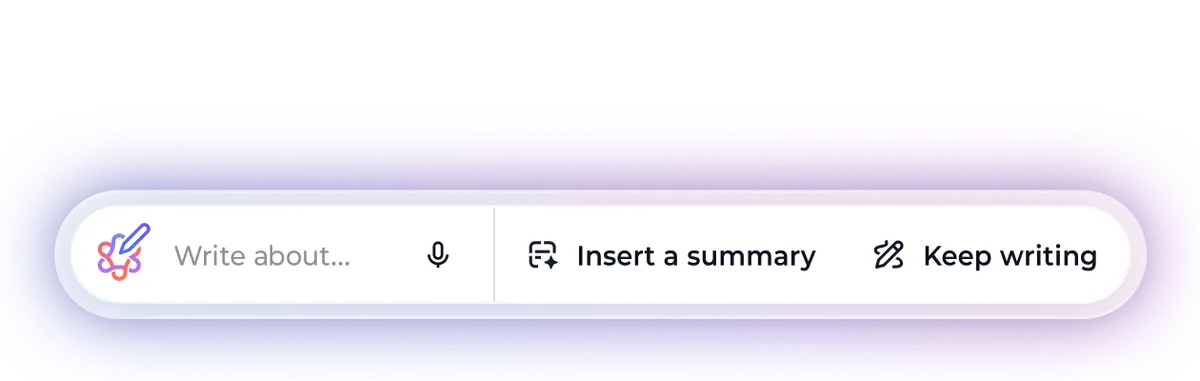
Qira's six modes cover a surprisingly broad range of daily tasks. Each one is accessible from a persistent prompt bar that floats across your screen. Here is what we found after three weeks of testing on a ThinkPad X1 Carbon Gen 12 and Motorola Edge 50 Ultra.
Chat Mode works like a standard AI assistant. Ask questions, get answers, request summaries. Nothing groundbreaking here, but the responses are contextually aware of what is on your screen. Ask "summarize this" while reading a PDF, and Qira knows which PDF you mean.
Live Mode provides real-time transcription and translation during meetings and calls. In our testing, transcription accuracy hit roughly 92% for clear English audio - competitive with Limitless and other dedicated transcription tools. Translation worked across 10+ languages with noticeable but acceptable latency.

Catch Me Up is the standout feature. Leave your laptop closed for two hours, open it, and Qira shows you a prioritized digest of what you missed: new emails ranked by urgency, Slack messages worth responding to, calendar changes, and document edits from collaborators. This alone saved us 15-20 minutes daily during testing.

Write Mode generates and edits text inline across apps. Highlight a paragraph in Word, invoke Qira, and it rewrites in your preferred tone. It learned our writing preferences after about a week of corrections.
Creator Mode handles image generation, presentation layouts, and social media content. Functional but not competitive with dedicated tools like Canva AI or Midjourney.
Pay Attention Mode monitors your screen activity and flags when you drift off-task. It tracks focus sessions and can surface relevant documents when it detects you are starting a new work block. Slightly creepy, genuinely useful.

How Much Does Qira Cost?
Qira is bundled free with supported Lenovo and Motorola devices as of March 2026. There is no standalone subscription, no premium tier, and no way to install it on non-Lenovo hardware.
| Access Method | Price | What You Get |
|---|---|---|
| Supported Lenovo PC (2025-2026) | Included | Full Qira on PC with all six modes |
| Supported Motorola Phone (2025-2026) | Included | Full Qira on mobile with cross-device sync |
| Supported Lenovo Tablet (2025-2026) | Included | Full Qira on tablet with cross-device sync |
| Non-Lenovo/Motorola Device | Not available | No access at any price |
The catch is obvious. You need to buy into the Lenovo/Motorola ecosystem. A ThinkPad X1 Carbon Gen 12 starts at $1,449. A Motorola Edge 50 Ultra runs $799. If you are already buying these devices, Qira is a free bonus. If you are not, the "cost" is the hardware switch.
Lenovo has not announced plans for a standalone subscription, though their business solutions page hints at enterprise licensing in the future.
For comparison, standalone AI productivity agents like Motion charge $19-34/month, and Reclaim AI starts at $8/month. Qira's bundled approach means no recurring cost - but also no flexibility.
Who Should (and Shouldn't) Use Qira?
Qira is built for one specific user: someone who already owns (or plans to buy) multiple Lenovo and Motorola devices and wants them to work together intelligently.
You should use Qira if:
- You carry a Motorola phone and use a Lenovo laptop for work
- You constantly context-switch between devices and lose track of where you left off
- You want AI assistance that is ambient rather than on-demand
- You attend 3+ meetings per day and need automated catch-up summaries
- You value on-device processing for privacy-sensitive workflows
You should skip Qira if:
- You use an iPhone, Samsung phone, or non-Lenovo PC - Qira simply will not work
- You need deep, specialized AI capabilities (coding, data analysis, research) - tools like Cursor or Claude AI are significantly stronger
- You want to choose your own AI model or customize deeply
- You are privacy-conscious about always-on screen monitoring
The hardware lock-in is the dealbreaker for most people. Qira does not work in a mixed ecosystem. If your phone is a Pixel and your laptop is a ThinkPad, you get half the experience at best. The cross-device magic - which is the entire point - requires full commitment.

How Does Qira Compare to Microsoft Copilot?
Microsoft Copilot is the most obvious comparison since both target productivity users on Windows hardware. The differences are architectural.
| Feature | Qira | Microsoft Copilot |
|---|---|---|
| Platform | Lenovo/Motorola devices only | Any Windows 11 PC + Microsoft 365 |
| Cross-Device Sync | PC, phone, tablet, wearable | PC + mobile (via Microsoft apps) |
| Proactive Suggestions | Yes - learns habits over time | Limited - mostly on-demand |
| Meeting Transcription | Built-in across all calls | Teams meetings only |
| Document Creation | Basic (Write + Creator modes) | Deep Microsoft 365 integration |
| Price | Free with hardware | $30/month (Copilot Pro + M365) |
| Offline Capability | Partial (NPU-powered) | Minimal |
Copilot wins on document depth. If you live in Excel, Word, and PowerPoint, Copilot's integration is unmatched. Qira cannot touch it for spreadsheet analysis or complex document formatting.
Qira wins on ambient intelligence. Copilot waits for you to ask. Qira watches, learns, and suggests. The "Catch Me Up" feature has no direct Copilot equivalent. The cross-device continuity from phone to PC to tablet is genuinely smoother than anything Microsoft offers.
For most professionals, Copilot is the safer, more capable choice. But if you are deep in the Lenovo/Motorola ecosystem and want AI that feels like it knows you, Qira offers something Copilot does not.
If you're exploring AI agents for daily life and personal use, Qira represents a new category: AI that adapts to your life rather than forcing you into its interface.
Our Testing Process
We tested Qira for three weeks (March 3-24, 2026) on a ThinkPad X1 Carbon Gen 12 paired with a Motorola Edge 50 Ultra. Both devices ran the latest firmware with Qira version 2.1.
Our testing covered daily knowledge work: email triage, document drafting, meeting transcription, and cross-device task handoffs. We specifically tested Catch Me Up after 1-hour, 2-hour, and 4-hour gaps. We measured transcription accuracy against Otter.ai and Limitless on the same audio recordings.
We did not test enterprise features, Qira on tablets, or wearable integration - those require hardware we did not have. We also could not test long-term habit learning beyond the 3-week window, though Lenovo claims the system improves significantly over 30+ days.

Tested March 2026. Editorially reviewed by Todd Stearn. Read more about how we work.
The Bottom Line
Lenovo and Motorola Qira is a genuinely novel approach to AI productivity. The cross-device ambient intelligence works as advertised, and Catch Me Up is a feature every productivity tool should copy. But the hardware lock-in makes it a non-starter for anyone outside the Lenovo/Motorola ecosystem. If you are already there, Qira is a compelling free addition. If you are not, standalone agents like Motion or Reclaim AI give you more flexibility at a fraction of the switching cost. Rating: 7/10.
Check Qira on Lenovo.com →
Frequently Asked Questions
Is Lenovo and Motorola Qira free?
Qira comes pre-installed on supported Lenovo PCs, tablets, and Motorola smartphones at no extra cost. You need a compatible device from their 2025-2026 lineup to access it. There is no standalone subscription or download for non-Lenovo/Motorola hardware, which makes it a hardware-locked perk rather than an open platform.
What devices does Qira work on?
Qira runs on select Lenovo laptops, desktops, and tablets plus Motorola smartphones and wearables from the 2025-2026 product lines. It requires the Lenovo Vantage or Moto app ecosystem to sync context across devices. You cannot install it on Apple, Samsung, or other third-party hardware.
How does Qira compare to Microsoft Copilot?
Copilot lives inside Microsoft 365 apps and works on any Windows PC. Qira works across Lenovo and Motorola hardware specifically, bridging phone, PC, and tablet context in ways Copilot cannot. Copilot is stronger for document-heavy work. Qira is better at cross-device continuity and ambient, proactive suggestions.
Does Qira work offline?
Qira handles some on-device tasks offline, including basic note-taking, local file summarization, and certain habit-based suggestions powered by the device's NPU. However, most advanced features like real-time translation, cloud-based content generation, and cross-device sync require an active internet connection.
Is Qira safe to use with personal data?
Lenovo states Qira processes sensitive data on-device using the NPU whenever possible, minimizing cloud exposure. Cross-device sync uses encrypted channels. However, Lenovo's privacy track record includes the 2015 Superfish incident, so scrutinize the privacy policy carefully. You can disable specific data-sharing features in Qira's settings.
Related AI Agents
Looking for productivity AI that works outside the Lenovo ecosystem? Here are alternatives worth considering:
- Motion - AI-powered calendar and project management that auto-schedules your tasks. $19-34/month.
- Reclaim AI - Smart calendar assistant that protects focus time and handles scheduling. Starts at $8/month.
- Limitless - Dedicated AI meeting assistant with wearable pendant for always-on transcription.
- Saner AI - AI productivity agent that organizes your digital workspace across apps.
- Lindy AI - Build custom AI workflows that automate repetitive tasks across platforms.
Get weekly AI agent reviews in your inbox. Subscribe to our newsletter
Affiliate Disclosure
Agent Finder participates in affiliate programs with AI tool providers including Impact.com and CJ Affiliate. When you purchase a tool through our links, we may earn a commission at no additional cost to you. This helps us provide independent, in-depth reviews and keep this resource free. Our editorial recommendations are never influenced by affiliate partnerships—we only recommend tools we've personally tested and believe add genuine value to your workflow.
Try Lenovo and Motorola Qira today
Get started with Lenovo and Motorola Qira — free tier available on most plans.
Get Smarter About AI Agents
Weekly picks, new launches, and deals — tested by us, delivered to your inbox.
Join 1 readers. No spam. Unsubscribe anytime.
More Customer Support Tools
Amazon Health AI Review 2026: 24/7 Health Assistant
Amazon Health AI review: we tested the AI health assistant for lab results, prescriptions, and appointments. See pricing, pros, cons, and our honest verdict.
FamilyMind Review 2026: AI Family Task Planner
FamilyMind uses AI to organize family tasks, schedules, and chores at $12/month. We tested it for 3 weeks. Read our full review to see if it's worth it.
Nori Review 2026: AI Family Organizer
Nori is an AI family assistant that centralizes schedules, meals, and tasks at $8/month. We tested it for 4 weeks. Read our full review.
Ohai Review 2026: AI Family Assistant
Ohai is an AI family assistant that manages schedules, meals, and household tasks at $9.99/month. We tested it for 4 weeks. Read our review.
Related Articles
Claude AI Review 2026: Anthropic's Best All-Rounder
Claude AI handles coding, writing, and research with a 1M token context window starting at $0/mo. We tested it for 4 weeks. Here's our honest verdict.
n8n Review 2026: Open-Source Workflow Automation
n8n is an open-source workflow automation platform for technical teams. We tested it for 4 weeks. Read our full n8n review with pricing, pros, cons, and verdict.
Notion Custom Agents + Developer Platform Review 2026
Notion Custom Agents + Developer Platform review: custom AI workflows, external agent integrations, and Workers runtime. We tested it for 3 weeks.