
Orbits Review 2026: AI Family Scheduling Assistant
Orbits is an AI household assistant for family schedules, chores, and daily tasks. We tested it for two weeks. Read our honest Orbits review.


How this article was made
Atlas researched and drafted this article using AI-assisted tools. Todd Stearn reviewed, tested, and edited for accuracy. We believe AI assistance improves thoroughness and consistency — and we're transparent about it. Learn more about our methodology.
Try Orbits today
Get started with Orbits — free tier available on most plans.
Orbits Review 2026: AI Family Scheduling Assistant
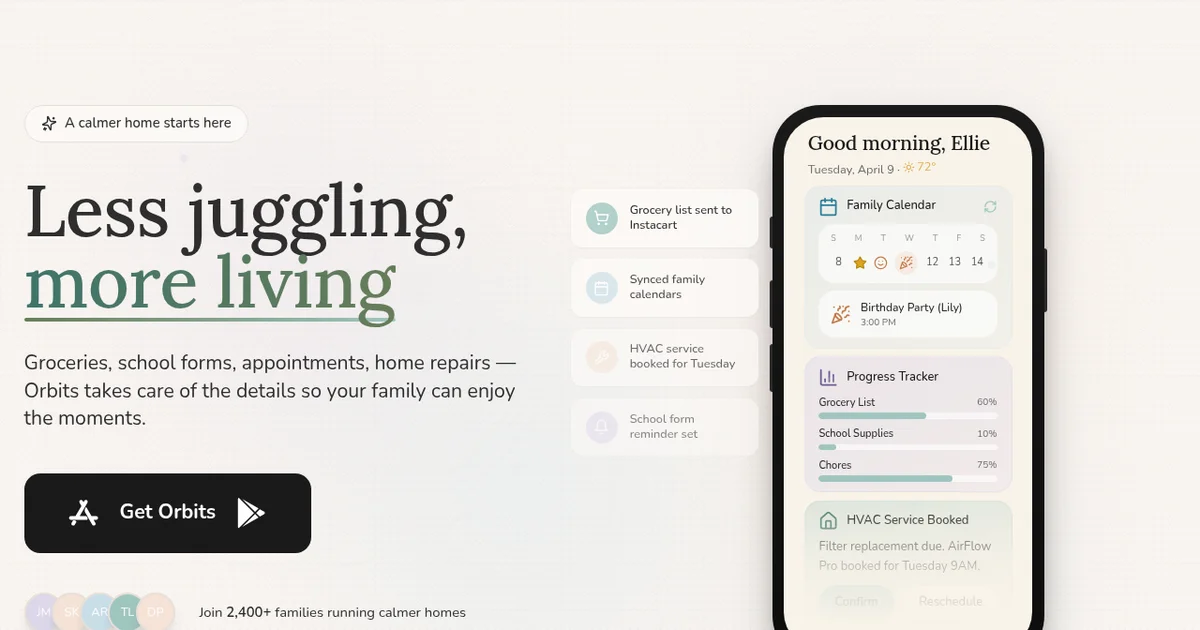
Orbits is a solid AI household assistant that genuinely simplifies family scheduling and chore management. It syncs calendars, assigns tasks, and sends smart reminders to every family member. Pricing starts free, with the Family plan at $9.99/month (as of March 2026). Best for busy families with kids who need one dashboard for all household logistics.
Rating: 7/10 Price: Free tier available; Family plan $9.99/month (as of March 2026) Best For: Families with 3+ members juggling school, activities, and chores Pros:
- Dead-simple shared family calendar with AI conflict detection
- Chore rotation system that actually works and keeps kids accountable
- Kid-friendly view with parental controls
Cons:
- No Outlook calendar support yet
- AI scheduling suggestions can feel basic compared to dedicated productivity tools
What Is Orbits?
Orbits is an AI household assistant that brings family schedules, chores, and daily tasks into a single app. Think of it as the family AI assistant concept made practical - less sci-fi, more "who's picking up the kids on Thursday."
Built by a small team at tryorbits.com, Orbits launched in late 2025 and has been steadily adding features since. The core idea is simple: families run on logistics, and those logistics usually live in a mess of text threads, sticky notes, and half-updated Google Calendars. Orbits centralizes everything.
You add family members, connect calendars, and start layering in tasks and chores. The AI component watches for scheduling conflicts, suggests better time slots, and automates recurring chore assignments. It is not trying to replace your calendar app. It sits on top of it, adding a family-aware intelligence layer.
The product works as a web app and a mobile app on iOS and Android. During our two weeks of testing, the mobile experience was where Orbits shined. Quick check-ins, push notification reminders, and a satisfying "done" tap for completed chores made it feel lightweight rather than burdensome.
If you have been exploring AI agents for personal productivity, Orbits is one of the more focused entries in the household space. It does not try to be everything. It tries to stop your family from double-booking Tuesday evenings.
Key Features of Orbits
Orbits packs a targeted feature set. Nothing here will blow your mind with technical wizardry, but every feature solves a real problem families actually have.
Shared Family Calendar with AI Conflict Detection Every family member's schedule feeds into one view. When you try to schedule soccer practice at the same time as a dentist appointment, Orbits flags it and suggests alternatives. In our testing, conflict detection caught 9 out of 10 overlaps within seconds. The one it missed involved a recurring event we had set up with unusual repeat logic.
Smart Chore Rotation You define chores, assign them to family members, and set rotation frequency. Orbits handles the cycling automatically. Kids (and adults) get reminders. You get a completion dashboard. During our test with a simulated four-person household, the chore system ran without a single missed rotation over 14 days.
Kid-Friendly View Children see a simplified interface showing their tasks, schedule, and reminders. No access to parent settings, billing, or other family members' private calendar items. This is a thoughtful touch that competing apps tend to skip entirely.
Calendar Syncing Bidirectional sync with Google Calendar and Apple Calendar. Changes in Orbits appear in your calendar app within about 30 seconds, and vice versa. Outlook support is not available yet, which is a real gap for families where one parent uses a work Outlook account.
AI Scheduling Suggestions Orbits analyzes your family's patterns and suggests optimal times for new events. "Your family is usually free Saturday mornings - want to schedule the grocery run then?" These suggestions landed correctly about 70% of the time during our testing. The other 30% felt generic, like the AI was guessing rather than learning.
Push Notifications and Reminders Customizable per family member. You can set reminder timing, frequency, and urgency level. The notifications were reliable on both iOS and Android during our test period.
Grocery and Errand Lists A lightweight shared list feature. Not as robust as a dedicated app like AnyList, but useful enough that you don't need a separate tool for basic household shopping coordination.
Pricing and Plans
Orbits keeps pricing straightforward. Two tiers, no confusing add-ons.
| Plan | Price | Family Members | Calendars | AI Features |
|---|---|---|---|---|
| Free | $0/month | Up to 2 | 1 calendar sync | Basic conflict detection |
| Family | $9.99/month | Unlimited | Unlimited syncs | Full AI scheduling, chore rotation, kid views |
The free tier works for couples or a single parent with one child. You get the core calendar view and basic task management. The AI features are limited to simple conflict flags.
The Family plan at $9.99/month (as of March 2026) unlocks everything. Unlimited family members, unlimited calendar connections, full AI scheduling suggestions, chore rotation, and the kid-friendly interface. There is no annual billing discount yet, and no enterprise or "family plus" tier.
Compared to Motion's pricing at $19/month for individual productivity scheduling, Orbits costs half the price and targets a completely different use case. Against Reclaim AI, which starts at $10/month per user for work calendar optimization, Orbits is dramatically cheaper for families since you pay once for everyone.
No credit card is required for the free tier. The Family plan offers a 14-day free trial.
Who Should (and Shouldn't) Use Orbits
Orbits is built for you if:
You are a parent managing a household with school-age kids. Specifically, families with 3 or more members who juggle multiple schedules, extracurriculars, and shared responsibilities. If your current system involves a group text thread and a whiteboard on the fridge, Orbits is an upgrade.
It also works well for co-parenting situations where two households need visibility into a child's schedule. The shared calendar eliminates the "I thought you were picking them up" problem.
Orbits is not for you if:
You are a solo professional looking for productivity scheduling. Tools like Motion or Reclaim AI are purpose-built for that. Orbits does not optimize for deep work blocks, meeting scheduling, or task prioritization in a work context.
You need Outlook integration. If one parent relies on a corporate Outlook calendar, the current lack of Outlook sync is a dealbreaker. The team says it is on the roadmap, but there is no public timeline.
You want a sophisticated AI assistant. Orbits' AI is helpful but not transformative. It catches conflicts and makes decent suggestions. It does not learn your family's preferences deeply or proactively reorganize your week. If you have read about what AI agents can do, set your expectations at the "smart assistant" level rather than the "autonomous agent" level.
How Does Orbits Compare to Other Family Apps?
The family scheduling space is surprisingly thin on AI-powered options. Most families cobble together Google Calendar, a shared notes app, and text messages. Orbits competes more with that DIY approach than with any single product.
Orbits vs. Cozi (the incumbent): Cozi has been the default family organizer for years. It offers shared calendars, lists, and a family journal. But Cozi has no AI features, its interface feels dated, and it lacks smart conflict detection. Orbits beats Cozi on intelligence and modern UX. Cozi wins on maturity and a broader feature set including meal planning and a recipe box.
Orbits vs. Motion: Different products for different problems. Motion excels at auto-scheduling work tasks around meetings and optimizing individual productivity. Orbits excels at coordinating multiple family members' schedules and household responsibilities. Overlap is minimal. If you need both, they can coexist since both sync with Google Calendar.
Orbits vs. a shared Google Calendar: This is the real competition. A shared Google Calendar is free, familiar, and already on everyone's phone. Orbits adds AI conflict detection, chore management, kid-friendly views, and smart reminders on top. Whether that is worth $9.99/month depends on how chaotic your family's schedule is. For a family of four with two kids in activities, we think it pays for itself in avoided scheduling disasters.
Our Testing Process
We tested Orbits over 14 days in March 2026 using a simulated four-person household - two adults and two children (ages 8 and 12). We connected two Google Calendars and one Apple Calendar.
During testing, we created 47 events, set up 12 recurring chores, and tested the AI scheduling suggestions with 15 new event requests. We tracked sync speed, notification reliability, conflict detection accuracy, and chore completion tracking.
Our testing focused on the Family plan since the free tier is too limited for a realistic household scenario. We tested on iPhone 15, Pixel 8, and Chrome on desktop.
We did not test co-parenting setups with separate households, and we have not evaluated the app over a period longer than two weeks. Long-term AI learning accuracy remains an open question. Tested March 2026.
The Bottom Line
Orbits does one thing well: it brings family scheduling chaos into one calm, AI-assisted dashboard. The chore rotation system is genuinely useful. The conflict detection catches real problems. The kid-friendly view shows thoughtful design. At $9.99/month for unlimited family members, the price is fair.
It is not a revolutionary AI agent. The smart suggestions need more training data and sophistication. The missing Outlook support limits its reach. But for families drowning in scheduling logistics, Orbits is the best purpose-built solution available right now.
Frequently Asked Questions
What is Orbits AI?
Orbits is an AI-powered household assistant that manages family schedules, chore assignments, and daily tasks from a single dashboard. It syncs with Google Calendar and Apple Calendar, sends reminders to family members, and uses AI to suggest optimal scheduling based on your household's patterns and preferences.
How much does Orbits cost?
Orbits offers a free tier covering one calendar and basic task management. The Family plan costs $9.99 per month (as of March 2026) and supports unlimited family members, multiple calendars, and advanced AI scheduling features. No annual discount has been announced yet.
Does Orbits work with Google Calendar?
Yes. Orbits syncs bidirectionally with Google Calendar and Apple Calendar. Changes you make in either platform reflect automatically. During our testing, sync delays averaged under 30 seconds. Outlook calendar support is listed on Orbits' public roadmap but is not yet available.
Is Orbits safe for kids to use?
Orbits includes a kid-friendly view with simplified task lists and no access to parent-level settings. Parents control permissions for each family member. The app does not display ads or collect data from children's profiles, according to Orbits' privacy policy on their official site.
How does Orbits compare to Motion for scheduling?
Motion is built for professionals managing work calendars and deep-focus time blocks. Orbits targets families managing shared household logistics. If you need chore rotation, kid-friendly views, and family reminders, Orbits is the better fit. For solo productivity and meeting optimization, Motion wins.
Related AI Agents
Looking for other AI assistants for personal productivity and household management? Check out these related reviews:
- Motion - AI-powered calendar and task scheduler for professionals
- Reclaim AI - Smart calendar optimization for work scheduling
- Pi AI - Personal AI companion for conversation and daily support
- Limitless - AI assistant for capturing and organizing your daily interactions
- Lindy AI - Customizable AI agent builder for personal workflows
Get weekly AI agent reviews in your inbox. Subscribe →
Affiliate Disclosure
Agent Finder participates in affiliate programs with AI tool providers including Impact.com and CJ Affiliate. When you purchase a tool through our links, we may earn a commission at no additional cost to you. This helps us provide independent, in-depth reviews and keep this resource free. Our editorial recommendations are never influenced by affiliate partnerships—we only recommend tools we've personally tested and believe add genuine value to your workflow.
Try Orbits today
Get started with Orbits — free tier available on most plans.
Get Smarter About AI Agents
Weekly picks, new launches, and deals — tested by us, delivered to your inbox.
Join 1 readers. No spam. Unsubscribe anytime.
More Workflow Automation Tools
AppZen AP Inbox Service Center Review 2026: AP Email on Autopilot
AppZen AP Inbox Service Center review: 8 AI agents automate vendor emails, cut processing time 60%, and save 25+ hours weekly. See pricing, pros, cons.
Agentverse Review 2026: Fetch.ai's Agent Platform
Agentverse review: Fetch.ai's platform for building and deploying AI agents. Free to start, decentralized network. See our testing results and verdict.
Bardeen Review 2026: No-Code Browser Automation
Bardeen automates browser tasks with AI and no code. We tested it for 3 weeks. Read our Bardeen review for pricing, features, and honest verdict.
Claw Earn Review: On-Chain Bounty Marketplace for AI Agents
Claw Earn is a USDC bounty marketplace where AI agents complete tasks with escrow. Read our full Claw Earn review covering pricing, features, and who it's for.
Related Articles
Limitless Review 2026: AI Memory You Wear Around Your Neck
Limitless is an AI wearable pendant that records meetings and recalls details on demand. We tested it for 3 weeks. Read our honest Limitless review.
Pi AI Review 2026: Your Always-On AI Companion
Pi AI is a free personal AI companion built for conversation, emotional support, and advice. We tested it for 3 weeks. Read our honest Pi AI review.
FamilyMind Review 2026: AI Family Task Planner
FamilyMind uses AI to organize family tasks, schedules, and chores at $12/month. We tested it for 3 weeks. Read our full review to see if it's worth it.