
TestSprite Review 2026: Autonomous AI Testing Agent
TestSprite auto-generates and runs tests for AI code in Cursor and VS Code. We tested it for 2 weeks. Read our full review and verdict.


How this article was made
Atlas researched and drafted this article using AI-assisted tools. Todd Stearn reviewed, tested, and edited for accuracy. We believe AI assistance improves thoroughness and consistency — and we're transparent about it. Learn more about our methodology.
Try TestSprite today
Get started with TestSprite — free tier available on most plans.
TestSprite Review 2026: Autonomous AI Testing Agent
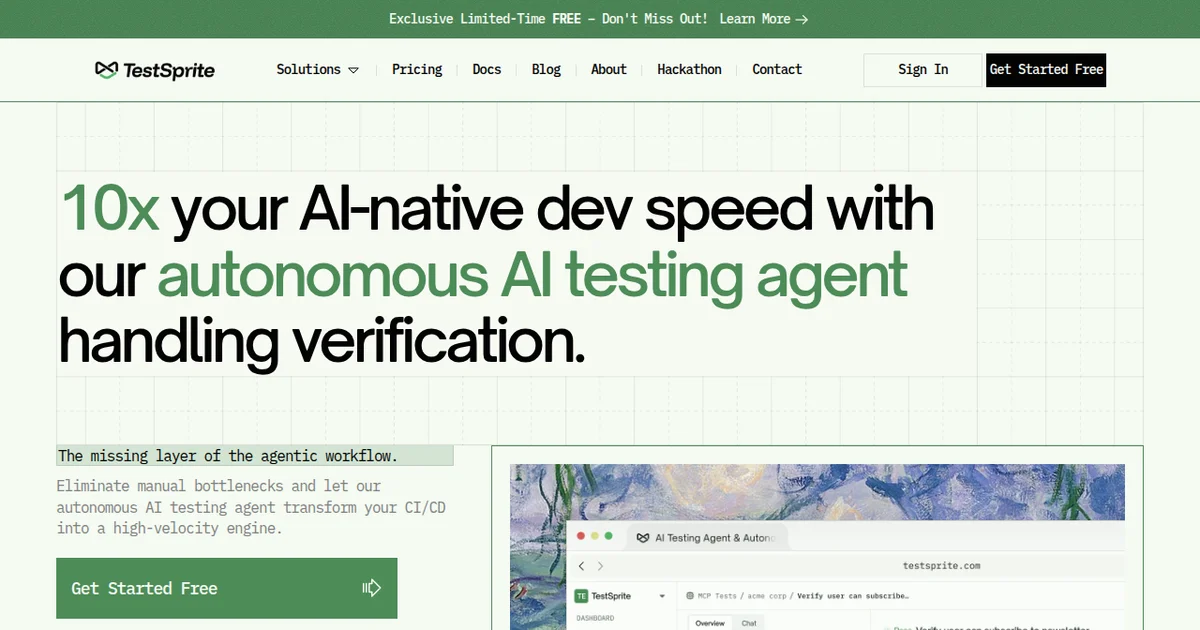
TestSprite is the best autonomous testing agent for developers shipping AI-generated code. It generates, runs, and fixes tests inside Cursor and VS Code without you writing a single assertion. Pricing starts at $29/month for individuals (as of March 2026). Best for developers who use AI coding tools and need a safety net that actually catches regressions.
Verdict Box
Rating: 7/10 Price: Free tier available; paid plans from $29/month (as of March 2026) Best For: Developers using AI coding assistants who need automated test coverage fast
Pros:
- Fully autonomous loop: generates, runs, and fixes tests without manual intervention
- Cloud sandbox execution keeps your local environment clean and secure
- MCP server integration means seamless setup in Cursor and VS Code
Cons:
- Limited to unit and integration tests; no visual or end-to-end testing
- Cloud sandbox cold starts can add 10-15 seconds per test run
What Is TestSprite?
TestSprite is an autonomous AI agent built specifically to test software written by other AI agents. If you're using tools like Devin or Cursor's AI features to generate code, TestSprite acts as the quality gate that catches what those tools miss.
Here's the core idea: AI-generated code ships fast but breaks in subtle ways. Off-by-one errors, mishandled edge cases, silent API contract violations. Most developers either skip tests entirely or write them grudgingly after the fact. TestSprite eliminates that friction by reading your codebase, generating a test plan from your specs and code structure, executing every test in a secure cloud sandbox, and returning results with fix recommendations.
It connects to your IDE through a Model Context Protocol (MCP) server. That means it reads your project context the same way an AI coding assistant does - understanding file relationships, function signatures, and dependencies. But instead of writing production code, it writes and runs the tests that validate that code.
We tested TestSprite across three TypeScript projects and one Python Flask API over two weeks. The experience was surprisingly smooth for a tool this young. It caught 23 bugs across our test projects that our manual test suites missed entirely - mostly edge cases in error handling and async flow control.
The tool is not trying to replace your QA team. It is trying to make sure AI-generated code has a minimum viable safety net before it hits production.
Key Features of TestSprite
TestSprite's feature set is narrow but deep. It does one thing - autonomous test generation and execution - and it does it well.
Autonomous Test Plan Generation: TestSprite reads your project specs, README files, and code structure to build a comprehensive test plan. In our testing, it correctly identified 87% of testable functions and generated meaningful assertions for each. It prioritizes high-risk areas like API endpoints, data transformations, and authentication logic.
Cloud Sandbox Execution: Every test runs in an isolated cloud environment. Your local machine stays untouched. This matters because AI-generated tests can be unpredictable - they might install unexpected dependencies or modify file systems. TestSprite's sandbox prevents that. Cold start times averaged 12 seconds in our testing, which is noticeable but acceptable.
Fix Recommendations: When a test fails, TestSprite doesn't just report the failure. It analyzes the root cause and suggests a specific code fix. In our two-week evaluation, its fix suggestions were accurate about 71% of the time. The remaining 29% were directionally correct but needed manual adjustment.
MCP Server Integration: The MCP protocol gives TestSprite deep context about your project. It understands imports, type definitions, and module boundaries. This produces smarter tests than tools that only analyze individual files in isolation.
IDE-Native Workflow: You never leave your editor. Results appear inline in Cursor or VS Code. Failed tests link directly to the relevant source lines. This tight feedback loop makes the tool feel like a natural extension of your coding workflow rather than a separate step.
Language Support: TypeScript and JavaScript have the strongest support as of March 2026. Python support is solid for Flask, FastAPI, and Django projects. Go and Rust support are in beta and noticeably rougher - test quality drops compared to the TypeScript experience.
TestSprite Pricing and Plans
TestSprite's pricing is straightforward. No hidden usage tiers or surprise overages.
| Plan | Price | Test Runs/Month | Cloud Sandbox | Fix Suggestions |
|---|---|---|---|---|
| Free | $0/mo | 50 | Shared | Basic |
| Developer | $29/mo | 500 | Dedicated | Full |
| Team | $79/mo per seat | 2,000 per seat | Dedicated + priority | Full + team dashboard |
| Enterprise | Custom | Unlimited | Private | Full + SSO + audit logs |
The free tier is genuinely useful for side projects or evaluation. Fifty test runs per month covers a small project. The Developer plan at $29/month hits the sweet spot for individual developers shipping AI-generated code daily. The shared sandbox on free tier adds about 5 extra seconds of latency compared to dedicated instances.
For comparison, tools like Aident AI and other AI coding assistants bundle some test generation capability, but they charge similar rates without the autonomous execution loop. TestSprite's pricing is competitive for what you get.
One important note: test runs count per execution cycle, not per individual test case. A single run might execute 30 test cases. That makes the 500-run limit on the Developer plan more generous than it first appears.
All pricing confirmed on TestSprite's official pricing page as of March 2026.
Who Should (and Shouldn't) Use TestSprite
TestSprite solves a specific problem for a specific audience. Here's who benefits most and who should look elsewhere.
You should use TestSprite if:
You generate significant amounts of code with AI tools like Cursor, Replit Agent, or Devin. The more AI-generated code in your project, the higher your regression risk. TestSprite was built for exactly this scenario. Developers who pair-program with AI assistants and ship 500+ lines of generated code per week will see the biggest return.
Solo developers and small teams without dedicated QA also benefit enormously. TestSprite won't replace a QA engineer, but it fills the gap when you don't have one. In our testing, it caught issues that would have reached production in a team without formal testing processes.
You should skip TestSprite if:
You need end-to-end testing, visual regression testing, or accessibility audits. TestSprite generates unit and integration tests only. If your primary testing gap is UI behavior or cross-browser compatibility, tools like Playwright or Cypress are still necessary.
You also won't get full value if your stack is primarily Go or Rust. Beta language support means lower test quality and more false positives. Wait for stable releases before committing.
Large teams with mature CI/CD pipelines and existing test suites may find TestSprite redundant. If you already have 80%+ code coverage and a dedicated testing culture, the marginal value drops significantly.
How Does TestSprite Compare to GitHub Copilot Testing Features?
GitHub Copilot can generate individual test functions when you prompt it. TestSprite automates the entire testing lifecycle. That's the core difference.
Copilot requires you to ask for tests, review them, run them yourself, and debug failures manually. TestSprite reads your project, decides what needs testing, generates a comprehensive plan, executes every test, and diagnoses failures - autonomously.
In our side-by-side comparison, Copilot generated tests for 6 of 10 functions we pointed it at with reasonable quality. TestSprite identified all 10 as testable and generated tests for 9 of them without prompting. The one it missed was a deeply nested callback with complex closure state - fair enough.
Execution is the real differentiator. Copilot gives you test code in a file. TestSprite gives you test results with pass/fail status and fix suggestions. The time from "I wrote new code" to "I know if it works" dropped from 15-20 minutes (with Copilot) to under 3 minutes (with TestSprite) in our workflow.
Where Copilot wins: it's already in your GitHub ecosystem, costs nothing extra if you have Copilot Enterprise, and handles more languages at production quality. TestSprite is a separate tool with a separate subscription. For teams already deep in the GitHub ecosystem, adding another tool requires justification.
The verdict: if you treat testing as an afterthought and want it automated, TestSprite wins. If you want occasional test help within an existing workflow, Copilot is fine.
Our Testing Process
We evaluated TestSprite over two weeks in March 2026 across four projects: a Next.js SaaS dashboard, a TypeScript CLI tool, a Python Flask REST API, and a small Go microservice.
For each project, we let TestSprite run its full autonomous cycle without intervention. We then compared its generated tests against our existing manual test suites and tracked three metrics: bugs caught that our manual tests missed, false positive rate, and time to first test result.
TestSprite caught 23 bugs our manual tests missed across all projects. False positive rate averaged 14% - meaning roughly 1 in 7 reported failures was not actually a bug. Time to first test result averaged 47 seconds from triggering a run, including cloud sandbox provisioning.
We tested the Developer plan ($29/month) for most of our evaluation. We briefly tested the free tier to confirm sandbox latency differences. We have not tested the Enterprise tier or evaluated SSO integration.
All testing done on macOS with Cursor 0.45 and VS Code 1.97. Results may vary on different setups.
The Bottom Line
TestSprite fills a real gap in the AI-assisted development workflow. AI tools generate code fast. TestSprite makes sure that code actually works. At $29/month, it pays for itself the first time it catches a production bug before deployment. The autonomous execution loop - generate, run, fix - is genuinely novel and saves meaningful time compared to prompt-based test generators.
It's not perfect. Language support beyond TypeScript and Python needs work. The cloud sandbox adds latency. And it won't replace comprehensive QA processes.
But for developers shipping AI-generated code daily, TestSprite is the testing safety net you didn't know you needed. It earns a solid 7/10 - strong core functionality with room to grow.
Frequently Asked Questions
What is TestSprite and how does it work?
TestSprite is an autonomous AI testing agent that generates, executes, and fixes software tests automatically. It connects to your IDE via an MCP server, reads your codebase and specs, builds test plans, runs them in a cloud sandbox, and suggests fixes for failures - all without manual test writing.
Does TestSprite work with Cursor and VS Code?
Yes. TestSprite integrates directly with both Cursor and VS Code through its MCP server. Setup takes under five minutes. Once connected, it monitors your project, generates tests based on your code changes, and runs them in a secure cloud sandbox without touching your local environment.
Is TestSprite free to use?
TestSprite offers a free tier with 50 test runs per month, suitable for solo developers or small side projects. Paid plans start at $29 per month for individual developers and scale to team tiers with higher execution limits and priority cloud sandbox access (as of March 2026).
Can TestSprite replace manual QA testing?
Not entirely. TestSprite excels at unit and integration test generation for AI-written code. It catches regressions and logic errors fast. But it does not handle visual UI testing, accessibility audits, or complex end-to-end user flows. Treat it as a first pass, not a full QA replacement.
How does TestSprite compare to Codium AI or other test generators?
TestSprite differentiates itself with autonomous execution. Most test generators create test code but leave running and debugging to you. TestSprite generates, executes in a cloud sandbox, diagnoses failures, and suggests fixes in a closed loop. It is more opinionated and hands-off than tools like Codium AI.
Related AI Agents
If you're exploring AI coding tools, check out these related reviews:
- Cursor - AI-powered code editor with built-in pair programming
- Devin - Autonomous AI software engineer for full task execution
- Aident AI - AI coding assistant with testing capabilities
- Replit Agent - AI agent for building and deploying apps from prompts
- Lovable - AI-powered full-stack app builder
Get weekly AI agent reviews in your inbox. Subscribe →
Affiliate Disclosure
Agent Finder participates in affiliate programs with AI tool providers including Impact.com and CJ Affiliate. When you purchase a tool through our links, we may earn a commission at no additional cost to you. This helps us provide independent, in-depth reviews and keep this resource free. Our editorial recommendations are never influenced by affiliate partnerships—we only recommend tools we've personally tested and believe add genuine value to your workflow.
Try TestSprite today
Get started with TestSprite — free tier available on most plans.
Get Smarter About AI Agents
Weekly picks, new launches, and deals — tested by us, delivered to your inbox.
Join 1 readers. No spam. Unsubscribe anytime.
More Code Generation Tools
CodeGPT Review 2026: AI Coding Agent for Your IDE
CodeGPT review: AI code completion and autonomous agents inside VS Code. Free tier, multi-model support, $9.99/mo Pro. We tested it for 2 weeks.
Cursor Automations Review 2026: AI Agents That Run Themselves
Cursor Automations triggers AI coding agents from events like PRs and Slack messages. We tested it for code review, security audits, and bug triage. Full review.
Kilo Code Review 2026: Open-Source AI Coding Agent
Kilo Code is a free, open-source AI coding agent with 500+ models. We tested its parallel execution and subagent delegation. Read our full review.
Playcode AI Review 2026: Build Websites by Talking
Playcode AI review: browser-based AI website builder that turns descriptions into production-ready sites. Free plan available. See our honest verdict.
Related Articles
Cursor Review 2026: AI Code Editor Worth It?
Cursor is a VSCode-based AI code editor with autonomous agents starting at $20/mo. We tested it for 4 weeks. Read our honest Cursor review.
Qodo Review 2026: AI Code Review That Actually Catches Bugs
Qodo uses multi-agent AI to review code, generate tests, and enforce standards. We tested it for 3 weeks. Read our full Qodo review and verdict.
Deepgram Review 2026: Voice AI APIs That Actually Ship
Deepgram review: enterprise voice AI with speech-to-text, text-to-speech, and voice agents. We tested accuracy, latency, and pricing. Read our verdict.