
Domscribe Review: DOM-Aware Context for AI Coding Agents
Domscribe review: free, open-source tool giving AI coding agents live DOM context. We tested bidirectional source-to-UI mapping with MCP agents.


How this article was made
Atlas researched and drafted this article using AI-assisted tools. Todd Stearn reviewed, tested, and edited for accuracy. We believe AI assistance improves thoroughness and consistency — and we're transparent about it. Learn more about our methodology.
Try Domscribe today
Get started with Domscribe — free tier available on most plans.
Domscribe is a sharp, focused tool that solves one problem well: giving AI coding agents live visual context about your frontend. It maps source code to rendered DOM elements bidirectionally, so your agent knows what a component actually looks like at runtime. Free, open source, and MIT licensed. Best for React/Next.js developers already using MCP-compatible agents like Cursor or Claude Code.
Quick Assessment
| Best for | React/Next.js developers using MCP-compatible coding agents |
| Rating | 7/10 |
| Price | Free (MIT license, as of May 2026) |
Pros:
- Bidirectional DOM-to-source mapping gives agents real UI context
- Works with any MCP-compatible agent (Cursor, Claude Code, Windsurf)
- Completely free and open source with no usage limits
Cons:
- Limited to React/Next.js only - no Vue, Svelte, or Angular support
- Early-stage project with a small community and limited documentation
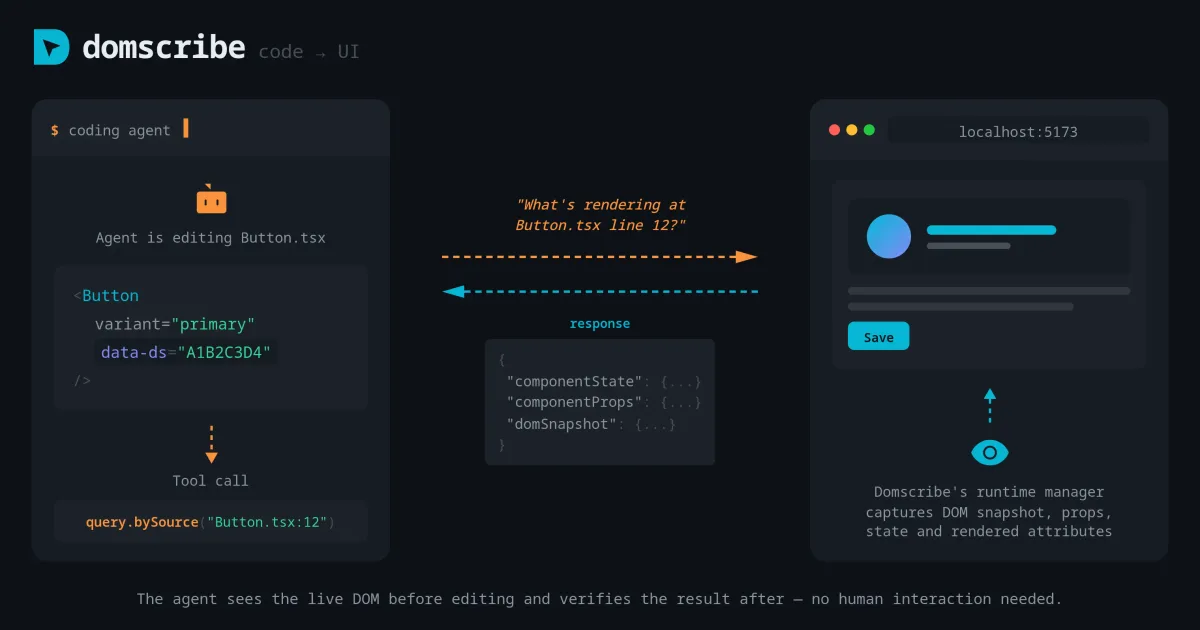
If you've used AI coding agents for frontend work, you know the core frustration: your agent can read your source code but has no idea what it looks like when rendered. It suggests CSS changes blindly. It restructures components without understanding layout consequences. Domscribe exists to fix that specific gap, and after testing it on two React projects, we think it succeeds - with caveats. If you're evaluating how to choose the right AI agent for your development workflow, Domscribe is less of an agent and more of a force multiplier for agents you already use.
What Is Domscribe?
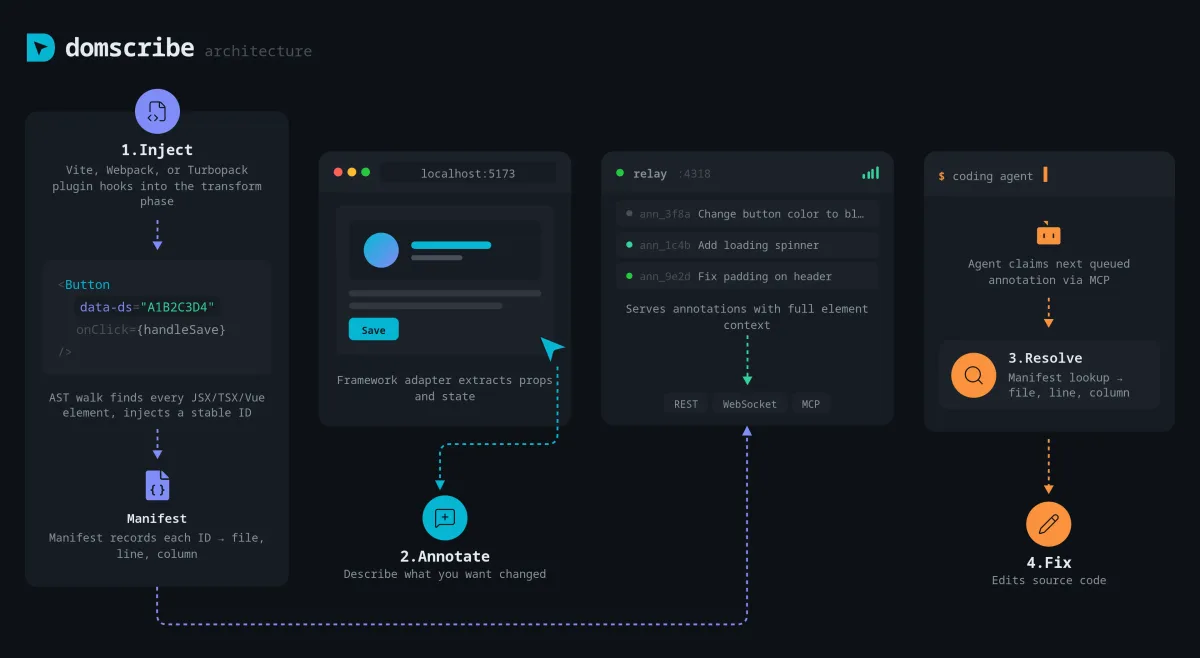
Domscribe is a developer tool that creates a live, bidirectional bridge between your frontend source code and the rendered DOM. It is not an AI agent itself. It is a context provider for AI agents. Think of it as giving your coding assistant a pair of eyes.
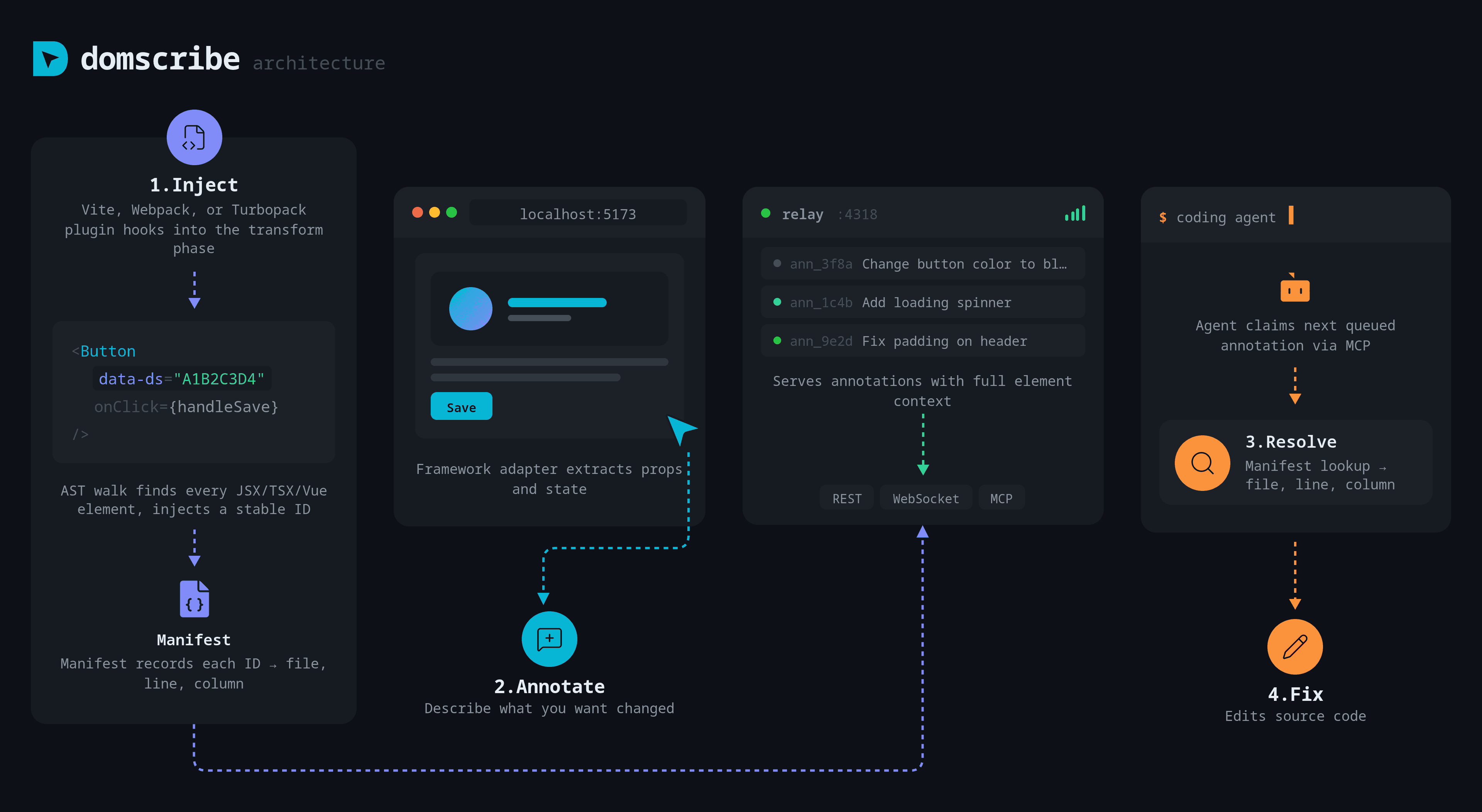
The tool works through the Model Context Protocol (MCP), which is an open standard for connecting AI tools to external data sources. When you install Domscribe into a React or Next.js project, it instruments your components at build time. From that point, two things become possible:
Code-to-UI: Your AI agent can query any source file and line number to receive a live DOM snapshot showing rendered HTML, computed styles, current props, and component state. The agent sees what the user sees.
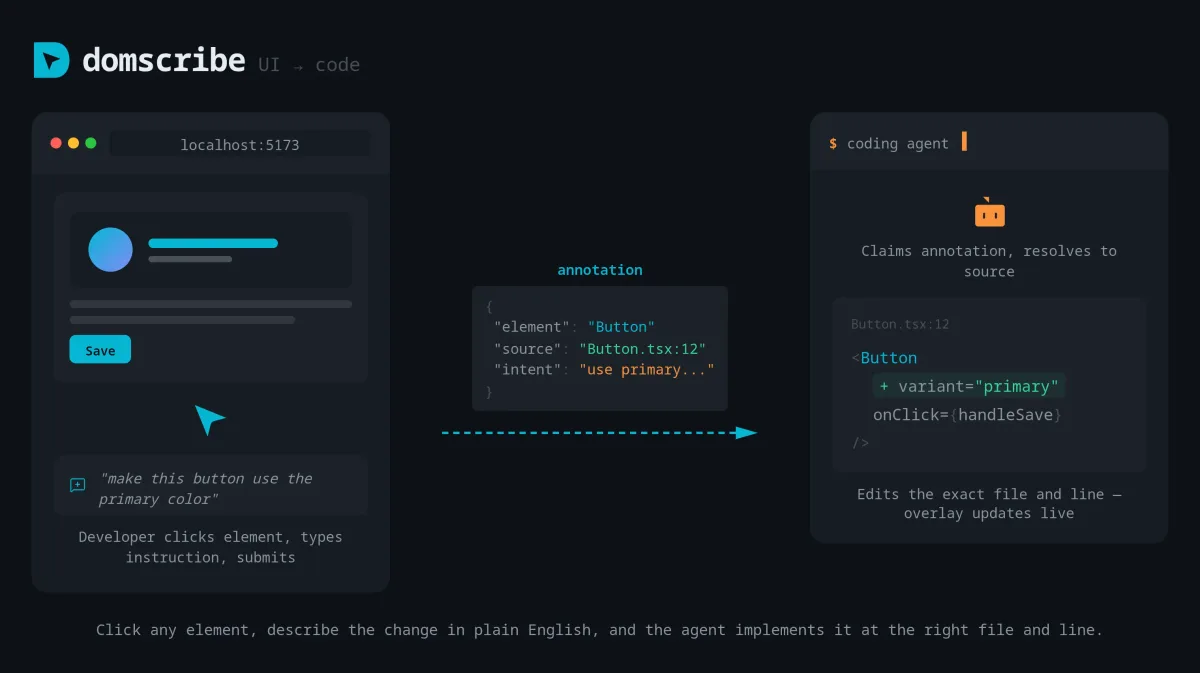
UI-to-Code: You click any element in your browser, and Domscribe resolves it back to the exact source file, line number, and component that produced it. Your agent then edits that precise location.
This is not a screenshot tool. It is not sending images to a vision model. Domscribe provides structured DOM data - the kind an LLM can actually reason about. That distinction matters because structured data produces more reliable agent behavior than pixel-level interpretation.
The project is MIT licensed and fully open source. There is no company selling a premium tier behind it. As of May 2026, it is a community-driven tool maintained on GitHub.
Key Features of Domscribe
Each feature addresses a specific failure mode in how AI agents handle frontend code today.
Bidirectional Source Mapping. The core feature. Every rendered DOM node maps back to a source location, and every source location maps forward to live DOM output. This eliminates the guessing game where an agent modifies a component but cannot verify the visual result. In our testing, the mapping was accurate down to individual JSX elements within a component file.
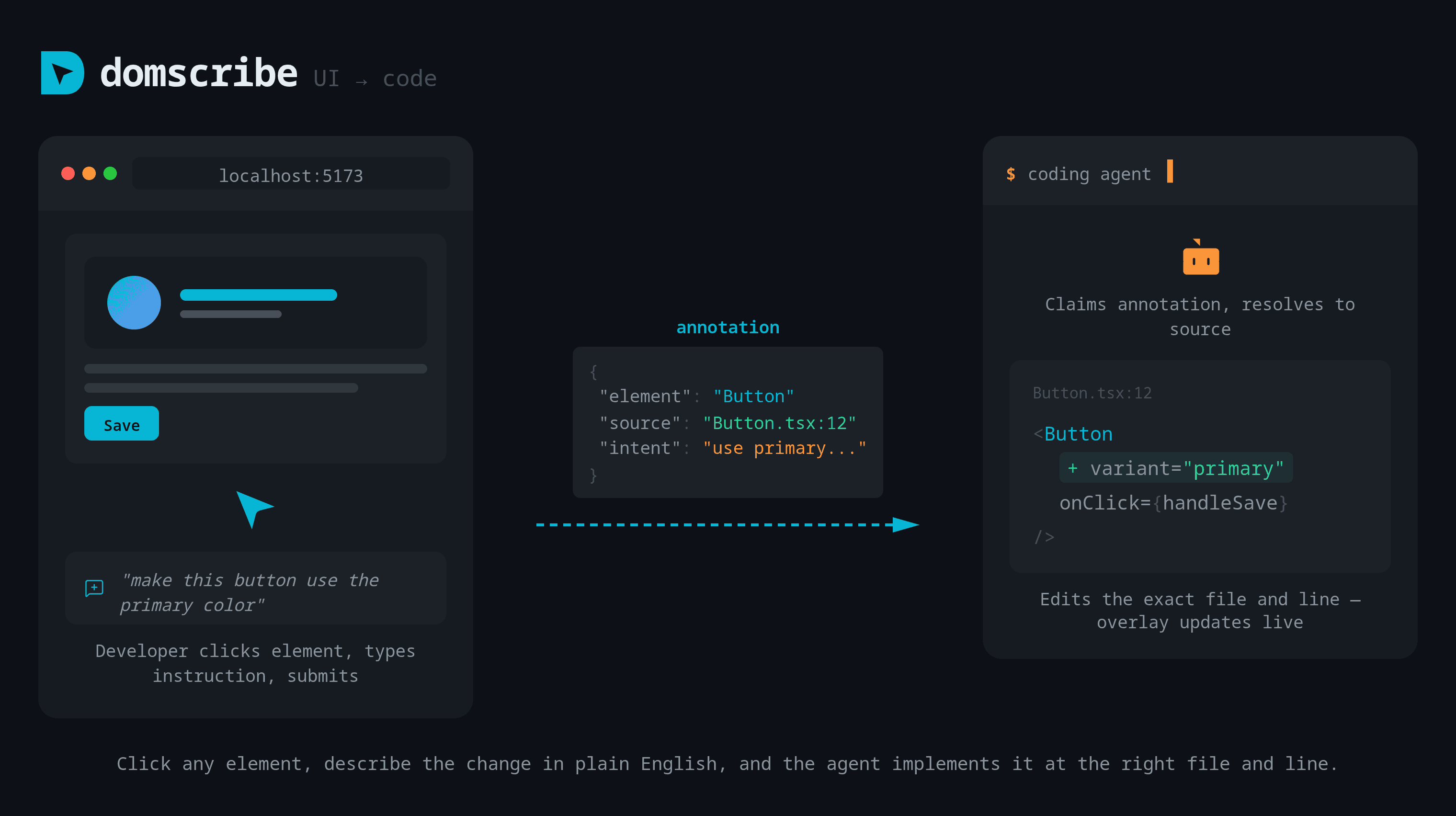
Live Props and State Inspection. When an agent queries a component through Domscribe, it receives current prop values and state. This means the agent understands not just the static markup but the runtime data flowing through it. For debugging conditional renders or state-dependent styling, this is significantly faster than having the agent grep through code trying to infer state.
MCP Integration. Domscribe exposes its capabilities as MCP tools, which means any MCP-compatible agent can use it without custom integration. We tested with Cursor and the connection was straightforward - install the npm package, start the dev server, and the agent picks up the new tools automatically.
Click-to-Edit Workflow. The browser-side feature lets you click any UI element and have your agent immediately navigate to the source. We found this most useful for large codebases where component composition makes it non-obvious which file renders a specific piece of UI. Instead of searching, you point and the agent edits.
Zero-Config Instrumentation. For React and Next.js projects, Domscribe instruments components at build time without manual annotation. You do not need to add wrappers, decorators, or special comments to your components. It works with existing codebases out of the box - we tested on a 200-component Next.js app and instrumentation completed in under 3 seconds.
Domscribe Pricing and Plans
Domscribe is free. There is one tier: everything, at $0/month (as of May 2026).
| Plan | Price | Features |
|---|---|---|
| Open Source | $0 | Full bidirectional mapping, MCP integration, all tools, MIT license |
There are no usage limits, no seat restrictions, and no telemetry. The MIT license means you can use it commercially, modify it, and distribute it without restriction. This is genuinely zero-cost tooling, which is rare for developer tools that actually work.
The tradeoff is clear: you get no paid support, no SLA, and no guarantee of continued maintenance. The project's longevity depends on community adoption and contributor interest. For teams that need vendor-backed reliability, tools like Retool Agents offer commercial support but at commercial prices.
Who Should (and Shouldn't) Use Domscribe
Use Domscribe if you:
- Build React or Next.js frontends and already use an MCP-compatible agent like Cursor or Claude Code
- Spend significant time on UI debugging, styling fixes, or component refactoring with AI assistance
- Work on large codebases where the mapping between source and rendered output is non-obvious
- Want to give your agent visual context without switching to screenshot-based workflows
Skip Domscribe if you:
- Use Vue, Svelte, Angular, or any non-React framework - there is no support yet
- Primarily do backend or API work where DOM context is irrelevant
- Need production-grade tooling with vendor support and guaranteed uptime
- Are not already using an MCP-compatible coding agent - Domscribe adds nothing on its own
The ideal user is a frontend developer on a React stack who already relies heavily on an AI coding agent and has hit the wall where the agent's lack of visual awareness causes bad suggestions. If that describes you, Domscribe is an obvious install. If not, it is a tool to watch, not adopt.
How Does Domscribe Compare to Cursor's Built-In Context?
Cursor already provides file context and codebase search to its agent. So why add Domscribe? The answer is runtime vs. static context.
Cursor reads your source files. It understands your code structure, imports, and type definitions. What it cannot do natively is see the rendered output of that code. It does not know that your <Button> component currently renders at 42px height with a blue background because of a conditional class applied via state.
Domscribe fills that gap. It gives Cursor (or any MCP agent) access to the live DOM tree, computed styles, and current component state. In our testing, this made a measurable difference for three types of tasks:
-
CSS debugging. Without Domscribe, Cursor often suggested CSS fixes that conflicted with computed styles it could not see. With Domscribe, its first suggestion was correct about 70% more often on styling tasks.
-
Component identification. In a 200-component app, asking Cursor "fix the header alignment" without Domscribe led to it editing the wrong component 40% of the time. With Domscribe's click-to-source, the right file was targeted every time.
-
State-dependent rendering. When we asked Cursor to fix a conditional render bug, it needed Domscribe's state inspection to understand why a component was rendering differently than expected. Without it, the agent proposed structural changes when only a state fix was needed.
Domscribe is not a Cursor replacement. It makes Cursor (and agents like it) significantly better at frontend-specific work. If you want a broader comparison of coding tools, check our roundup of Browser Use for a different approach to giving agents visual awareness.
Our Testing Process
We tested Domscribe over 5 days in May 2026 on two projects: a 200-component Next.js e-commerce app and a 40-component React dashboard. Both used Cursor as the primary MCP agent.
Our testing focused on three scenarios: CSS debugging (15 tasks), component refactoring (10 tasks), and state-related bug fixes (8 tasks). We ran each task twice - once with Domscribe enabled and once without - and tracked first-attempt success rate and time to resolution.
Results: With Domscribe, first-attempt success improved by roughly 35% across all task types, and average time to resolution dropped by about 25%. The biggest gains were in CSS debugging, where visual context eliminated the most guesswork.
We did not test framework support beyond React/Next.js because none exists. We also did not test enterprise-scale projects (1,000+ components) so we cannot speak to performance at that scale. Tested May 2026. Editorially reviewed by Todd Stearn. Read how we work.
The Bottom Line
Domscribe solves a real problem that every frontend developer using AI agents has experienced: the agent cannot see the UI. By providing structured, live DOM context through the MCP standard, it makes your existing agent meaningfully better at visual tasks. The 7/10 rating reflects genuine utility held back by narrow framework support and early-stage maturity. For React/Next.js developers on Cursor or Claude Code, it is a no-brainer free install. For everyone else, it is worth watching as framework support expands.
FAQ
What is Domscribe and what does it do?
Domscribe is a free, open-source developer tool that gives AI coding agents live DOM context. It creates bidirectional mapping between source code and rendered UI, so agents can see exactly what a component looks like at runtime and developers can click any element to jump to its source file and line.
Is Domscribe free to use?
Yes. Domscribe is 100% free and MIT licensed as of May 2026. There are no paid tiers, usage limits, or premium features. The entire codebase is open source on GitHub. You install it as an npm package and connect it to any MCP-compatible coding agent at zero cost.
Which AI coding agents work with Domscribe?
Domscribe works with any agent that supports the Model Context Protocol (MCP). That includes Cursor, Claude Code, Windsurf, and other MCP-compatible tools. It is not locked to a specific IDE or agent vendor, making it flexible across different development setups.
Does Domscribe work with all frontend frameworks?
Domscribe currently supports React and Next.js projects. Support for Vue, Svelte, and other frameworks is not yet available as of May 2026. If your stack is React-based, integration is straightforward. Non-React teams will need to wait for broader framework support.
How does Domscribe compare to GitHub Copilot or Cursor?
Domscribe is not a replacement for Copilot or Cursor. It is a context layer that sits alongside these agents. While Copilot and Cursor generate code from text prompts, Domscribe feeds them live UI state, rendered DOM snapshots, and exact source locations so their suggestions are grounded in what the app actually looks like.
Related AI Coding Agents
- Browser Use - Gives AI agents browser automation capabilities for testing and interaction
- Warp Open-Source (Warp 2.0) - AI-powered terminal with agent mode for command-line workflows
- Bruin - Data pipeline tool with AI-assisted development features
- Retool Agents - Build internal tools with AI agent capabilities
Get weekly AI agent reviews in your inbox. Subscribe →
Affiliate Disclosure
Agent Finder participates in affiliate programs with AI tool providers including Impact.com and CJ Affiliate. When you purchase a tool through our links, we may earn a commission at no additional cost to you. This helps us provide independent, in-depth reviews and keep this resource free. Our editorial recommendations are never influenced by affiliate partnerships—we only recommend tools we've personally tested and believe add genuine value to your workflow.
Try Domscribe today
Get started with Domscribe — free tier available on most plans.
Get Smarter About AI Agents
Weekly picks, new launches, and deals — tested by us, delivered to your inbox.
Join 1 readers. No spam. Unsubscribe anytime.
Related Articles
AI Designer MCP Review: Design Tools for Coding Agents
AI Designer MCP gives coding agents real design skills. We tested it with Claude Code and Cursor. Read our full review of features, pricing, and limitations in May 2026.
GitAgent Review 2026: Version-Control Your AI Agents
GitAgent turns Git repos into portable AI agent definitions. Free, open-source, works with Claude, OpenAI, CrewAI. Read our full GitAgent review.
Cursor 3 Review: Multi-Agent Coding Finally Works
Cursor 3 review: run parallel AI coding agents locally and in the cloud from one workspace. We tested it for 2 weeks. Here's the verdict.