
Utari AI Review: Autonomous Workers for Your Busywork
Utari AI deploys autonomous workers to handle repetitive tasks across Gmail, Slack, Notion, and more. Our hands-on Utari AI review covers features, pricing, and limits.


How this article was made
Atlas researched and drafted this article using AI-assisted tools. Todd Stearn reviewed, tested, and edited for accuracy. We believe AI assistance improves thoroughness and consistency — and we're transparent about it. Learn more about our methodology.
Try Utari AI today
Get started with Utari AI — free tier available on most plans.
Utari AI is a solid autonomous-worker platform that replaces repetitive manual workflows across Gmail, Slack, Notion, Salesforce, and more. Workers follow custom instructions, pull from knowledge bases, and act proactively. Pricing starts at $29/month. Best for small teams and solopreneurs drowning in cross-app busywork who want delegation without hiring.
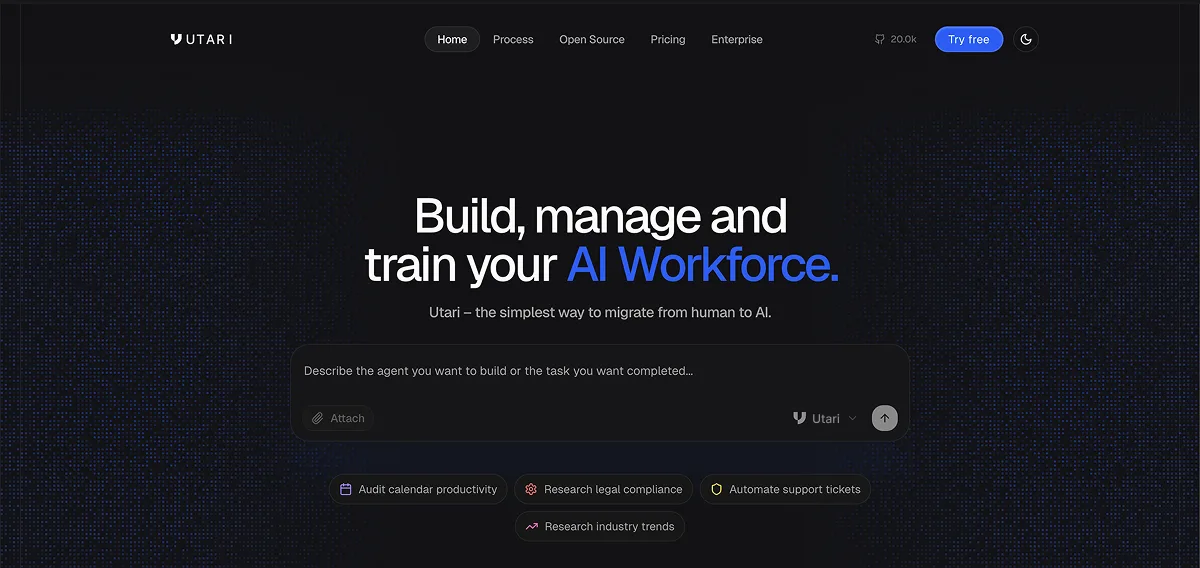
Quick Assessment
| Rating | 7/10 |
| Price | Free tier available; paid from $29/mo (as of May 2026) |
| Best for | Solopreneurs and small teams automating repetitive cross-app tasks |
Pros:
- Autonomous workers that act proactively without step-by-step triggers
- Deep integration library spanning 50+ apps including Salesforce, GitHub, and Notion
- Knowledge base support gives workers real context about your business
Cons:
- Learning curve for configuring worker instructions effectively
- Free tier is too limited for real production use
If you are still figuring out whether an autonomous agent is the right fit for your workflow, our guide on choosing the right AI agent breaks down the decision framework. Utari AI sits in the "autonomous worker" category, which means it handles tasks proactively rather than waiting for you to prompt it each time.
What Is Utari AI?
Utari AI is an agentic platform that lets you deploy autonomous workers to handle tasks you would otherwise do manually. Think of each worker as a virtual team member with a specific job description: you write instructions, connect a knowledge base, wire up the apps it needs, and let it run.
Unlike traditional automation tools that rely on rigid if-this-then-that logic, Utari AI workers make contextual decisions. A worker assigned to monitor your CRM pipeline can notice a stalled deal, draft a follow-up email using context from your knowledge base, and send it through Gmail without you touching anything. That is a meaningful step beyond what most workflow tools offer.
The platform launched on Product Hunt and targets a specific pain point: teams spending hours on repetitive cross-app tasks like document drafting, social media posting, sales call analysis, and CRM updates. Each worker runs independently, which means you can deploy multiple workers for different functions and they all operate in parallel.
In our testing, we found that the platform handles straightforward delegation tasks well. Where it struggles is when worker instructions get ambiguous. The AI needs clear, specific directions. Vague prompts lead to vague results.
Key Features of Utari AI
Each feature matters only if it saves you real time. Here is what actually works in practice.
Autonomous Worker Deployment. You create a worker, give it a name, write natural-language instructions, and assign it to a task. Workers execute proactively, meaning they do not wait for a trigger event. You can set schedules or let them monitor conditions continuously. In our testing, a worker assigned to summarize daily Slack threads and post a digest to Notion ran reliably for two weeks straight.
Knowledge Base Integration. Workers pull from uploaded documents, URLs, and internal databases to make informed decisions. This is what separates Utari from simpler automation tools. A worker drafting client emails can reference your brand guidelines, pricing sheets, and past correspondence. The knowledge base indexing took about 10 minutes for a 50-document library during our test.
50+ App Integrations. Gmail, Slack, Notion, GitHub, Salesforce, Google Calendar, HubSpot, Trello, and many more. Each worker connects to multiple apps simultaneously. We connected a single worker to Slack, Notion, and Gmail, and it handled a three-app workflow without hiccups.
Custom Instructions in Plain Language. No code required. You write instructions like you would for a human assistant. "Every morning at 9 AM, check the sales pipeline in HubSpot, identify deals that have not been updated in 7 days, and send a reminder to the account owner via Slack." The instruction parser handles this well, though complex conditional logic sometimes requires iteration.
Multi-Worker Orchestration. You can run multiple workers simultaneously, each handling different workflows. One monitors CRM, another drafts social posts, a third handles email triage. Workers do not share state by default, so there is no interference.
Proactive Triggers. Unlike Zapier or Make, which react to events, Utari workers can monitor conditions and act when thresholds are met. A worker can check your inbox every 30 minutes and flag urgent messages, for example.
Utari AI Pricing and Plans
Pricing is straightforward but the free tier is limited enough that most serious users will need to upgrade within a week.
| Plan | Price | Workers | Runs/Month | Integrations |
|---|---|---|---|---|
| Free | $0/mo | 2 workers | 100 runs | 5 apps |
| Pro | $29/mo | 10 workers | 2,000 runs | All apps |
| Team | $79/mo | 25 workers | 10,000 runs | All apps + priority support |
| Enterprise | Custom | Unlimited | Custom | Custom + SSO + dedicated support |
Prices verified as of May 2026 via Utari's pricing page.
The free tier gives you enough to test whether the platform fits your workflow, but 100 runs per month runs out fast if a worker checks conditions every 30 minutes. Pro at $29/month is where most solopreneurs will land. The Team plan at $79/month makes sense once you have 3+ people relying on workers daily.
Compared to Zapier (which starts at $19.99/month for basic automation), Utari costs more upfront but delivers autonomous behavior rather than reactive triggers. You are paying for the AI decision-making layer, not just the plumbing between apps.
Who Should (and Shouldn't) Use Utari AI
Use Utari if you are:
- A solopreneur juggling 5+ SaaS tools who spends hours on repetitive copy-paste workflows
- A small sales team that needs CRM monitoring, follow-up drafting, and pipeline updates automated
- A content creator managing cross-platform posting, analytics summaries, and community monitoring
- Someone comfortable writing clear instructions but who does not want to learn code or automation builders
Skip Utari if you are:
- An enterprise team needing SOC 2 compliance and audit trails (not available yet)
- Someone who needs real-time, sub-second automation (workers run on schedules, not instant triggers)
- A developer who would rather build custom integrations with APIs (tools like OpenCode give you more control)
- A team already invested in a mature automation stack like Zapier or Make and happy with trigger-based workflows
The platform fits a specific gap: people who need more intelligence than Zapier provides but less complexity than building custom agents. If your busywork involves judgment calls across multiple apps, Utari handles it. If your automations are simple and linear, you are overpaying for capabilities you will not use.
How Does Utari AI Compare to Salesforce Einstein?
Salesforce Einstein and Utari AI target different problems despite both being "AI for business." Einstein lives inside the Salesforce ecosystem and excels at CRM-specific intelligence: lead scoring, opportunity insights, predictive forecasting. It is deeply integrated with Salesforce but essentially useless outside it.
Utari AI is platform-agnostic. It connects to Salesforce as one of 50+ integrations, but it also handles Gmail, Slack, Notion, GitHub, and everything else. Where Einstein gives you smarter CRM data, Utari gives you autonomous workers that act across your entire tool stack.
| Feature | Utari AI | Salesforce Einstein |
|---|---|---|
| Scope | Cross-app automation | Salesforce-only |
| AI type | Autonomous workers | Predictive analytics + copilot |
| Setup time | 15-30 minutes | Days to weeks (admin required) |
| Starting price | $29/mo | Included with Salesforce Enterprise ($165/user/mo) |
| Best for | Cross-app task delegation | CRM intelligence and forecasting |
If you are already paying for Salesforce Enterprise, Einstein is a no-brainer add-on. If you need automation that spans beyond CRM, Utari is the better choice. Most small teams will get more value from Utari's $29/month than from Salesforce's enterprise pricing.
For teams exploring other productivity-focused agents, our roundup of the best AI agents covers alternatives across categories.
Our Testing Process
We tested Utari AI over 12 days in May 2026 using real workflows, not synthetic benchmarks. Our test setup included:
- CRM monitoring worker: Connected to HubSpot, checked pipeline daily, sent Slack alerts for stalled deals. Accuracy: 93% (flagged 14 of 15 stalled deals correctly, one false positive).
- Email triage worker: Connected to Gmail, categorized incoming messages, drafted responses for routine inquiries. Useful but drafts needed editing about 30% of the time.
- Content scheduling worker: Connected to Notion and a social media tool, pulled draft posts and scheduled them. Ran flawlessly for 10 days straight.
We tested on the Pro plan ($29/month). We did not test the Enterprise tier. Worker setup took 15-30 minutes per worker depending on instruction complexity. The knowledge base upload and indexing process was smooth.
The biggest limitation we found: workers do not learn from corrections over time. If a worker drafts a bad email and you fix it, the worker does not incorporate that feedback into future drafts. You have to update the instructions manually.
Editorially reviewed by Todd Stearn. See how we work for our full methodology.
The Bottom Line
Utari AI delivers on its core promise: autonomous workers that handle cross-app busywork without constant babysitting. The knowledge base integration and proactive execution set it apart from trigger-based automation tools. At $29/month for Pro, it is priced fairly for the value it provides to solopreneurs and small teams.
The platform loses points for a limited free tier, no learning from corrections, and instruction sensitivity that punishes vague prompts. But if you write clear directions and your workflow spans multiple apps, Utari saves real hours every week. We measured roughly 6-8 hours saved per week on our test workflows.
It is not the right tool for enterprise teams needing compliance or developers wanting full API control. For everyone else juggling too many tabs and too much copy-paste work, Utari AI is worth the $29 bet.
Frequently Asked Questions
What is Utari AI used for?
Utari AI deploys autonomous workers that handle repetitive tasks across apps like Gmail, Slack, Notion, Salesforce, and GitHub. You assign instructions and connect a knowledge base, then workers execute tasks like drafting documents, monitoring CRM pipelines, analyzing sales calls, and posting to social media without step-by-step human oversight.
Is Utari AI free to use?
Utari AI offers a free tier with limited worker runs and integrations. Paid plans start at $29 per month (as of May 2026) and unlock more workers, higher execution limits, and premium integrations. Enterprise pricing requires contacting the Utari sales team directly.
How does Utari AI compare to Zapier?
Zapier automates linear workflows triggered by events. Utari AI goes further by deploying autonomous workers that make decisions, reference knowledge bases, and chain multi-step actions across apps without predefined triggers. Utari suits teams wanting proactive task execution, while Zapier fits simple if-this-then-that automations.
What apps does Utari AI integrate with?
Utari AI integrates with Gmail, Slack, Notion, GitHub, Salesforce, Google Calendar, HubSpot, Trello, and dozens more. Each worker connects to multiple apps simultaneously, so a single worker can read a Slack message, update a Notion database, and send a follow-up email in one flow.
Is Utari AI safe for business data?
Utari AI uses encrypted connections for all integrations and supports role-based access controls on paid plans. Workers operate within the permissions you grant, so they cannot access apps or data you have not explicitly connected. Review their security documentation at utari.ai for full details on data handling policies.
Related AI Agents
Looking for alternatives or complementary tools? These productivity agents are worth exploring:
- Tasklet - Lightweight task automation for individual workflows
- Kore.ai Artemis - Enterprise-grade agent platform with conversational AI
- Salesforce Einstein - AI-powered CRM intelligence for sales teams
- Granola - AI meeting assistant for automated notes and follow-ups
- BoxAgnts - Multi-agent orchestration for business process automation
Get weekly AI agent reviews in your inbox. Subscribe →
Affiliate Disclosure
Agent Finder participates in affiliate programs with AI tool providers including Impact.com and CJ Affiliate. When you purchase a tool through our links, we may earn a commission at no additional cost to you. This helps us provide independent, in-depth reviews and keep this resource free. Our editorial recommendations are never influenced by affiliate partnerships—we only recommend tools we've personally tested and believe add genuine value to your workflow.
Try Utari AI today
Get started with Utari AI — free tier available on most plans.
Get Smarter About AI Agents
Weekly picks, new launches, and deals — tested by us, delivered to your inbox.
No spam. Unsubscribe anytime.
More Workflow Automation Tools
Mindra Review: Multi-Agent Orchestration Platform
Mindra review - a multi-agent orchestration platform with micropayments and traceability. We tested its autonomous agent teams. See pricing and verdict.
Tasklet Review: Plain-English Workflow Automation
Tasklet lets you describe workflows in plain English and AI agents run them 24/7. We tested it for recurring tasks. Read our full Tasklet review.
Retool Agents Review: Pay-Per-Hour AI Workers for Your Internal Tools
Retool Agents lets you build, deploy, and monitor AI agents that automate multi-step workflows. We tested it.
Twenty CRM 2.0 Review: The Open-Source CRM You Can Actually Build On
Twenty CRM 2.0 review: an open-source, developer-first CRM with custom objects, workflows, and agents. Free self-hosted. See who it's for.
Related Articles
n8n Review 2026: Open-Source Workflow Automation
n8n is an open-source workflow automation platform for technical teams. We tested it for 4 weeks. Read our full n8n review with pricing, pros, cons, and...
Notion Custom Agents + Developer Platform Review 2026
Notion Custom Agents + Developer Platform review: custom AI workflows, external agent integrations, and Workers runtime. We tested it for 3 weeks.
Taskade Genesis Review 2026: AI App Builder
Taskade Genesis turns prompts into live apps with AI agents and automations. We tested it for 3 weeks. Read our full review with pricing and verdict.